
- SEO
- GEO
- Technical audit
Sitechecker: audit and monitor all your clients’ websites in one place
Good tool
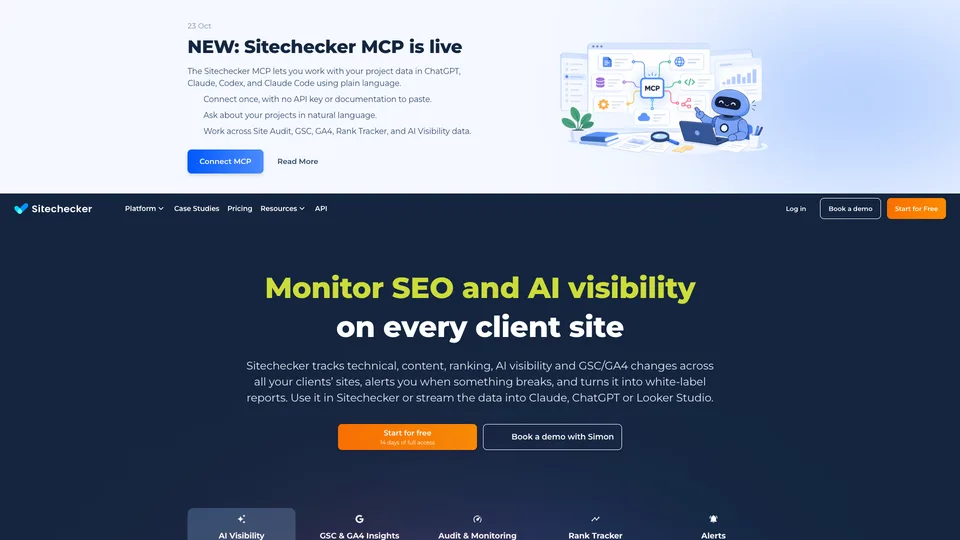
Sitechecker combs through a website to find its technical errors, then monitors it continuously: broken pages, changed tags, a site that goes offline, rankings that drop, clicks that fall in Search Console. As soon as a problem appears, an alert goes out by email or on Slack, and the data ends up in reports you can send to clients, white-labeled if needed. Without claiming to compete with the big SEO suites, it has carved out a place with agencies and consultants who manage many sites and want to know something has broken before their clients do.
What is Sitechecker?
Each site you track becomes a project, which a crawler explores to check more than 300 technical points: error codes, redirects, title and H1 tags, internal links, orphan pages, hreflang tags, JavaScript rendering, security headers. Each issue comes with a guide to fixing it. Once that audit is in place, monitoring takes over, from weekly to every twelve hours depending on the plan, on a sample of pages: content or tag changes, pages that have become non-indexable, a modified robots.txt file, a deleted Google Analytics tracking code, an invalid SSL certificate or a domain name about to expire. In the same place, the tool tracks rankings in Google, Bing or Yahoo and brand visibility in ChatGPT, Gemini, Perplexity, Copilot and Google’s AI Mode, and it connects to Search Console and Google Analytics 4 to build reports that are more flexible than Google’s own interfaces. Its data can be exported to Data Studio, an API and, since October 2026, an MCP server that lets you query it from ChatGPT or Claude.
The tool started out in 2016 as a simple page checker, built for in-house needs at Boosta, an IT holding company of Ukrainian origin. Requests from outside users pushed it toward the general market: the full site audit arrived in 2017–2018, the Chrome extension in 2018, and rank tracking and the Google dashboard in 2019. The site is now operated by Cyber Circus Limited, a company based in Gibraltar, with Dmytro Bondar as CEO and Anton Reva as product designer.
Sitechecker at a glance
- Type
- Online software (SaaS)
- Founded
- 2016
- Origin
- Developed within Boosta (Ukraine)
- Operator
- Cyber Circus Limited, Gibraltar
- Leadership
- Dmytro Bondar (CEO), Anton Reva (product)
- Checks
- More than 300 technical issues
- Free plan
- No, 14-day trial
- Starting price
- See the official pricing page
What is Sitechecker used for?
-
Audit a site in depth
more than 300 technical checks, with a fixing guide for every error found.
-
Monitor your sites continuously
broken pages, changed content, robots.txt, SSL, an expiring domain, and homepage uptime every five minutes.
-
Track your rankings
in Google, Bing or Yahoo, by country, city, language and device, with search results page history.
-
Make the most of Search Console and GA4
reports more flexible than Google’s, well beyond the interface’s 1,000-row limit thanks to the API, and SEO tests measured on your real data.
-
Measure your presence in AI answers
whether ChatGPT, Gemini, Perplexity, Copilot or Google’s AI Mode cite your brand, and for which prompts.
-
Deliver reports to your clients
as PDFs or in Data Studio, with your logo and, on Premium, your own domain name.
-
Connect your tools
Slack alerts, an API, an audit triggered with every deployment and an MCP server for ChatGPT or Claude.


Sitechecker review
Good tool
Sitechecker comes into its own as soon as you manage more than a handful of sites. Its real talent isn’t finding keywords or picking apart a competitor’s links, but keeping watch: a homepage that goes down, a noindex tag slipped in by mistake during an update, a redirect that breaks, a tracking code that disappears. For an agency, that alert alone is worth a good part of the subscription. The interface is clear, the explanations make sense to non-specialists too, and unlimited users spare you the unpleasant surprise of suites that charge for every extra seat.
Its data has the advantage of coming from your own sites: its own crawler for the audit, Search Console and Google Analytics for traffic. Nothing is estimated, then, but there is also nothing about the market beyond your projects. Keyword research is limited to Google’s suggestions and a few dozen checks a month, and there is no link database or competitor traffic estimate comparable to those of Semrush or Ahrefs. It is a monitoring tool, not a research tool.
For three sites, the first plan seems expensive if you only have one site to monitor, and the math only becomes attractive as you add projects. The interface can also be slow on large accounts, and some analyses are less thorough than those of a specialized crawler such as Screaming Frog or Sitebulb. The subscription renews automatically and only the first payment is refundable, within 48 hours: once the trial has started, the countdown doesn’t send you a reminder.
Strengths
- Continuous monitoring and alerts that flag a problem before it costs you traffic.
- Audit, rankings, Search Console, GA4 and AI visibility in a single dashboard.
- Data from your own sites, not estimates.
- A clear interface, with a fixing guide for every error.
- Unlimited users and white-labeling, well designed for agencies.
- A 14-day trial with every feature and no credit card.
Weaknesses
- No real keyword or link database for studying the market or competitors.
- A first plan that is expensive for a single site.
- Change monitoring limited to 100 or 200 pages depending on the plan, and only weekly on Basic.
- An interface that is sometimes slow on busy accounts.
- A refund possible only within 48 hours of the first payment.
- No lasting free version, apart from the Chrome extension and the online checker.
Is Sitechecker worth it?
Yes, if you are an agency or a consultant tracking ten or more sites and you spend too much time juggling Search Console, Google Analytics, a crawler and Data Studio dashboards. Sitechecker brings everything together, warns you when something breaks and produces presentable reports, without charging for every team member. The fourteen-day trial is enough to connect it to a few client sites and judge for yourself.
Not necessarily, if you only have one site: Google Search Console, which is free, and an occasional crawl with a tool like Screaming Frog, free up to 500 URLs, cover the essentials. If what you need is to analyze a market, find keywords or study competitors’ links, a full suite such as SE Ranking, Semrush or Ahrefs will be a better fit. For a very thorough technical audit, Sitebulb or Screaming Frog go further, and Conductor Website Monitoring, formerly ContentKing, plays on the same real-time monitoring field.
How much does Sitechecker cost?
Sitechecker is sold by subscription, monthly or yearly, with a yearly commitment giving you two months free. The three published plans differ in the number of sites, tracked keywords, AI prompts and crawled pages, as well as in monitoring frequency; users, recrawls and the API are unlimited on every plan. We were unable to verify a consistent dollar price grid on the official pricing page, so check the amounts there before you subscribe.
| Plan | Per month | Per month, billed yearly | Included | Who it's for |
|---|---|---|---|---|
| Basic | €89 | €75 | 3 sites, 500 keywords, 50 prompts, 10,000 pages, weekly monitoring | Consultants and very small teams |
| Standard | €219 | €183 | 20 sites, 2,500 keywords, 150 prompts, 50,000 pages, daily monitoring, email and Slack alerts | Small agencies that are growing |
| Premium | €379 | €316 | 50 sites, 5,000 keywords, 250 prompts, 200,000 pages, monitoring every 12 hours, full white-labeling | Mid-size agencies |
| Enterprise | Custom pricing | Unlimited sites, keywords and prompts, training, dedicated contact | Large agencies | |
Source: official Sitechecker pricing page, checked on October 31, 2026.
- 14-day free trial with every feature, no credit card required.
- Basic and Standard also come in a version with doubled limits, at a higher price: check the exact rate at checkout.
- Only the first payment is refundable, within 48 hours. The subscription renews automatically and can be paused; after cancellation, data is deleted after 7 days.
- Payment by card or PayPal. A few pay-per-use tools (migration check, bulk URL check, one-off audit) are sold separately.
FAQ
Answers to questions about Sitechecker
Is Sitechecker free?
No. It offers a 14-day trial with no credit card, then a paid subscription whose rates are listed on the official pricing page. The Chrome extension, which analyzes the open page, and the online SEO checker remain free.
Does Sitechecker replace Semrush or Ahrefs?
Not really. It covers auditing, monitoring, rankings and Google data for your own sites, but has no comparable keyword or link database for studying the market or competitors.
Where does Sitechecker’s data come from?
From its own crawler for auditing and monitoring, and from your Google Search Console and Google Analytics 4 accounts for traffic. So these aren’t estimates, but they only cover the sites you track.
Can you get a refund on a Sitechecker subscription?
Only for the first payment, and only if you request it within 48 hours. Later renewals are not refunded.
Information checked on October 31, 2026