
- SEO
- Content optimization
Yoast SEO: the plugin that guides the SEO of every WordPress page
Reference
Installed on a WordPress site, Yoast SEO adds a panel under each post that assesses the text as you write: where the keyphrase appears, the length of the title and description, sentence readability, all summed up with red, orange or green bullets. Behind the scenes, the plugin also handles the technical side you would happily forget about: XML sitemap, canonical tags, structured data. With more than ten million active installations, it is the most widely used SEO plugin for WordPress, and for many people the first one they add to a new site.
What is Yoast SEO?
Yoast SEO doesn’t live in separate software: you install it in two clicks from the WordPress dashboard, and it plugs into the editor. A setup wizard first asks who publishes the site, a person or an organization, in order to build the schema.org structured data that describes the site to search engines. After that, everything happens page by page. You enter the target keyphrase, and the analysis checks that it appears in the title, the introduction, the subheadings or the URL, while a second tab handles readability: sentences that are too long, dense paragraphs, passive voice. A preview shows the page as it would appear in Google, on desktop and on mobile. The rest runs on its own: XML sitemaps, canonical tags, breadcrumbs, settings that limit unnecessary crawling and now an llms.txt file intended for AI models, a proposed format that no major AI company has confirmed it uses.
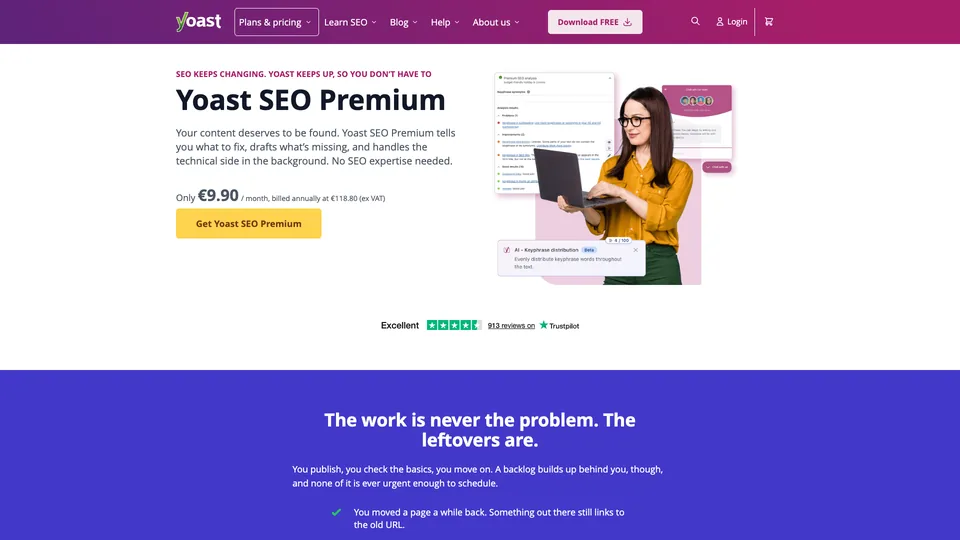
The paid version, Yoast SEO Premium, adds multiple keyphrases per page with support for synonyms, internal linking suggestions, a redirect manager, social media previews and AI features that draft titles and descriptions for you to approve. Since summer 2025, the former Local SEO, News SEO and Video SEO plugins have been included. Two broader plans target WooCommerce stores and, with Yoast SEO AI+, brand tracking in answers from ChatGPT, Gemini, Claude and Perplexity. A separate version also exists for Shopify.
Behind the plugin is Yoast, a Dutch company founded in 2010 by Joost de Valk in Wijchen, near Nijmegen, where most of the team still works. Its success owes a lot to that of WordPress, which powers 39.5% of all websites according to W3Techs (November 2026). In August 2021, Yoast came under the control of Newfold Digital, the parent company of web host Bluehost, while keeping its brand. Its influence also reaches beyond the general public: in a 2024 survey of nearly 400 SEOs by the agency Aira, 27% said they used it for technical SEO.
Yoast SEO at a glance
- Type
- SEO plugin for WordPress (and Shopify app)
- Founded
- 2010 (Yoast company)
- Founder
- Joost de Valk
- Origin
- Netherlands
- Headquarters
- Wijchen, Netherlands
- Owner
- Newfold Digital, since 2021
- Active installations
- More than 10 million
- Free plan
- Yes, with no time limit
- Starting price
- $118.80 a year before tax (Premium)
What is Yoast SEO used for?
-
Optimize a text as you write it
the SEO and readability analyses flag, bullet by bullet, what the post is missing before it goes live.
-
Polish your snippet in Google
edit the title and meta description in a preview that shows how they look on desktop and on mobile.
-
Generate your sitemaps
XML sitemaps are created and updated automatically, ready to submit to Search Console.
-
Handle the technical side without code
canonical tags, schema.org structured data, breadcrumbs and page indexing are all managed from the dashboard.
-
Link your content together
with Premium, internal linking suggestions while you write and a list of orphaned posts that nothing links to.
-
Keep your old URLs alive
with Premium, a redirect suggested as soon as a page is moved or deleted, and bulk import from a CSV file.
-
Let AI write your metadata
with Premium, five title and description suggestions at a time, in bulk across the whole site too, always subject to your approval.
-
Prepare your site for AI crawlers
an llms.txt file in the free version and, with Premium, robots.txt directives asking declared training crawlers (GPTBot, ClaudeBot, Google-Extended…) to stay away, with no effect on those that ignore them.
-
Optimize a WooCommerce store
with the WooCommerce SEO plan, an analysis tailored to product pages and structured data for price, stock and reviews.


Yoast SEO review
Reference
Yoast SEO has taught the basics of SEO to millions of writers, and that is still where it excels. The colored bullets speak to everyone: you quickly understand that you need a shorter title, a keyphrase in the introduction or shorter sentences. For a blog, a brochure site or a small editorial team, the free version covers the essentials, especially since the technical side, sitemaps, canonicals and structured data, is set up once and for all without touching code.
The flip side of that simplicity is a very mechanical score. The analysis counts occurrences and lengths; it doesn’t judge the relevance of the content or the competition for the query: an all-green post may never rank, and chasing green at all costs ends up weighing texts down. It is better to see it as a checklist than as a prediction. Yoast has no search volume or ranking data of its own: it relays data from Semrush and Wincher, and for your real numbers you need Search Console or a dedicated SEO tool.
In use, the plugin is stable and well maintained, with an update every two weeks. On the other hand, there are a lot of settings, the panel sometimes sits awkwardly in the editor, and the Shopify version requires more patience than the WordPress one.
Premium deserves its own calculation. At $118.80 a year per site, it mostly adds convenience: redirects, internal linking, multiple keyphrases, AI for metadata. Useful for a site that publishes a lot or changes URLs often, much less so for a small site, and the bill climbs fast when you manage several domains.
Strengths
- A complete free version for basic SEO, with no time limit.
- Writing advice a beginner can follow, page by page.
- Sitemaps, canonicals and structured data handled without a single line of code.
- A very widely used plugin, stable and updated every two weeks.
- Premium bundles redirects, internal linking, AI and local plugins in a single subscription.
Weaknesses
- A score that counts keywords without judging quality or competition.
- Only one keyphrase per page in the free version.
- Lots of settings, confusing at first.
- No search volume or ranking data without an external tool.
- One Premium subscription per site, which quickly gets expensive across several domains.
Is Yoast SEO worth it?
Yes, if you run a WordPress site and want clean SEO foundations without spending your evenings on it: the free version takes care of the technical side and guides the writing of every post. Premium is worth it for an editorial site that publishes often, a team of writers to supervise, or pages that change URLs regularly.
Not necessarily, if your site doesn’t run on WordPress, or if you are looking for data on your competitors, keywords and rankings: Yoast optimizes what you publish; it doesn’t analyze the market. Seasoned SEOs will also find its recommendations too textbook.
On WordPress, the main alternative is Rank Math, installed on more than four million sites, whose free version already includes multiple keyphrases per page and a redirect manager. To go beyond the page level, you need a suite such as Semrush or SE Ranking, and for in-depth work on the substance of your texts, a semantic optimization tool such as Surfer SEO or YourTextGuru.
How much does Yoast SEO cost?
The core plugin is free and stays free with no time limit. The paid WordPress plans are sold only by the year, before tax, and one subscription covers a single site; each plan includes everything in the one before it.
| Plan | Per month | Per month, billed yearly | Included | Who it's for |
|---|---|---|---|---|
| Yoast SEO | $0 | — | SEO and readability analysis, sitemaps, canonicals, structured data | Blogs, brochure sites, most WordPress sites |
| Premium | — | $9.90 | Up to 5 keyphrases, redirects, internal links, AI, Local, News and Video SEO, 24/7 support | Editorial sites and writing teams |
| WooCommerce SEO | — | $14.90 | Premium, plus product analysis and product structured data | WooCommerce stores |
| AI+ | — | $29.90 | WooCommerce SEO, plus brand tracking in ChatGPT, Gemini, Claude and Perplexity | Brands monitoring their visibility in AI answers |
Source: official Yoast SEO pricing page (US dollars), checked on November 1, 2026.
- Yearly prices are $118.80 for Premium, $178.80 for WooCommerce SEO and $358.80 for AI+, before tax; there is no monthly billing.
- One seat for the Google Docs add-on is included with Premium; each additional seat is billed monthly.
- Several sites require several subscriptions, with a discount on bulk purchases.
- Your first purchase is refunded on request within 30 days; renewals are not.
- The Shopify version has its own pricing, billed by Shopify every 30 days, with a 14-day free trial.
FAQ
Answers to questions about Yoast SEO
Is the free version of Yoast SEO enough?
For most blogs and brochure sites, yes: it handles sitemaps, canonical tags, structured data and the analysis of each page. Premium becomes useful for tracking multiple keyphrases per page, managing redirects or automating internal linking.
Do you need a green light on every post?
No. The score checks simple rules, such as whether the keyphrase is present or how long the sentences are, without judging the quality of the content or the competition. An orange light on a useful, natural text is better than a green one earned by repeating the keyword.
Yoast SEO or Rank Math?
Both cover the essentials of SEO on WordPress. Rank Math offers more features in its free version, while Yoast SEO relies on the simplicity of its advice and its long track record. You can switch from one to the other: each imports the other’s settings.
Does a Yoast SEO Premium license cover several sites?
No, one subscription is valid for one site or domain. You need to buy one per site, with a discount on bulk purchases, and a subscription can be transferred from one site to another.
Information checked on November 1, 2026