
- Web technical
- HTML and CSS validation
- Web quality and compliance
W3C Validator: the official check for a web page’s HTML code
Reference
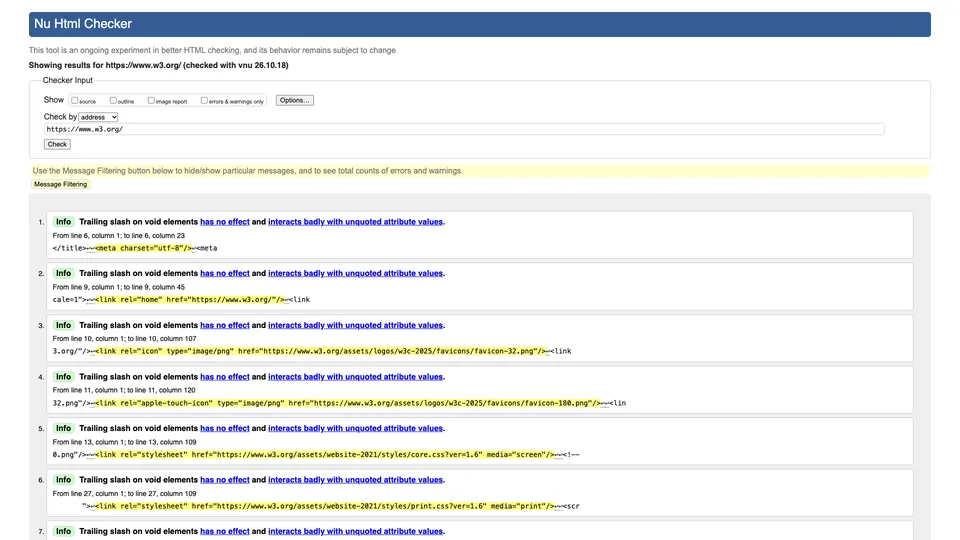
A tag that is never closed, a misspelled attribute, a duplicate ID, an image without alt text: the W3C Validator runs a page’s code against web standards and lists every error with its line and column. You give it a URL, a file or a pasted snippet of code, and the report comes back in seconds. Provided free of charge by the W3C, the consortium that publishes web standards, it remains the benchmark for checking that HTML conforms to the WHATWG Living Standard, and its engine, the Nu Html Checker, also checks CSS and SVG.
What is W3C Validator?
Behind the validator.w3.org address there are actually two programs, and that is often a source of confusion. The first, the Markup Validation Service, is the legacy validator: it compares the page with the formal grammar (DTD) declared by its doctype, which suits HTML 4.01, XHTML 1.0 and 1.1, SVG, MathML or SMIL. The second, the Nu Html Checker, was designed for HTML5, which no longer has a DTD: it parses the page the way a browser would, then applies the rules of the specification. For the user, the distinction is almost invisible. A modern page sent to the classic validator is automatically redirected to the Nu Html Checker, which then shows its own report. Together they form one and the same service.
The report sorts messages into errors, warnings and simple information, quotes the faulty code excerpt and, for many rules, links to the corresponding explanation. Options let you show the source, the page’s heading outline or a report on images and their alt text, filter messages, or emulate another browser and language. The engine also exists outside the website: open-source software under the MIT license, it can be downloaded as Java, as binaries for Windows, macOS and Linux, as a Docker image or as an npm package, and it has a web API that returns results in JSON or XML.
The tool’s history is intertwined with that of the web. The first online HTML validator dates back to 1994; the one by Gerald Oskoboiny, first called The Kinder, Gentler HTML Validator, became the W3C’s official service in December 1997. The HTML5 engine came from elsewhere: Finnish developer Henri Sivonen wrote it in 2007 under the name Validator.nu, before the W3C integrated it in 2008. The code, whose copyright belongs to the Mozilla Foundation, is now maintained on GitHub, mainly by Michael Smith of the W3C team. The consortium itself, founded in 1994 by Tim Berners-Lee, became an independent nonprofit organization in January 2023; it sells nothing around the validator and simply asks for donations.
W3C Validator at a glance
- Type
- Online service and open-source software
- Publisher
- W3C, World Wide Web Consortium
- Official service
- Since December 1997
- HTML5 engine
- Nu Html Checker, created by Henri Sivonen
- Formats checked
- HTML, XHTML, CSS, SVG, MathML
- License
- MIT (Nu Html Checker engine)
- Free plan
- Yes, the service is entirely free
- Starting price
- Free, no account needed
What is W3C Validator used for?
-
Validate a page’s HTML
by URL, by file upload or by pasting the code, with every error pinpointed to the line and column.
-
Check CSS and SVG
the Nu Html Checker also checks style sheets and vector images, and the W3C offers a dedicated CSS validator as well.
-
Spot errors that hurt accessibility
missing alt text, duplicate IDs or misused ARIA roles, with a report dedicated to images.
-
Review your heading structure
the “outline” option shows the page’s structure, useful for checking the H1 to H6 hierarchy.
-
Automate your checks
a JSON web API and an installable engine (Java, Docker, npm) to validate your templates with every release.


W3C Validator review
Reference
There is something reassuring about having your code reviewed by the body that writes the rules. The W3C Validator gives no opinion; it applies the specification, and that is exactly what you want from it: to say whether a tag is badly nested, whether an attribute doesn’t exist or whether an ID appears twice. On that ground, no other tool has the same legitimacy, and several paid validation services actually run its engine behind the scenes.
You still need to know what a “valid document” is worth. The W3C says so itself: a valid page is not necessarily a good page. Validation measures neither speed, nor SEO, nor accessibility in the broad sense, and Google does not use it as a ranking factor; most major websites display their share of errors without suffering for it. Its value lies elsewhere: a stray tag or a misplaced element can break a layout in a browser, confuse a screen reader or skew the way a bot reads a page, and the validator finds them in seconds.
It remains a tool for developers and front-end integrators. Messages are written in technical English, with no ranking by actual severity, and a WordPress theme or a website builder can generate dozens of warnings you have no control over. The online site also checks only one page at a time: to review an entire website, you need to install the engine, use its API or turn to a third-party service that embeds it.
Another limit worth knowing: when given a URL, the validator analyzes the HTML as the server sends it, not the page once JavaScript has transformed it. On a site whose content is built client-side, it is better to copy the DOM from the browser’s developer tools and paste it into the tool, which also takes care of password-protected pages.
A benchmark tool, free and with no strings attached, to open after every template overhaul or whenever a page behaves strangely. Just don’t aim for zero errors at all costs: it is better to fix what affects structure and accessibility than to chase every warning.
Strengths
- The W3C’s official tool, which applies the HTML specification directly.
- Completely free, with no account, no ads and no stated limit.
- Errors pinpointed to the line, with the code excerpt in question.
- HTML, CSS and SVG checked by the same engine, kept up to date with the standard.
- An open-source engine that can be installed and queried through an API to automate tests.
Weaknesses
- Technical messages in English that mean little to non-developers.
- Only one page at a time on the website, with no crawling of an entire site.
- No prioritization between serious errors and harmless details.
- A valid page is not faster, not better ranked and not necessarily accessible.
- Rules that evolve: a page with no errors today may show some tomorrow.
Is W3C Validator worth it?
Yes, if you write or integrate HTML yourself, deliver a theme or template to a client, or have a page that displays badly in a browser for no obvious reason. It is also a good reflex before an audit against the RGAA, the French accessibility framework, whose criterion 8.2 still requires valid code even though WCAG 2.2 dropped its parsing criterion; duplicate IDs and misused ARIA attributes, for their part, remain accessibility defects under both frameworks. And since the tool costs nothing, there is no reason to go without it.
Not necessarily, if you run a site on a CMS without touching the code: the errors found then come from the theme or plugins, and your time is better spent on speed or content. To check an entire site in one go, Rocket Validator, a paid service independent of the W3C, runs the same engine on every page, and audit crawlers such as Screaming Frog or Sitebulb catch some of the structural defects on their own. For accessibility proper, WAVE or Lighthouse go further, while the W3C CSS Validator remains the reference for a standalone style sheet.
How much does W3C Validator cost?
Nothing at all: the W3C presents its validator as a free tool and service, with no paid plan, no account and no stated limit, only asking for reasonable use of the API. The engine, under an open-source license, can also be installed for free on your own servers.
| Plan | Per month | Included | Who it's for |
|---|---|---|---|
| Free | $0 | Unlimited online validation, web API and open-source engine to install | Developers, front-end integrators and any website owner |
Source: official W3C Validator help, which presents it as a free service, checked on October 31, 2026.
- There is no paid offer: the site simply invites you to donate to the W3C, with nothing in return.
- The public API shows no quota but asks for reasonable use; for large volumes, the engine can be installed for free on your own machine.
- The paid services that crawl an entire site, such as Rocket Validator, are third-party products with no connection to the W3C.
FAQ
Answers to questions about W3C Validator
Is the W3C Validator free?
Yes, completely. There is no paid plan and no account to create, and the engine is open-source software you can install yourself.
What is the difference between the W3C Validator and the Nu Html Checker?
It is the same service. The Nu Html Checker is the engine that checks HTML5; when you submit a modern page to the W3C’s historic validator, it is automatically passed on to it. The legacy engine is only used for old doctypes, such as HTML 4.01 or XHTML 1.0.
Does valid code improve SEO?
Not directly: Google does not use it as a ranking factor. Fixing structural errors does, however, prevent display problems and issues with how bots and screen readers read the page.
Can you validate an entire website at once?
Not from the W3C website, which checks one page at a time. You need to install the engine and query it with a script, or use a third-party service such as Rocket Validator, which runs it on every page of a site.
Does the W3C Validator also check CSS?
The Nu Html Checker checks CSS and SVG, but the W3C also offers a separate CSS validator, more thorough for a standalone style sheet.
Information checked on October 31, 2026