
- Web technical
- Web accessibility
WAVE (WebAIM): spot the accessibility barriers on a web page
Reference
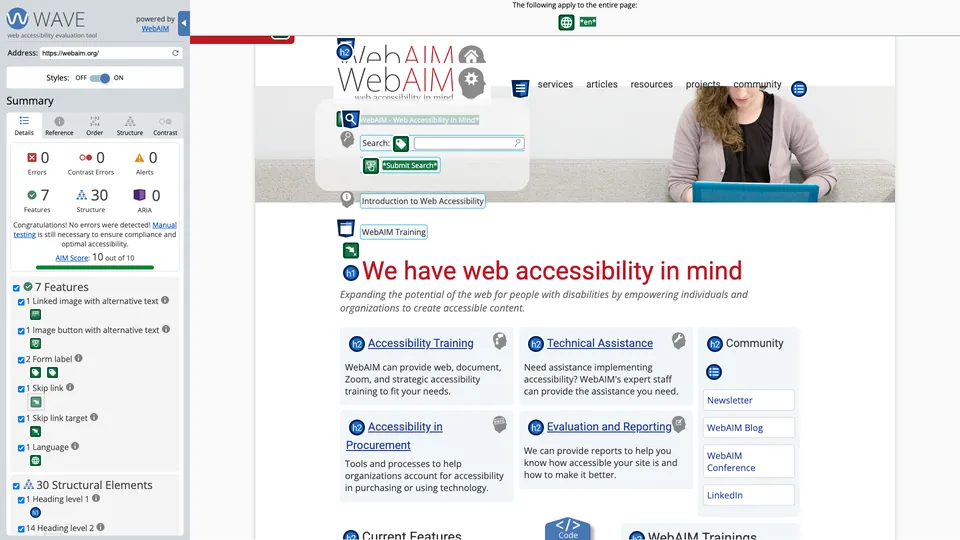
Paste a page’s address, or click the browser extension, and WAVE covers the page with icons: red for accessibility errors, yellow for points to review, green for what already helps people with disabilities. Images without alt text, form fields without labels, low contrast, poorly structured headings: everything shows up at the exact spot where the problem is. Free and with no sign-up, it is one of the automated checking tools most widely used by developers and accessibility specialists.
What is WAVE (WebAIM)?
Behind the acronym (Web Accessibility Evaluation Tool) is a small family of tools: an online version, extensions for Chrome, Firefox and Edge, an API and an audit report. They all run on the same engine, which checks the page against WCAG 2.2, the international reference, and the US Section 508, adding checks that appear in no standard but cause real problems for users. Results are shown on the page itself, with a summary panel, an explanation for each icon, a code view and a button that strips styles to show the order in which a screen reader or keyboard moves through the content.
The online version only reads public pages, and JavaScript isn’t always fully executed there. The extensions, on the other hand, analyze the page as the browser displays it, without sending anything to WAVE’s servers: they work for password-protected pages, intranets, local files and highly dynamic interfaces.
WAVE is published by WebAIM (Web Accessibility In Mind), a nonprofit center at Utah State University in Logan, Utah. Launched in 2001 from an idea by Leonard Kasday, the tool was first funded by the Institute on Disabilities at Temple University, then partly by a grant from the US Department of Education. WebAIM also uses it for its annual WebAIM Million study, which examines the home pages of one million websites.
On the regulatory side, WAVE isn’t a compliance tool. In France, the official reference is the RGAA, published by the government (version 4.1.2, with a version 5 announced for late 2026), and the European directive on the accessibility of products and services, in force since June 28, 2025, extends obligations to many private companies, including online stores. WAVE helps fix a good share of the issues a machine can detect; it replaces neither an expert audit nor an accessibility statement.
WAVE (WebAIM) at a glance
- Type
- Web accessibility evaluation
- Launched
- 2001
- Publisher
- WebAIM, Utah State University
- Status
- Nonprofit center
- Origin
- United States
- Headquarters
- Logan, Utah
- Standards
- WCAG 2.2, Section 508
- Free plan
- Online tool and extensions, no account
- Starting price
- Free; API from $10
What is WAVE (WebAIM) used for?
-
Detect accessibility errors
images without alternatives, empty links, unlabeled fields or a missing language are flagged in red, right where they are on the page.
-
Check contrast
a dedicated tab lists text whose color stands out too little from the background to be read comfortably, as long as that background is a solid color: text over an image or a gradient has to be checked by hand.
-
Check your page structure
Heading hierarchy, regions, ARIA attributes and the unstyled reading order show how a screen reader perceives your content.
-
Test pages in bulk
The API and the stand-alone engine return results in JSON or XML and fit into your testing pipelines, Selenium and Puppeteer included.
-
Get an impact report
The AIM report combines a WAVE scan of your whole site with manual tests run by WebAIM’s experts.


WAVE (WebAIM) review
Reference
For a first accessibility check, WAVE is one of the tools you open without thinking twice. It is free, needs no account, and its way of placing problems right on the page speaks to everyone: a writer sees the image they forgot to describe, a developer the field with no label. The explanation pages do the rest, and you learn a lot about accessibility simply by fixing what it flags.
Like any automated tool, WAVE only catches part of the issues: it sees that an image has alt text, not whether that text makes sense, and it says nothing about keyboard navigation or whether a user flow is understandable. WebAIM says so itself: a page with no errors is not necessarily accessible or compliant. Against WCAG or European rules, WAVE helps rough out the work, and testing with a screen reader or a human audit remains essential.
In practice, a page covered in icons quickly becomes hard to read on a busy site, and the yellow alerts take some knowledge to sort through. You also analyze one page at a time, which is fine for a template or a launch but not for monitoring an entire site. For that, you need the API, billed per page, or the tools built on the WAVE engine. Finally, get into the habit of using the extension: it is the one that sees the page as actually displayed, including behind a login, without anything leaving the browser.
Strengths
- Free with no sign-up, online and as an extension.
- Problems flagged at their exact location, understandable even if you aren’t a developer.
- An explanation and the relevant WCAG rule for every icon.
- Extensions that analyze private and dynamic pages without sending anything.
- A nonprofit publisher, a recognized accessibility specialist for more than twenty years.
- An API and a stand-alone engine for testing at scale.
Weaknesses
- Only part of accessibility issues can be detected automatically.
- No direct mapping to the criteria of the French RGAA.
- Only one page per scan in the free version.
- A display quickly cluttered with icons on dense pages.
- Alerts that need interpreting, confusing for beginners.
- An interface and documentation in English only.
Is WAVE (WebAIM) worth it?
Yes, if you build or edit a site and want to clear out the obvious errors before launch: contrast, alt text, forms, headings. A few minutes per template is enough, and the extension works just as well on a site in development as on a customer account area. For an agency or a web writer, it is a very good tool for training your eye.
Not necessarily, if you need to prove your site’s compliance or track the accessibility of thousands of pages over time. You then need an audit by an expert, with the manual tests the standard requires, and a site-wide monitoring tool, such as Pope Tech, built on the WAVE engine.
Alternatives: Deque’s free axe DevTools extension, designed first for developers; Microsoft’s Accessibility Insights, also free, which adds what WAVE doesn’t do, a guided keyboard navigation test and a criterion-by-criterion manual assessment; and the Lighthouse accessibility audit, built into Chrome and PageSpeed Insights, which is more basic. Many specialists combine two of these tools, because none of them catches everything.
How much does WAVE (WebAIM) cost?
The online tool and the extensions are free, with no stated limit. WebAIM only sells high-volume use, in dollars only: a prepaid credit API, a yearly license for an engine you install yourself, and a one-off audit report. The table covers the free version and the three stand-alone engine licenses; the API and the report are detailed below.
| Plan | Per month | Per month, billed yearly | What’s included | Who it's for |
|---|---|---|---|---|
| Free | $0 | — | Online tool and Chrome, Firefox, Edge extensions | Everyone, page by page |
| Stand-alone Basic | — | $333.33 | 100,000 requests a year, 3 domains, 1 installation | Teams testing their own site |
| Stand-alone Expanded | — | $666.67 | 300,000 requests a year, 10 domains, 3 installations | Large organizations, several sites |
| Stand-alone Unlimited | — | $1,000 | Unlimited requests, domains and installations | Large accounts, large-scale integration |
Source: official WAVE pricing page, checked on October 31, 2026.
- Stand-alone engine licenses are billed yearly: $4,000, $8,000 and $12,000. A trial version is available on request.
- The subscription API runs on credits: 100 free at sign-up, then $0.04 per credit from 250 to 999 credits (minimum purchase of $10), $0.03 from 1,000 to 9,999 and $0.025 beyond that. A page costs one credit for a basic scan, two or three with advanced options.
- The AIM report costs $500 for a one-off analysis of up to 20,000 pages, $100 more per additional 20,000 pages, and $100 if WebAIM has to crawl the site itself. Beyond 100,000 pages, pricing is quote-based.
FAQ
Answers to questions about WAVE (WebAIM)
Is WAVE free?
Yes. The online tool and the extensions for Chrome, Firefox and Edge are free and need no account. Only the API, the installable engine and the AIM audit report are paid.
Is a page with no errors in WAVE accessible?
No. WAVE only detects problems a machine can spot, and WebAIM itself points out that the absence of errors proves neither accessibility nor compliance. Manual tests, with a keyboard and a screen reader, are still needed.
Is WAVE enough for WCAG compliance?
No. WAVE is based on WCAG, but it doesn’t verify every criterion one by one. Compliance is established through a full audit, largely done by hand.
Can you test a password-protected page?
Yes, with the extension: it analyzes the page displayed in your browser, after you log in, without sending its content to WAVE’s servers. The online version, on the other hand, only reads public pages.
Information checked on October 31, 2026