
- Web technical
- HTML and CSS validation
W3C CSS Validator: the official syntax check for your style sheets
Good tool
The W3C CSS Validator checks a style sheet against the CSS specifications and flags everything that doesn’t conform: a misspelled property, an invalid value, a missing curly brace, an unknown rule. You give it a page URL, a file or a simple code snippet, and it returns the list of errors, line by line, along with lower-key warnings. Free and maintained by the W3C, the consortium that standardizes the language, it is the reference CSS validator.
What is W3C CSS Validator?
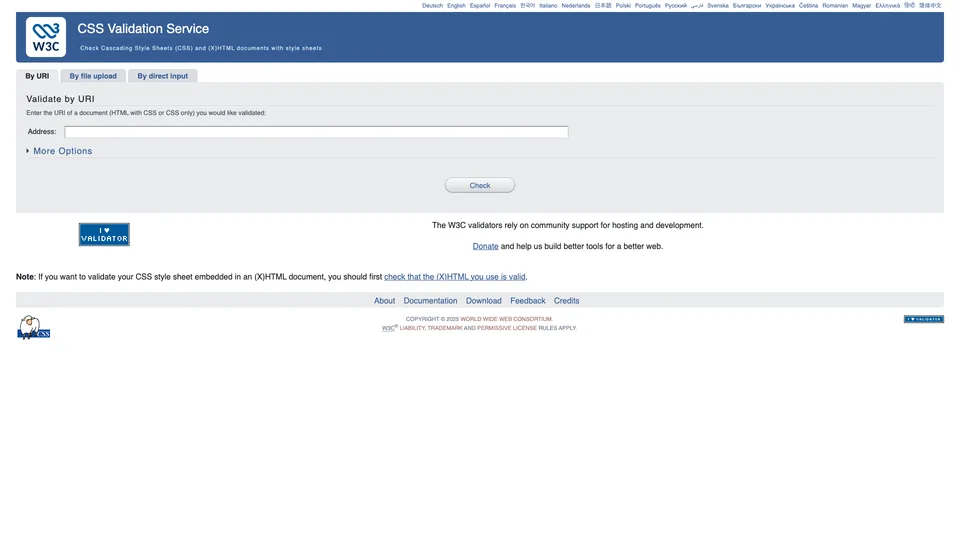
Behind an interface that still looks like the 2000s runs a parser written in Java that checks every CSS declaration against the grammar and properties described in the specifications. Three tabs let you submit code: the URL of a live page, whose embedded styles and linked style sheets it reads; an upload of a CSS file from your computer; or a copy-and-paste into a text box. Options tucked under “More Options” set the target CSS level (CSS 3 and SVG by default, but also CSS 2.1, SVG or profiles for mobile devices and TVs), the target medium, such as screen or print, the number of warnings and how to handle vendor prefixes like -webkit-. The report lists errors with their line number and, for a typo, suggests the closest property.
The validator was born at the W3C in the late 1990s: its beta version was announced in March 1998, developed by Philippe Le Hégaret with Sijtsche Smeman, under the supervision of Bert Bos, one of the authors of CSS, then based at INRIA in Sophia Antipolis, France. It has remained an open-source W3C project ever since. The consortium, founded by Tim Berners-Lee in 1994, became independent in January 2023 as a nonprofit organization. The code, published on GitHub, still receives fixes, and the service relies on donations to fund its hosting. It can also be downloaded to run from the command line or on your own server.
W3C CSS Validator at a glance
- Type
- Free, open-source online service
- Launched
- 1998 (beta version)
- Creators
- Philippe Le Hégaret and Sijtsche Smeman
- Publisher
- W3C (World Wide Web Consortium)
- Publisher status
- Nonprofit organization
- Language
- Java, public code on GitHub
- Default profile
- CSS level 3 + SVG
- Free plan
- Yes, no account and no stated limit
- Price
- Free, optional donations
What is W3C CSS Validator used for?
-
Validate the CSS of a live page
just enter the URL: the page’s embedded styles and the style sheets it loads are analyzed in one go.
-
Test a file or a snippet
a style sheet still on your computer or a few lines pasted into the text box, handy before going live.
-
Fix one error at a time
each issue is tied to its line, with the closest property suggested when you have made a typo.
-
Choose the CSS level and medium
CSS 2.1, CSS 3, SVG, print or screen: the profile you choose changes the verdict, and a modern style sheet validated as CSS 2.1 will look wrong from start to finish; stick with CSS 3 unless you have a specific constraint.
-
Automate validation
a public API, SOAP or text output, and a program you can install to validate your files from the command line or on your server.


W3C CSS Validator review
Good tool
When a layout stubbornly refuses to display as intended, the cause is sometimes trivial: a missing semicolon, an extra curly brace, “colr” instead of “color.” The browser simply ignores the faulty line without warning you. That is exactly what the W3C validator brings to light, in a few seconds, with nothing to install, and with the backing of the consortium that publishes the CSS specifications. For a beginner, a student or a front-end developer who wants a quick check, it still has its place.
You do need to know what it doesn’t do, though. Valid doesn’t mean compatible: the tool says nothing about whether Safari or Firefox actually supports a property, and perfectly conforming CSS can still render badly. Above all, the validator lags behind the standards. In our tests, it accepted nested rules, the :has() selector and @layer cascade layers, but flagged container queries and the @property rule as errors, even though every recent browser supports them. An error in the report isn’t always an error in the code, so you have to sort through it yourself. Prefixes like -webkit- are now only warnings, which makes the report easier to read.
In professional projects, the tool has largely given way to linters, led by Stylelint, which check code right in the editor and on every commit, with rules tailored to the team. The W3C validator then remains a good second opinion, or a simple way to check the CSS of a site whose source files you don’t have. One last caveat: its documentation isn’t always up to date, and it still says the default profile is CSS 2.1, even though the form now offers CSS 3.
Strengths
- Completely free, no account, and usable in seconds.
- The official tool from the W3C, which publishes the CSS specifications itself.
- Three ways to submit your code: URL, file or copy-and-paste.
- Clear messages tied to their line, with a suggestion when there is a typo.
- An API and open-source code to automate checks or host your own instance.
Weaknesses
- Behind on recent CSS: container queries and @property still flagged as errors.
- No information on browser compatibility.
- Warnings that are sometimes of little use, such as a text color without a background color.
- Less practical than a linter built into the editor on an ongoing project.
- An aging interface and partly outdated documentation.
Is W3C CSS Validator worth it?
Yes, if you are learning CSS, working on a client’s site without access to their development tools, or dealing with a layout that breaks for no visible reason: a single validation is often enough to find the typo or the misplaced curly brace. Since it is free, trying it costs nothing.
Not necessarily, if you work on a project with a modern editor and a deployment process. Stylelint, free and open source, checks code as you type, with rules you adapt to your project; Chrome and Firefox developer tools already flag ignored declarations, and the Can I use website remains the go-to resource for browser compatibility. For the page markup itself, the W3C HTML validator is the one to open, and it is best run before checking the CSS.
How much does W3C CSS Validator cost?
The W3C CSS validator costs nothing: no paid plan, no sign-up, no stated quota. Its hosting and development rely partly on donations, which are entirely optional.
| Plan | Per month | Access | Who it's for |
|---|---|---|---|
| Online service | $0 | Unlimited validation, no account, API included | All web developers and front-end developers |
Source: official W3C CSS Validator “About” page, checked on October 31, 2026.
- No pricing page: the service’s “About” page states that it is free.
- For automated use, the W3C asks you to leave at least one second between requests, or to install your own instance, which is also free.
FAQ
Answers to questions about W3C CSS Validator
Is the W3C CSS validator free?
Yes, completely, with no account and no paid plan. The W3C accepts donations to fund hosting, but they are optional.
Why does the validator flag an error on CSS that works?
Because it doesn’t yet recognize all of the language’s newest features. In October 2026, container queries and the @property rule, which recent browsers support, still showed up as errors. In that case, check the property in the specification or on Can I use.
Should I fix the warnings about -webkit- prefixes?
Not necessarily. The validator flags them because they aren’t part of any specification, but they are sometimes still useful for older browsers. The “Vendor Extensions” option lets you hide them or, on the contrary, treat them as errors.
Does valid CSS display the same way everywhere?
No. Validation checks conformance with the specifications, not support in each browser. Valid code can still display differently depending on the browser and its version.
Information checked on October 31, 2026