
- SEO
- Web technical
- Technical audit
- Testing and monitoring
Lumar: crawl, audit and monitor the technical health of very large websites
Good tool
Lumar crawls an entire website from the cloud, JavaScript rendering included, then sorts what it finds into hundreds of reports: non-indexable pages, redirect chains, duplicate content, broken internal links, slow pages, accessibility issues. Beyond one-off audits, the platform tracks these metrics over time, sends alerts when they get worse and can even block a release that would break your SEO. Formerly known as Deepcrawl, it ranks, alongside Botify and Oncrawl, among the most widely used enterprise crawling platforms.
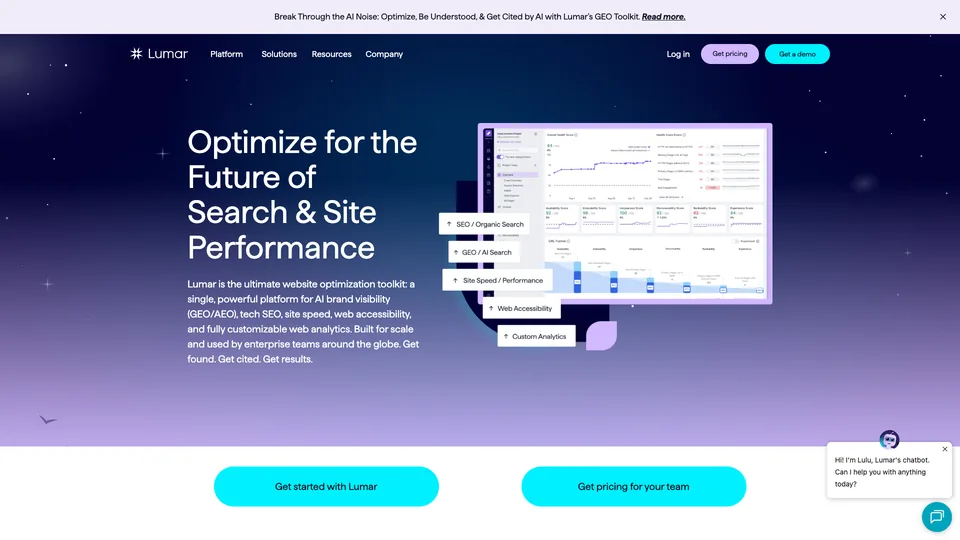
What is Lumar?
Lumar is an online platform (SaaS) that runs on the vendor’s servers: there is no software to install, and crawls keep going even with your computer turned off. Its crawler claims up to 450 URLs per second without rendering and 350 with JavaScript rendering, speeds measured in testing that are throttled in practice to spare the site’s server. You can schedule crawls, run several at once, extract your own data from the HTML and set an error threshold beyond which the crawl pauses.
Before the first crawl, warn the operations team and have Lumar’s crawler allowlisted in the firewall or CDN (Cloudflare, Akamai, Fastly…): at that pace, a crawl looks like an attack and gets blocked, which fills the reports with errors that don’t exist. The same precaution applies to password-protected staging environments.
The offering is split into four apps. Analyze brings together more than 350 audit reports; Monitor tracks how metrics change on one or more domains and sends alerts; Protect runs more than 350 automated tests in the developers’ deployment pipeline, with GitHub, Jenkins, CircleCI or Azure DevOps, and can stop a release that would drag down the site’s technical health; Impact measures the effect of fixes. Topic modules come on top: technical SEO, speed, accessibility against WCAG 2.2 criteria and, more recently, AI search, covering AI crawler access, content analysis and tracking of a brand’s presence in answers from ChatGPT, Claude, Gemini or Perplexity. Search Console, Google Analytics, Adobe Analytics, Splunk for logs or Power BI connect to the crawl data, and a GraphQL API is open to every customer.
The tool was born in London in 2010 as Deepcrawl, founded by Michal Magdziarz, Matt Jones and Chris Evans. The company raised money from Beringea, then $19 million in 2020 in a Series B led by Five Elms Capital, and expanded in the United States, which already accounted for nearly half of its revenue in 2019. In September 2022, Deepcrawl became Lumar to mark its shift from an SEO crawler to a broader website quality platform. Michal Magdziarz is now its chairman and Panos Savopoulos its CEO; the company lists customers such as Adobe, Microsoft, Comcast and Deloitte.
Lumar at a glance
- Type
- SaaS platform for crawling and technical SEO
- Founded
- 2010, as Deepcrawl
- Founders
- Michal Magdziarz, Matt Jones and Chris Evans
- Origin
- United Kingdom
- Headquarters
- London and New York
- Owner
- Private company, backed by Five Elms Capital and Beringea
- Free plan
- No
- Starting price
- On quote
What is Lumar used for?
-
Crawl a site with millions of pages
a cloud-hosted crawler, JavaScript rendering included, that you schedule and whose speed you set so as not to overload the server.
-
Audit technical health
more than 350 reports on indexability, redirects, duplicates, internal linking or structured data, with a health score for each topic.
-
Monitor your sites over time
how metrics change from one crawl to the next, across several domains, with alerts when an issue appears.
-
Test before every release
automated tests plugged into the deployment pipeline, which warn developers or block a release that would hurt your SEO.
-
Get your pages ready for AI search
AI crawler access, content readable without JavaScript, structured data and tracking of your brand in the answers of the main AI assistants.
-
Check accessibility
WCAG 2.2 criteria, from level A to AAA, checked on every crawled page and not just on a few templates.
-
Combine the crawl with your data
Search Console, Google Analytics, Adobe Analytics, server logs via Splunk or Logz.io, and export to Power BI, Tableau or BigQuery.


Lumar review
Good tool
Lumar should be judged on very specific ground: websites too big to audit by hand or from a laptop. On an ecommerce catalog, a media site or a site rolled out in twenty countries, its cloud crawler does the job without flagging, and its ready-made reports save you from rebuilding every analysis in a spreadsheet. It is a tool for specialists, and for a fairly small number of them: of the roughly 400 SEOs surveyed by the agency Aira for its State of Technical SEO 2024 report, 11% used it for technical SEO. Those who have adopted it often make it their main tool.
What sets it apart has less to do with the audit than with what comes next. Continuous monitoring, and above all tests built into deployment, change how you work with developers: instead of discovering a forgotten noindex tag three weeks after launch, you stop it before it ships. For a large web team, that is a serious argument, and the platform also helps present results to people outside the field. The data comes from a crawl, so it reflects findings on the site itself rather than estimates; to know what Google actually visits, you have to cross-check it with server logs, which Lumar only reads through integrations such as Splunk.
You do, however, need to know what you are buying. Lumar tells you nothing about competitors, keywords or backlinks: it doesn’t replace an SEO suite, it complements one. The sheer volume of reports takes time and a solid grounding in technical SEO, even with help from an account manager. As for the price, it is never displayed: everything goes through a quote, based on the number of projects and URLs crawled, which in practice limits the platform to companies and to agencies that handle large accounts.
Strengths
- A fast cloud crawler, comfortable on sites with millions of pages, JavaScript included.
- More than 350 ready-made reports, readable even by non-specialists.
- Automated tests in the deployment pipeline that stop errors before they go live.
- Continuous monitoring of several domains, with alerts.
- SEO, speed, accessibility and AI search in a single platform.
- A GraphQL API and many integrations with analytics and BI tools.
Weaknesses
- No public pricing and no free plan: everything goes through a demo and a quote.
- No data on competitors, keywords or backlinks.
- A wealth of reports that takes time and solid technical skills.
- Log analysis depends on a third-party tool such as Splunk or Logz.io.
- Staging environments locked behind a VPN remain hard to crawl.
Is Lumar worth it?
Yes, if you are responsible for the SEO or quality of a large website, releases are frequent and every technical regression costs traffic. That is where Lumar comes into its own: regular crawls of the entire site, alerts, and tests that keep errors from going live. Agencies that manage several large accounts will also get their money’s worth.
Not necessarily, if you work alone, or on a site with only a few thousand pages. Desktop software such as Screaming Frog or Sitebulb covers most audit needs for a far more affordable yearly license, and Search Console remains essential and free. If you also want keyword and competitor data, a suite like Semrush or Ahrefs will be more useful day to day.
Botify and Oncrawl compete with Lumar in the same category; Oncrawl and Botify have built-in log analysis, whereas Lumar relies on third-party tools, but Lumar goes further on pre-release testing. The safest approach is to ask two or three of these vendors for a demo on your own site and compare quotes for the same scope. Before committing that kind of budget, a one-off technical SEO audit is often enough to gauge how much needs fixing, and tells you whether continuous monitoring is justified.
How much does Lumar cost?
Lumar publishes neither a pricing grid nor any amounts. Its pricing page comes down to a form: the company puts together a custom offer based on the apps and modules you choose, the number of active projects and the volume of URLs crawled over the billing period, with no limit on the number of domains.
| Plan | Per month | Included | Who it's for |
|---|---|---|---|
| Lumar platform (custom) | Custom pricing | Your choice of the Analyze, Monitor, Protect and Impact apps, technical SEO, GEO, speed, accessibility and analytics modules, GraphQL API | SEO, web and development teams of large sites, agencies |
| SEO professional services | Custom pricing | Monthly support from Lumar’s SEO experts | Teams that want strategic support on top of the tool |
Source: official Lumar pricing page (no prices published, quote on request), checked on November 1, 2026.
- No free plan or self-serve trial is advertised: access starts with a demo.
- Capacity is measured in active projects and in the number of URLs that can be crawled per billing period; the number of domains isn’t limited.
- The GraphQL API is included for every customer, subject to fair use.
FAQ
Answers to questions about Lumar
Are Lumar and Deepcrawl the same tool?
Yes. Deepcrawl, launched in 2010, was renamed Lumar in September 2022, as the platform expanded beyond technical SEO into speed, accessibility and website quality.
How much does Lumar cost?
Lumar publishes no prices. Everything goes through a quote, put together based on the apps and modules you choose, the number of active projects and the volume of URLs crawled per billing period. In practice, the platform is aimed at companies and agencies with large sites to manage.
Lumar, Botify or Oncrawl?
All three play in the same category of enterprise crawlers, sold on a quote. Oncrawl and Botify include log analysis, while Lumar stands out for its pre-release testing. The safest bet is a demo on your own site with two or three vendors, and quotes compared on the same scope.
Does Lumar have a free plan?
No. Lumar advertises no free plan and no self-serve trial: everything starts with a demo request.
What is the difference between Lumar and Screaming Frog?
Screaming Frog installs on your computer and is enough for most audits. Lumar runs in the cloud, handles much bigger sites, monitors metrics over time and plugs into the developers’ deployment process, at a much higher price.
Information checked on November 1, 2026