
- Web technical
- Web security
Mozilla HTTP Observatory: a free check of your website’s security headers
Reference
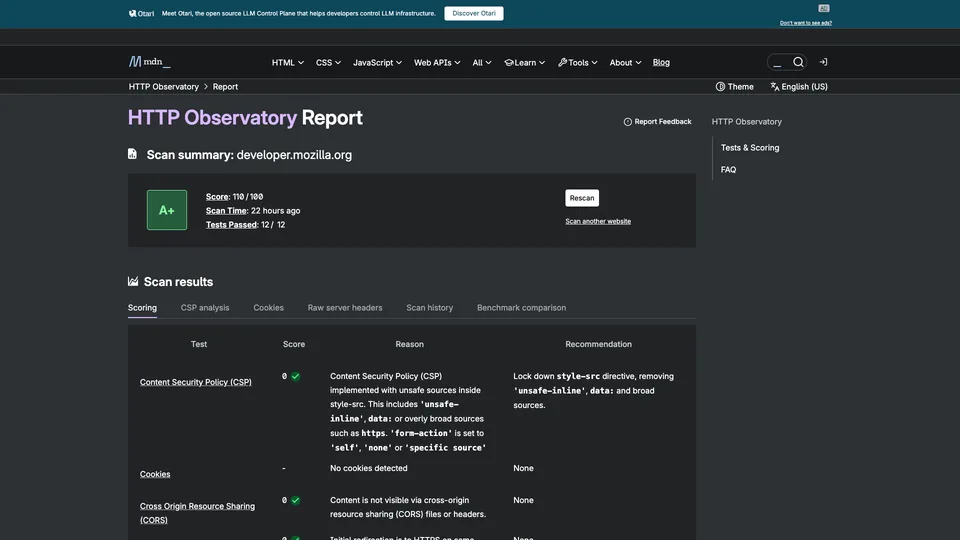
HTTP Observatory examines how a website protects itself at the browser level. You enter a domain name, and the tool queries the server to check about a dozen settings: Content Security Policy (CSP), forced HTTPS, cookies, and protection against the site being displayed in someone else’s frame. It returns a grade from A+ to F, then, test by test, what is missing and how to fix it. Free, with no sign-up and published by Mozilla on MDN, it is one of the go-to tools developers use to harden a site’s HTTP configuration.
What is Mozilla HTTP Observatory?
The scan touches neither the site’s code nor its database: the Observatory behaves like a visitor, follows the redirects from the HTTP address, then reads the headers the server sends back and the code of the home page. It runs twelve tests, each on a specific defense mechanism: CSP, which restricts which scripts are allowed and curbs code injection attacks (XSS); HSTS and redirection to HTTPS on the same domain name, against interception of traffic; the Secure, HttpOnly and SameSite cookie attributes; X-Frame-Options or the frame-ancestors directive, against clickjacking; as well as Referrer-Policy, X-Content-Type-Options, the integrity of scripts loaded from a content delivery network (SRI), cross-origin resource sharing (CORS) and the Cross-Origin-Resource-Policy (CORP) isolation header.
The grade follows a public scoring system. Every site starts at 100 points, loses points for each failed test, then, if it stays above 90, earns bonuses for the most advanced protections, up to 145. The score translates into a letter, from F to A+ at 100 and above. The report then breaks down the CSP directive by directive, the cookies, the raw headers returned by the server and the domain’s scan history. The tool doesn’t look for flaws in the code, outdated software or vulnerable plugins, and it no longer tests TLS certificates.
One detail matters when reading the report: a content policy declared in a meta tag on the page is taken into account, but a Report-Only policy, useful for testing without breaking anything, doesn’t count toward the grade.
The project started at Mozilla, the maker of Firefox, where security engineer April King designed it to improve the company’s own sites before making it public in August 2016, under the name Mozilla Observatory. On July 2, 2024, it moved to MDN Web Docs, the reference documentation for web developers maintained by Mozilla, with an engine rewritten in JavaScript and released as open source. The old site, which also tested TLS and SSH, closed in October 2024. At the time of the move, in July 2024, Mozilla said the tool had already scanned more than 6.9 million websites, for a total of 47 million scans.
Mozilla HTTP Observatory at a glance
- Type
- Online tool, API and command line
- Launched
- 2016
- Created by
- April King, security engineer at Mozilla
- Publisher
- Mozilla, on MDN Web Docs
- Headquarters
- San Francisco, United States
- Checks
- 12 tests, grade from A+ to F
- Source code
- Open source, MPL 2.0 license
- Free plan
- Yes, the entire tool
- Starting price
- Free, no account
What is Mozilla HTTP Observatory used for?
-
Grade your site’s HTTP security
a grade from A+ to F and a score out of 100, with the reason for each test result and the recommended fix.
-
Break down your CSP
every directive in your Content Security Policy is reviewed, with overly permissive sources flagged.
-
Check HTTPS and HSTS
the redirect from HTTP, where it leads and how long the browser must enforce HTTPS.
-
Check your cookies
the Secure, HttpOnly and SameSite attributes of every cookie set by the home page.
-
Track your progress
your domain’s scan history and a comparison with the other sites tested.
-
Automate the check
a free API with no key and a command-line tool to test your sites with every deployment.


Mozilla HTTP Observatory review
Reference
HTTP Observatory is the right place to start if you want to know whether a site uses the protections browsers make available to it. A minute is enough to get a clear list of fixes, sorted by test, each with the header to add. It is also a transparent tool: the scoring system is published, the code is open and Mozilla documents its choices. After a launch, or a change of host or CDN, this is the check to run.
The grade, however, calls for some perspective. As Mozilla itself admits, the points assigned to each test are partly arbitrary: a small brochure site with no forms or customer accounts doesn’t have the same needs as an online bank, and the tool judges them by the same standard. The typical case is a strict CSP, which weighs heavily in the score but can take weeks of work on a site loaded with third-party scripts, analytics tags or a CMS like WordPress. A well-understood B is better than an A+ earned by breaking features on your site.
What it doesn’t look at matters just as much. The Observatory checks configuration, not how robust the application is: SQL injection, a vulnerable plugin or a weak password fly under its radar, and TLS configuration hasn’t been analyzed since 2024. An A+ doesn’t mean “secure site,” then, but “site with well-configured headers.” Only the home page is scanned, and the tool is designed for websites, not APIs.
For free and without an account, there is nothing simpler for spotting the most common oversights. The fixes, on the other hand, require access to the server configuration, and often a developer’s help.
Strengths
- Completely free, with no account, plus an open API and command line.
- A published scoring system and code: you know exactly where the grade comes from.
- A precise recommendation for every failed test.
- Detailed analysis of the CSP and cookies, rare in a free tool.
- Scan history for each domain, useful for tracking a fix.
Weaknesses
- A grade based on partly arbitrary weightings that ignore the type of site.
- A strict CSP that is hard to achieve on a site that relies on third-party scripts.
- No search for application vulnerabilities and, since 2024, no TLS check.
- Only the home page is scanned, not the whole site.
- No alerts or automatic monitoring between two scans.
Is Mozilla HTTP Observatory worth it?
Yes, if you are launching a site, changing its hosting or taking over its maintenance, and want to check in a few minutes that its security headers are in place. Developers, front-end integrators and agencies will get a concrete, free to-do list, and an API to build it into their automated tests.
Not necessarily, if you want to know whether your site is actually vulnerable. For that, you need a vulnerability scanner, such as the open-source ZAP, or a security audit by a specialist. For TLS configuration and certificates, Qualys SSL Labs has taken over since the old Observatory closed. And for a quick look at headers, Security Headers gives a similar, more concise verdict. For configuration checks, though, this tool still does the job better.
How much does Mozilla HTTP Observatory cost?
Nothing at all. Mozilla doesn’t sell any plan: online scans need no account, the API answers without a key and the command-line tool is open source. The only limit is pace: the same site can only be scanned once a minute.
| Plan | Per month | Access | Who it's for |
|---|---|---|---|
| Online tool | $0 | No account, one domain per scan | Checking a site by hand |
| API and command line | $0 | No key, open-source code | Developers, automated tests, monitoring several sites |
Source: official Mozilla HTTP Observatory page (official tool page, no paid plan), checked on October 31, 2026.
- The same site can be scanned once every 60 seconds; a report viewed more than 24 hours after the last scan is rerun automatically.
- Each domain’s scan history is public: anyone can look up a site’s results.
- The engine can also be installed on your own server, with a PostgreSQL database, at no license cost.
FAQ
Answers to questions about Mozilla HTTP Observatory
Is Mozilla HTTP Observatory free?
Yes, completely. Online scans need no account, the API answers without a key and the code is open source. The only limit: one scan per site per minute.
Does an A+ mean my site is secure?
No. The tool checks HTTP security headers and the configuration of cookies and redirects. It doesn’t look for flaws in the code or for outdated software or plugins, and it no longer tests TLS configuration.
What happened to observatory.mozilla.org?
The tool moved to MDN Web Docs, at developer.mozilla.org/observatory, on July 2, 2024. The old site, which also tested TLS and SSH, closed in October 2024; scan history was kept.
Why is my score penalized when my site does redirect to HTTPS?
The Observatory requires the first redirect to go to HTTPS on the same domain name. Going straight from http://example.com to https://www.example.com is penalized: you first need to redirect to https://example.com, then to the www version.
Should you aim for the top grade?
Not at any cost. Some protections, such as a strict CSP, can break features on a site that relies on third-party scripts. Fix HTTPS, HSTS and cookies first, then work on the CSP without breaking anything.
Information checked on October 31, 2026