
- Web technical
- SSL and HTTPS
- Web security
SSL Labs: the benchmark test for grading a server’s HTTPS configuration
Reference
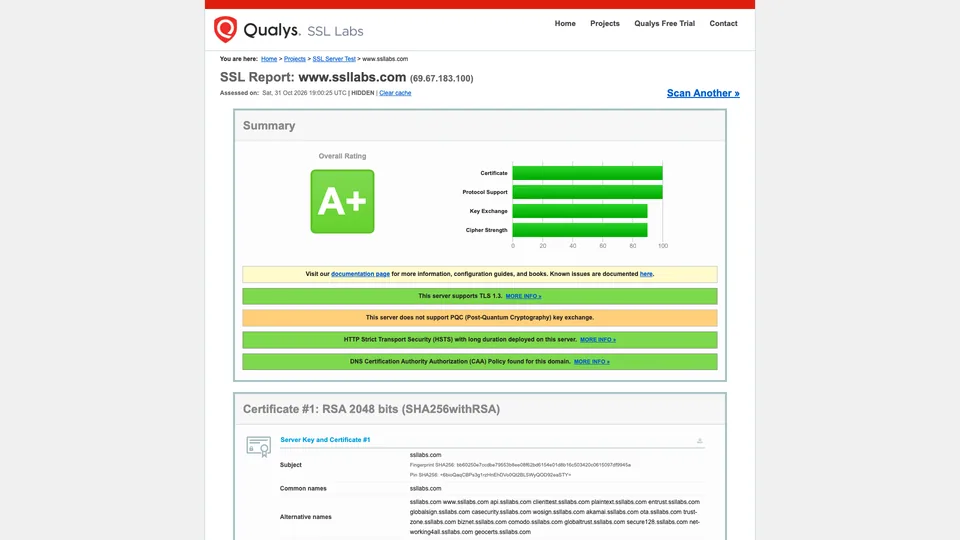
Enter a domain name, wait about a minute, and SSL Labs returns a grade from A+ to F on how the server encrypts its connections: certificate, accepted TLS versions, cipher suites, known vulnerabilities, browser compatibility. The report details each point and color-codes whatever is a problem. Free and requiring no sign-up, it is the benchmark system administrators, hosting providers and auditors cite whenever they need to judge the quality of an HTTPS setup.
What is SSL Labs?
The SSL Server Test, to use its exact name, connects to the server you enter the way a browser would, but tries every possible combination. It retrieves the certificate and its chain, checks that they are trusted by the Mozilla, Apple, Android, Java and Windows root stores, lists the protocol versions accepted (from SSL 2 to TLS 1.3) and every cipher suite offered, then tests for known vulnerabilities, from Heartbleed to POODLE and ROBOT. A handshake simulation also shows which protocol dozens of browsers, operating systems and bots, old and new, would negotiate. Finally, the report flags good settings, such as HSTS and a CAA record in DNS, and even the absence of a key exchange resistant to future quantum computers. The tests are non-intrusive: no malicious traffic, no exploitation attempts.
The grade follows a public rubric, the SSL Server Rating Guide. The score combines protocol support (30%), key exchange (30%) and cipher strength (40%), then caps apply: TLS 1.0 still enabled caps the grade at B, no TLS 1.3 limits it to A-, and a serious vulnerability drops it to F. Two separate grades, T and M, flag an untrusted certificate or one issued for another name. To get an A+, you need a configuration with no warnings and an HSTS header of at least six months. The rubric evolves with industry practice: its latest revision dates from May 2025.
SSL Labs was launched in early 2009 by Ivan Ristić, a security engineer already known for the ModSecurity web application firewall, who was looking for reliable tools and documentation on a topic with a reputation for being obscure. He joined Qualys with his project in spring 2010. The California company, one of the pioneers of SaaS security, still presents SSL Labs as a non-commercial research effort; alongside it, it publishes a browser test, best-practice guides and SSL Pulse, a dashboard tracking the HTTPS quality of the most popular websites. Ivan Ristić handed the project over to the Qualys team in 2016, while staying on as an advisor.
SSL Labs at a glance
- Type
- Online test and API
- Launched
- 2009
- Founder
- Ivan Ristić
- Publisher
- Qualys, since 2010
- Publisher headquarters
- Foster City, California
- Qualys revenue
- $669.1 million in 2025
- Grading scale
- A+ to F, plus T and M
- Free plan
- Yes, the whole tool
- Starting price
- Free, no account
What is SSL Labs used for?
-
Grade your HTTPS configuration
a grade from A+ to F, broken down into four bars (certificate, protocol support, key exchange, cipher strength), with the reasons for each cap.
-
Check your certificate
validity dates, complete or incomplete chain, trust by the major root stores, revocation and the domain’s CAA policy.
-
Clean up your protocols
the list of TLS versions and cipher suites your server accepts, including the ones considered weak.
-
Spot known vulnerabilities
Heartbleed, POODLE, ROBOT, insecure renegotiation and other protocol vulnerabilities, tested without exploiting them.
-
Plan for compatibility
a simulated connection from many browsers, operating systems and bots, so you know who would be locked out if you turn off an old protocol.
-
Test in bulk through the API
a free API to run scans from your scripts, limited to non-commercial use and to servers you are authorized to test.


SSL Labs review
Reference
When an administrator wants to know whether their HTTPS holds up, this is almost always the first place they go. SSL Labs has set the vocabulary: “we’re at A+” has become a standard line in audit reports, and the grade serves as a shared reference between a client, their service provider and their hosting company. Its strength lies in the depth of the report, free of charge, and in a public, documented rubric that makes the grade verifiable.
You still need to know what that grade measures. It judges the encryption of the connection, not the security of the site: a vulnerable application can get an A+, and security headers other than HSTS, even when they appear in the report, don’t count toward the grade. The rubric also gets stricter over time: a server graded A two years ago can slip without anyone touching it, simply because TLS 1.0 or an aging cipher is now penalized. That is by design, but it catches people off guard. Behind a CDN such as Cloudflare, it is the CDN’s configuration being graded, and getting it to A+ often means adjusting its settings rather than your own server.
The tool also has a narrow scope. It only tests public web servers on the standard HTTPS port: an internal server, an unusual port or a mail server using STARTTLS are out of reach. There is no history, no alert when a certificate expires, and each scan takes about a minute. Results show up on the site’s public boards if you forget to check the box provided. As for the API, it requires signing up with a business email address and prohibits commercial use without Qualys’s agreement.
For checking an HTTPS setup, before going live, after renewing a certificate or at a client’s request, there is nothing better. For monitoring a fleet of servers over time, you will need another tool.
Strengths
- Free, with no account, for a report of rare depth.
- An A+ to F grade recognized everywhere, which makes conversations with a client or a hosting provider easier.
- A public, documented rubric that explains every cap.
- The compatibility simulation, invaluable before turning off an old protocol.
- Non-intrusive tests, with no risk to the server being scanned.
Weaknesses
- A grade that measures encryption, not the site’s overall security.
- Public web servers only: no non-standard ports, internal servers or STARTTLS mail servers.
- No history, monitoring or expiration alerts.
- A scan takes about a minute, and results appear on the public boards unless you check the box.
- An API limited to non-commercial use, with sign-up by business email address.
Is SSL Labs worth it?
Yes, if you manage a website, a server or a hosting fleet and want to know, with evidence, whether your HTTPS is properly configured: after installing a certificate, before a security audit, or when a client asks for an A. Developers also find there the exact list of protocols and ciphers to disable, and what they risk breaking by doing so.
Not necessarily, if you need to test internal servers, non-standard ports or mail servers: testssl.sh, an open-source command-line tool, does the same job from your own machine. To monitor certificate expiration and the configuration of many domains over time, you need a monitoring service, such as Hardenize or Qualys’s own offerings. For HTTP header security in the broader sense, the free Mozilla HTTP Observatory rounds out the picture nicely. And to write a good configuration rather than grade one, Mozilla’s SSL Configuration Generator remains a handy starting point.
How much does SSL Labs cost?
SSL Labs doesn’t sell anything: there is no paid plan and no stated limit for manual use. The API is free too, but governed by Qualys’s terms of use.
| Plan | Per month | Included | Who it's for |
|---|---|---|---|
| Online tool | $0 | No account, one domain per scan, full report | Checking a site by hand |
| API | $0 | Sign-up with a business email address, limited number of concurrent scans | Non-commercial scripts and open-source tools |
Source: official Qualys SSL Labs SSL Server Test page, checked on October 31, 2026.
- Without Qualys’s agreement, the API may not be used commercially, on a public website or to resell the service; it may only target servers you are authorized to test.
- Hosting providers, certificate authorities, CDNs and web agencies can get relaxed terms, provided they offer the test free of charge to all their customers.
- Automating the web interface (scraping) is prohibited: automated scans go through the API.
FAQ
Answers to questions about SSL Labs
Is SSL Labs free?
Yes, completely. The online test works without an account and the API is free, but limited to non-commercial use unless Qualys agrees otherwise.
How do I get an A+ on SSL Labs?
You need a configuration with no warnings: TLS 1.2 and 1.3 only, modern cipher suites with forward secrecy, a valid and complete certificate, and an HSTS header lasting at least six months. Since the May 2025 revision, a missing or malformed HSTS header doesn’t just cost you the A+: it brings the grade down to A-.
Why did my grade drop when I didn’t change anything?
The grading rubric is revised over the years: protocols or ciphers that used to be accepted are now penalized. An expired certificate or an incomplete chain also makes the grade drop.
Are test results public?
By default, the tested domain can appear in the site’s recent results lists. To avoid that, check the “Do not show the results on the boards” box before starting the scan.
Can SSL Labs test a mail server or an internal server?
No. The test targets public web servers on the standard HTTPS port. For an internal server, another port or a mail server, a command-line tool such as testssl.sh is a better fit.
Information checked on October 31, 2026