
- Website creation
- No-code website builders
Webflow: design a professional website without writing code
Good tool
Webflow lets you design, publish and run a professional website without writing a single line of code, with layout freedom close to a developer’s. You build your pages on a visual canvas that turns every setting into HTML and CSS, organize blog posts, case studies or job listings in a CMS, and the site is hosted by Webflow. Far less widespread than WordPress or Wix, it has carved out a place of its own among designers, web agencies and marketing teams who want a custom look without depending on a developer.
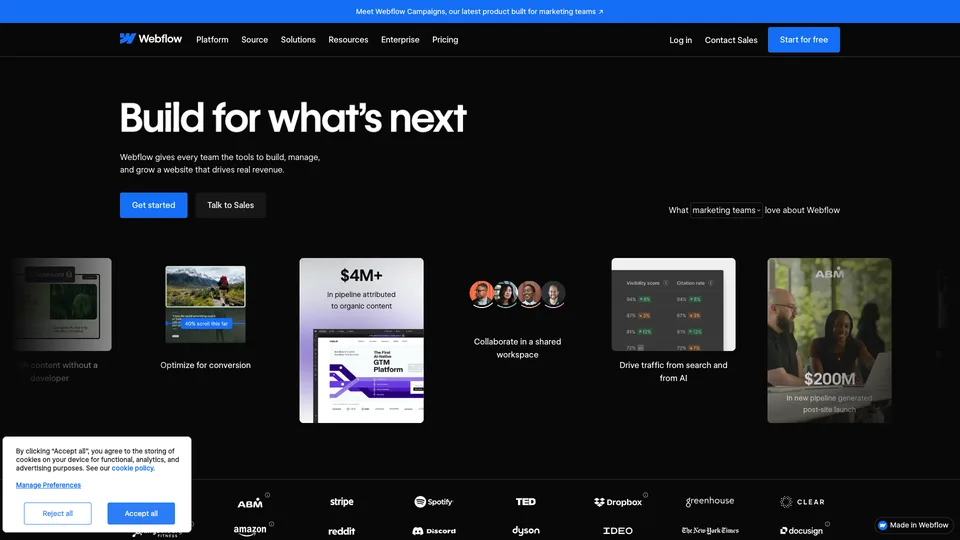
What is Webflow?
Opening the Webflow Designer means working with the logic of a web page without having to type it. Every element is a box you place, align with flexbox or grid and style with reusable classes, exactly as in CSS; the tool writes the code as you go and displays it identically on desktop, tablet and mobile. Scroll and hover animations are set up in the same panel. Alongside it, the CMS organizes content into collections, such as blog posts, case studies or team members, each linked to a page template: writers fill in the entries, and the design stays put.
Around that core, Webflow has stacked up the building blocks of a full platform: hosting included, an online store, site translation with Localize, audience analytics with Analyze, A/B testing and personalization with Optimize. Webflow AI generates a site from a description, adds sections or writes first drafts, and an MCP server lets AI assistants act directly on the site. Each site lives in a Workspace where you invite colleagues and clients, and, starting with the Core workspace, you can export the HTML, CSS and JavaScript of static pages. Collection pages and CMS items aren’t included: content is exported separately, as CSV, one collection at a time, and has to be rebuilt in another tool.
The company was founded in San Francisco in 2013 by Vlad Magdalin, Sergie Magdalin and Bryant Chou. It has raised $335 million in total, including $140 million in January 2021 at a $2.1 billion valuation, and has been led by Linda Tong since June 2024. Webflow has grown through acquisitions in recent years: Intellimize in April 2024, which became Webflow Optimize, then GreenSock, the company behind the GSAP animation library, in October of the same year. The company now claims 300,000 customer organizations.
Webflow at a glance
- Type
- Online visual website builder (SaaS)
- Founded
- 2013
- Founders
- Vlad Magdalin, Sergie Magdalin and Bryant Chou
- Headquarters
- San Francisco, United States
- Customers
- 300,000 organizations, according to the company
- Share of websites
- 0.8% (W3Techs, October 2026)
- Free plan
- Yes, 2 pages on a webflow.io address
- Starting price
- $15/month billed annually, $25 month to month (Basic)
What is Webflow used for?
-
Design a custom website
a visual canvas that handles boxes, classes, flexbox and grids just like CSS, without writing code.
-
Manage your content in the CMS
blog, case studies or job listings organized into collections, each with its own page template, that your writers update without touching the design.
-
Publish without managing a server
hosting, backups and updates are handled by Webflow, with your own domain name starting with the Basic plan.
-
Take care of your SEO
title and meta tags, readable URLs, redirects and sitemap can be set page by page or by collection template.
-
Translate your site
with the Localize add-on, versions by language in subfolders, machine translation and generated hreflang tags.
-
Sell online
a store built into the site, with a fully customizable cart and checkout, from 500 to 15,000 items depending on the plan.
-
Measure and improve your pages
Analyze tracks traffic and engagement, Optimize runs A/B tests and personalizes pages, both as paid add-ons.
-
Work with AI
Webflow AI builds a site or sections from a prompt and writes first drafts, within your workspace’s credit limit.
-
Connect your tools
marketplace apps, the CMS API, an MCP server for AI assistants and HTML and CSS code export.


Webflow review
Good tool
Webflow has no no-code equivalent for anyone who wants a site that looks exactly like its mockup. You get the rigor of web development, with classes, grids and rules that apply everywhere, and you end up with a site with clean code, hosted by Webflow, with no plugins to update. Its CMS, designed for marketing sites, is the other big asset: once the templates are in place, a team can publish its articles or case studies without ever breaking the layout.
Two SEO caveats are worth knowing before you trust the tool with a large blog: pagination on collection lists relies on a URL parameter, which produces hard-to-read addresses for pages 2, 3 and 4 that you need to watch in indexing, and every collection, like every site, is capped in number of items depending on the plan. A publisher putting out thousands of articles hits those limits sooner than it expects.
That freedom comes at a cost in time, first of all. Webflow isn’t a simple drag-and-drop builder: you need to understand how boxes nest, what a class does and why a setting changed in one place changes ten pages at once. A graphic designer or a front-end developer quickly feels at home, but a tradesperson who just wants to present their business risks getting lost. For them, Wix or Squarespace will be faster.
It comes at a cost in money too, with a bill that is harder to read than it looks. You need a plan per site, a workspace plan as soon as you collaborate, extra seats, then add-ons for translation, analytics or bandwidth. Pricing was overhauled again in spring 2026, which pushed up the bill for some customers, and an annual commitment is due until it ends. Don’t count on very responsive support either, and be aware that the site doesn’t move easily elsewhere: code export leaves the CMS content behind.
Webflow is therefore an excellent choice for a polished brochure site, a startup website or an agency delivering custom sites to its clients, as long as you accept the learning curve and run the numbers before committing.
Strengths
- Rare layout freedom without code, with clean HTML and CSS as output.
- A well-designed CMS that keeps content editing separate from design.
- Hosting managed by Webflow, with no updates or plugins to keep an eye on.
- Advanced animations and interactions built into the editor.
- Complete SEO settings and built-in site translation as an add-on.
- A wide choice of templates, free training and a network of certified partners.
Weaknesses
- A demanding learning curve that requires understanding the logic of CSS.
- A bill in several layers (site, workspace, seats, add-ons).
- Pricing changes that have increased the bill for some existing customers.
- An annual commitment due until the end of the term and support that is hard to reach quickly.
- An online store less complete than a dedicated ecommerce platform’s.
- A site that is hard to move: CMS content doesn’t come out with the code export.
Is Webflow worth it?
Yes, if you are a designer, an agency or a marketing team and the site is a brand showcase: a custom layout, polished animations, a blog or case studies published without a developer. It is also a great fit for a freelancer delivering sites to clients, thanks to workspaces designed for freelancers and agencies.
Not necessarily, if you just want a simple business site that you will update yourself, on a small budget: Wix or Squarespace take far less time to learn. For a large product catalog, Shopify is better equipped, and for an editorial site that needs to be able to switch hosts or providers, WordPress keeps the advantage of freedom. Finally, Framer appeals to designers who want to publish highly visual pages fast, with a similar but lighter approach.
How much does Webflow cost?
With Webflow, the bill is made up of two separate subscriptions. The Site plan is purchased site by site: it is what lets you publish on your own domain name, and it sets the number of pages, the CMS, bandwidth and, in its ecommerce version, the store. The Workspace plan covers where you build and collaborate: number of staging sites, seats, roles, code export. The free workspace accepts as many paid sites as you want; the Core and Growth plans are aimed at in-house teams, Freelancer and Agency at service providers. All prices are published in US dollars, excluding taxes.
| Plan | Per month | Per month, billed yearly | Included | Who it's for |
|---|---|---|---|---|
| Site Starter | $0 | — | webflow.io address, 2 pages, limited CMS, 1 GB of bandwidth, 50 form submissions, Webflow badge | Learning the tool, preparing a mockup |
| Site Basic | $25 | $15 | Custom domain, 300 pages, 10 GB, unlimited forms, no CMS | Simple brochure site, no blog |
| Site Premium | $39 | $25 | CMS with 20,000 items and 40 collections, site search, 50 GB expandable up to 2.5 TB | Business site with a blog or content |
| Ecommerce Standard | $42 | $29 | 500 items, 2% fee on sales, customizable cart and checkout | Small store getting started |
| Ecommerce Plus | $84 | $74 | 5,000 items, no Webflow transaction fee, emails without Webflow branding | Store with established volume |
| Ecommerce Advanced | $235 | $212 | 15,000 items, no Webflow transaction fee | Large catalog |
| Team | — | $2,500 | Site and workspace combined, Localize, AEO agents, publishing workflows, priority support, annual contract | Growing marketing teams |
| Enterprise | Custom pricing | Custom roles, governance, account manager, service commitments | Large organizations | |
| Workspace Core | $28 | $19 | 10 staging sites, 300 pages each, custom code, code export, 300 AI credits | Small team preparing several sites |
| Workspace Growth | $60 | $49 | Unlimited staging sites, site-level roles, publishing permissions, 400 AI credits | Team collaborating on several sites |
| Workspace Freelancer | $24 | $16 | 10 staging sites, free guest access in client workspaces, client billing, 300 AI credits | Freelancers with a few clients |
| Workspace Agency | $42 | $35 | Unlimited staging sites, 3 free client seats per site, 400 AI credits | Agencies with many clients |
Source: official Webflow pricing page, checked on October 31, 2026.
- Prices are in US dollars, excluding taxes: applicable taxes are added at checkout.
- The Premium price includes 50 GB of bandwidth; each additional tier is extra, from $20 a month billed annually for 50 GB more up to $974 to reach 2.5 TB.
- One full seat is included in each workspace. Additional ones cost $39 a month billed annually ($45 month to month), or $15 ($19 month to month) for a seat limited to content editing; reviewers are free.
- Paid add-ons, per site and billed annually: Localize from $9 a month per language, Analyze from $9 a month, Optimize from $299 a month. A pack of 2,000 extra AI credits costs $20 a month billed annually.
- Beyond the included volumes (requests, storage, compute), usage is billed at $2 per increment.
- No free trial as such: the Starter plan, free with no time limit, serves that purpose. A plan can be canceled at any time, but the rest of the committed period remains due.
- This pricing took effect on May 13, 2026. Existing customers switch over at renewal starting June 29, 2026, or November 16, 2026 for Freelancer and Agency workspaces and legacy plans.
FAQ
Answers to questions about Webflow
Is Webflow free?
Partly. The Starter plan is free with no time limit, but it is limited to two pages published on a webflow.io address, with the Webflow badge. To use your own domain name, you need a paid Site plan, starting at $15 a month billed annually.
What is the difference between a Site plan and a Workspace plan?
The Site plan is paid for each published site: it provides the domain name, hosting, the CMS and the store. The Workspace plan covers collaboration: number of staging sites, seats, roles and code export. Someone working alone who publishes their own sites can make do with the free workspace.
Do I need to know how to code to use Webflow?
No, you don’t need to write a single line of code. But the editor follows the logic of HTML and CSS, with boxes, classes and grids: some knowledge of web layout helps a lot, and you should expect a longer learning curve than with Wix or Squarespace.
Can I pay for Webflow in euros?
No. Webflow publishes all its prices in US dollars, excluding taxes, including on its French-language page. Taxes are added at checkout.
Can I leave Webflow and take my site with me?
Only partly. Starting with the Core workspace, you can export the site’s HTML and CSS code, but not the dynamic CMS content, which has to be retrieved separately. Moving to another tool therefore takes real migration work.
Webflow or WordPress?
Webflow suits a brochure or marketing site where design matters, hosted with no maintenance and updated by the team itself. WordPress keeps the advantage for a content-heavy editorial site, a WooCommerce store or a project that needs to be able to switch hosts and providers, at the cost of regular maintenance.
Information checked on October 31, 2026