
- Website creation
- No-code website builders
Framer: the designers’ website builder, now powered by AI
Good tool
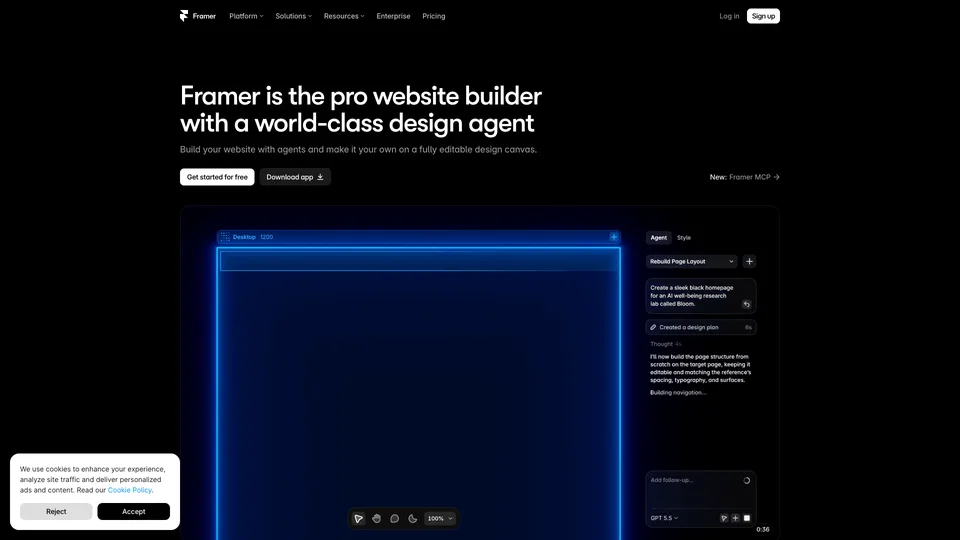
Framer lets you design a website the way you design a mockup, then publish it in one click without writing code. You place text, images and animations freely on a canvas, adapt the layout for desktop, tablet and mobile, and you can also describe the page you want to an AI agent that builds it right on that canvas. Hosting, a CMS, SEO settings, translation and analytics are included. Designers, studios and startups mostly use it for polished marketing sites and landing pages.
What is Framer?
Framer’s interface borrows heavily from design software like Figma: a large canvas, layers, reusable components and breakpoints to adapt each page to the screen size. The difference is that what you design is already the website. Scroll animations, hover effects and page transitions are set up with the mouse, and the “Publish” button puts everything live on Framer’s hosting, served through a global content delivery network. A CMS handles repeating content such as blog posts, case studies or job listings, and a marketplace offers free and paid templates and components made by the community.
Artificial intelligence now plays a central role. Agents generate or edit a page from a simple prompt, fill in the CMS or write small code effects, using up credits included in each plan. An MCP server, still in preview, also lets assistants like Claude, Codex or Cursor work on a Framer project. Developers can still add React components, but nothing forces you to touch them.
The company was founded in Amsterdam by Dutch entrepreneurs Koen Bok and Jorn van Dijk, who had previously sold their design studio, Sofa, to Facebook in 2011. Launched in 2014, Framer started out as an app prototyping tool popular with interface designers, before reinventing itself in May 2022 as a builder for professional websites. The bet paid off: in August 2025, a $100 million round led by Meritech and Atomico valued it at $2 billion.
Framer at a glance
- Type
- Online no-code website builder, with AI
- Founded
- 2014 (website builder since 2022)
- Founders
- Koen Bok and Jorn van Dijk
- Origin
- Netherlands
- Headquarters
- Amsterdam
- Valuation
- $2B (August 2025)
- Free plan
- Yes, Framer subdomain, non-commercial use
- Starting price
- $10/month billed annually, $15 month to month
What is Framer used for?
-
Design your site without code
freeform layout on a canvas, reusable components, animations and mobile versions set up with the mouse.
-
Hand pages off to AI
an agent creates or edits a section from a prompt, right on the canvas, where everything stays editable.
-
Manage your content in the CMS
blog posts, case studies or team profiles organized into collections, with on-page editing open to writers.
-
Publish in one click
hosting and a global content delivery network included, with a custom domain on paid plans.
-
Fine-tune your SEO
title and description tags, URLs, social sharing images and redirects (Pro plan) from the site settings.
-
Translate your site
versions in several languages translated by AI, as a paid add-on per language.
-
Track your audience
visits, page views and performance metrics in a built-in dashboard, with no third-party tool.
-
Test two versions of a page
A/B tests and conversion funnels with the Convert add-on, billed by number of events.


Framer review
Good tool
Sites built with Framer stand out first for their polish, typography and animations, which are hard to achieve elsewhere without a developer, and the tool is quick to pick up for anyone who has already opened Figma. For a portfolio, a studio’s showcase site or a startup’s launch page, it is probably one of the shortest paths today from a good-looking mockup to a live website. The AI agent pushes in the same direction: it produces a decent first draft in a few minutes, which you then refine by hand.
The AI does come at a cost you should keep in mind, though. Every request uses up credits, and a simple edit the agent misunderstands can burn through several, which you then have to fix yourself. The monthly allowance on the smaller plans runs out quickly if you treat it as an always-on assistant; it is better seen as a way to get started faster than as a way to stop doing the work.
Framer also shows its limits as soon as a site grows. The Basic plan caps out at 30 pages and two CMS collections, and every extra tier, whether pages, items, bandwidth, languages or editors, is billed separately. A content-heavy blog or an editorial site built for search will be more at home on WordPress or Webflow, which are more flexible about content structure. And since the site lives on the platform, you can’t walk away with code ready to host elsewhere.
The business relationship, for its part, calls for caution. Plan changes, with caps introduced along the way, have left some customers facing a heavier bill, support goes through a bot first, and refunds are only offered to customers in the European Union and Turkey, within 14 days. A remarkable tool for building, then, but one whose subscription you should watch as closely as the design.
Strengths
- Layout and animation freedom that is rare for a no-code tool.
- Quick to pick up for designers used to Figma.
- An AI agent that works on the canvas, where every element stays editable.
- Hosting, CMS, SEO, analytics and translation all in one place.
- A well-stocked marketplace of templates and components to get started fast.
Weaknesses
- Page, CMS and bandwidth caps that are quickly reached on the Basic plan.
- Paid add-ons that pile up: editors, languages, A/B tests, credits.
- AI credits that run out fast, including on botched edits.
- A CMS less flexible than WordPress’s or Webflow’s for a large editorial site.
- Support that is hard to reach and billing that leads to disputes.
Is Framer worth it?
Yes, if you are a designer, a studio or a startup and the look of the site matters as much as its content: a portfolio, a brochure site, a launch page or a marketing site of a few dozen pages. You will save weeks compared with custom development, and the AI agent helps lay down a first version. The free plan is enough to try it out, but not for a professional site, since it lacks a custom domain.
Not necessarily, if your site depends on a large volume of content or on the search performance of a content-heavy blog: Webflow, with a more structured CMS, or WordPress, open source and with no page cap, are better fits. If you simply want a decent online presence without polishing every detail, Wix or Squarespace are simpler and more predictable. And on a tight budget, stacking Framer add-ons can quickly exceed what you planned to spend.
How much does Framer cost?
Framer is billed per site, monthly or yearly, with a discount of about a third on annual billing. These prices correspond to the base tier of AI credits: choosing more credits in the plan menu raises the price.
| Plan | Per month | Per month, billed yearly | Included | Who it's for |
|---|---|---|---|---|
| Free | $0 | — | Framer subdomain, 1 GB of bandwidth, 500 AI credits to try it out | Trying the tool, non-commercial projects |
| Basic | $15 | $10 | Custom domain, 30 pages, 2 CMS collections, 50 GB, 1,000 AI credits a month | Portfolios, freelancers, small studios |
| Pro | $45 | $30 | 150 pages, 10 CMS collections, 100 GB, 3,000 AI credits, redirects, staging and branches | Agencies, startups, growing marketing sites |
| Enterprise | Custom pricing | Custom limits, unlimited editors, SSO, uptime guarantee | Large teams, business-critical sites | |
Source: official Framer pricing page, checked on October 31, 2026.
- The workspace owner is included; each additional editor and each content editor is billed on top, and viewers are free.
- Add-ons: translation billed per language per month, A/B tests (Convert) billed per block of 500,000 events, and advanced hosting.
- On Pro, pages, collections, CMS items and bandwidth can be extended in paid tiers (pages, for example, in blocks of 100, up to 700).
- The domain name is free with an annual subscription. Applicable sales tax is added at checkout.
- Refunds are available within 14 days of purchase, only for customers in the European Union and Turkey.
FAQ
Answers to questions about Framer
Is Framer free?
There is a free plan, with no time limit, for building and publishing a site on a Framer subdomain, with 1 GB of bandwidth and 500 AI credits to try it out. Framer intends it for non-commercial projects: a custom domain requires at least the Basic plan, at $10 a month billed annually.
Do I need to know how to code to use Framer?
No. Everything happens on a visual canvas, and an AI agent can build pages from a description. Developers can add code components, but it is never required.
Framer or Webflow?
Framer is faster to learn and shines on the design and animations of marketing sites. Webflow, more technical, offers a more structured CMS and is better suited to content-rich sites.
Is Framer good for SEO?
The basics are there: title and description tags, customizable URLs, redirects on the Pro plan, an automatically generated sitemap and fast hosting. Two points still call for care: the tag for each heading (H1, H2) is set in the text style and isn’t applied for you, and speed depends mostly on what you design, since animations, background videos and multiple fonts quickly weigh on Core Web Vitals. For a blog with several thousand posts, however, the caps on pages and CMS items become a constraint.
What does it have to do with Framer Motion?
Framer Motion is an animation library for React developers, created at Framer and later spun off as an independent project under the name Motion. It isn’t the website builder covered here.
Information checked on October 31, 2026