
- Web technical
- Testing and monitoring
UptimeRobot: know your site is down before your customers do
Reference
UptimeRobot checks at regular intervals that your website, API or server is responding, and alerts you by email, text message, mobile app or Slack message as soon as it isn’t. You set it up in two minutes, forget about it, and it speaks up the day something breaks. With a free plan that already monitors 50 addresses every five minutes, it is one of the most widely used uptime monitoring services, from the freelancer managing a handful of client sites to the tech team publishing a status page.
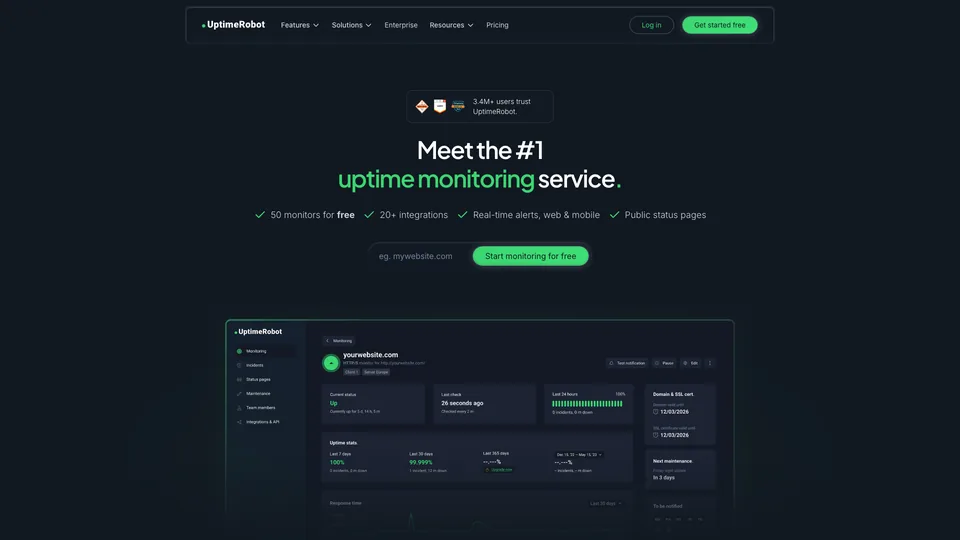
What is UptimeRobot?
Everything starts with the monitor. Each one is something to watch: a web address, a port, a server you ping, a specific word on a page, or a scheduled task that has to check in at a set time. UptimeRobot’s servers query those targets every five minutes on the free plan, and as often as every fifteen seconds on the most expensive plans. When a check fails, the service runs it again from a second data center in the same region before sending the alert, to rule out simple network hiccups.
The paid plans add monitoring of SSL certificates and domain expiry, DNS records and APIs with JSON response checks, as well as alerts when response time crosses a threshold. Every account also comes with public status pages, which you can brand with your own colors and host on your own domain, plus an API, a mobile app and about twenty integrations, from Slack to PagerDuty.
The service was launched in January 2010 by two developers, Umut Muhaddisoğlu and Daniel Rimille, who wanted a monitoring tool simpler and cheaper than the ones built for system administrators. In late 2019, it was taken over by itrinity, a Slovak group that buys and builds online software. It is now operated by UptimeRobot s. r. o., based in Bratislava, and claims more than 3.4 million users.
UptimeRobot at a glance
- Type
- Online monitoring service
- Launched
- January 2010
- Founders
- Umut Muhaddisoğlu and Daniel Rimille
- Owner
- itrinity, since late 2019
- Headquarters
- Bratislava (Slovakia)
- Users
- More than 3.4 million, according to the company
- Free plan
- Yes, 50 monitors every 5 minutes
- Starting price
- $10/month ($9 billed annually)
What is UptimeRobot used for?
-
Monitor your sites’ uptime
HTTP request, ping, port or a keyword expected on the page, checked every 5 minutes for free and as often as every 15 seconds on paid plans. The keyword, searched for in the HTML the server sends, catches pages that return a 200 while displaying an error.
-
Get the alert in the right place
email, text message, voice call, mobile notification, Slack, Teams, Discord, webhook or PagerDuty, depending on the plan.
-
Publish a status page
a public page that shows your customers the status of your services and the incident history, on your own domain from the Solo plan up.
-
Stay ahead of certificate expiry
reminders 30, 14 and 7 days before your SSL certificate or domain name expires, on paid plans only.
-
Check your scheduled tasks
your backups or automated scripts ping UptimeRobot every time they run, and an alert goes out if the ping doesn’t arrive on time.
-
Track your response times
uptime history, incident duration and alerts when your site slows down past a threshold you set.


UptimeRobot review
Reference
For most websites, UptimeRobot answers a simple question, “is my site up?”, and it answers it very well. Creating a monitor takes less than a minute, the interface stays readable even with dozens of sites, and alerts arrive quickly, including on your phone. It is exactly the kind of tool a freelancer or a small agency hooks up to all of its client sites to find out before the client calls.
Its free plan is especially generous in the number of sites it monitors, and it allows commercial use. Five minutes between checks is enough for a business website or a blog. You do need to know what isn’t included, though: no SSL certificate monitoring, no reminder before the domain expires, no slowdown alerts, and the history only goes back three months. For an online store or an app where every minute of downtime costs money, the Solo plan with one-minute checks quickly becomes the reasonable minimum.
Trust is another matter. The company has revised its terms several times in recent years, moved features that used to be included into paid tiers and imposed steep increases on some longtime subscribers. The current price lists are still affordable, but it’s best not to take today’s terms for granted. Alerts also sometimes fire for a site that is working fine: the double check from a second data center reduces the problem without making it go away. The cause is often a firewall, bot protection or a CDN that turns away the service’s probes; UptimeRobot publishes the list of its IP addresses, which you can allow with your host or in Cloudflare before concluding there’s an outage.
UptimeRobot monitors from the outside, without getting inside your application. It tells you a page has stopped responding, not why; to test a checkout flow or analyze slowdowns, you need a more comprehensive monitoring tool.
Strengths
- A generous free plan: 50 monitors, commercial use allowed, no credit card.
- Instant onboarding and a clear interface, even with many sites.
- Alerts on every useful channel, from email to voice calls and Slack.
- Public status pages included in every plan.
- Affordable paid plans for moving to checks every minute.
- An API, a mobile app and plenty of integrations.
Weaknesses
- No SSL certificate or domain monitoring on the free plan.
- Five minutes between checks on the free plan, too slow for a critical site.
- Occasional false alerts, despite the double check.
- Terms and prices that have changed several times, at the expense of longtime subscribers.
- Outside-in monitoring only: no user flow tests and no root-cause diagnosis.
- Text messages and calls billed in credits, on top of the subscription once the quota runs out.
Is UptimeRobot worth it?
Yes, if you manage one or more websites and simply want to be alerted when one of them goes down. The free plan covers that need for a business website, a blog or a portfolio of client sites, and for a few dollars a month the Solo plan adds the one-minute checks and certificate monitoring the free plan lacks. Teams that want a status page and shared alerts will find what they need in the Team plan.
Not necessarily, if you need to test complete user flows (login, payment) or understand what is causing a slowdown: Pingdom, Checkly or Better Stack go further, for a bigger budget. If you would rather not depend on any provider, Uptime Kuma, free open-source software you install on your own server, does the essentials at no cost, as long as you host it somewhere other than the machines it monitors.
How much does UptimeRobot cost?
UptimeRobot stays free for up to 50 monitors checked every five minutes. The paid plans differ mainly in check frequency, the number of monitors and status pages, and team access. An annual commitment saves about 15%, and the Solo and Scale plans come in two sizes.
| Plan | Per month | Per month, billed yearly | Monitors and frequency | Who it's for |
|---|---|---|---|---|
| Free | $0 | — | 50 monitors, every 5 minutes | Business websites, blogs, personal projects |
| Solo | $10 | $9 | 10 monitors, every 60 seconds | Freelancers and small sites that want fast alerts |
| Team | $41 | $35 | 100 monitors, every 30 seconds | Small tech teams, agencies |
| Scale | $77 | $65 | 200 monitors, every 15 seconds | Large fleets of sites and services |
| Enterprise | Custom pricing | More than 500 monitors, custom frequency | Large companies with contractual requirements | |
Source: official UptimeRobot pricing page, checked on October 31, 2026.
- Solo also comes with 50 monitors, and Scale with 500 monitors, at a higher price.
- The free plan doesn’t include SSL and DNS monitoring, slowdown alerts or maintenance windows, and has only one status page with no customization.
- Paid plans include a few text message and voice call credits; beyond that, credit packs are sold separately and don’t renew automatically with the subscription. Additional seats are also paid.
- New subscriptions and upgrades can be refunded within 14 days, and you can cancel the subscription at any time.
FAQ
Answers to questions about UptimeRobot
Is UptimeRobot free?
Yes, for 50 monitors checked every five minutes, with no credit card. Monitoring SSL certificates, DNS and response times requires a paid plan, starting at $10 a month or $9 billed annually.
Can I use the free plan for a business website?
Yes. The current terms of service allow any use, including commercial, within the company’s fair use policy.
How often does UptimeRobot check a website?
Every five minutes on the free plan, every 60 seconds with Solo, every 30 seconds with Team and every 15 seconds with Scale. The Enterprise plan allows custom intervals.
Does UptimeRobot warn you before an SSL certificate expires?
Yes, but only on paid plans: it sends reminders 30, 14 and 7 days before expiry, then on the day itself, and also flags a faulty certificate.
Who is behind UptimeRobot?
Launched in 2010 by Umut Muhaddisoğlu and Daniel Rimille, the service has belonged to the itrinity group since late 2019. It is operated by UptimeRobot s. r. o., a company based in Bratislava, Slovakia.
Information checked on October 31, 2026