
- Web technical
- Testing and monitoring
Checkly: monitor your APIs and user journeys as code
Good tool
A checkout page that stops responding on a Sunday night, an API that starts throwing errors after a release: Checkly is built to catch these before your customers do. From several regions around the world, it continuously replays requests against your APIs and full journeys in a real browser powered by Playwright, then alerts the team as soon as a check fails. What sets it apart is the method: checks are written in TypeScript, stored in the code repository and deployed like the rest of the application. That approach has earned it a place of its own among synthetic monitoring services built for developers.
What is Checkly?
Checkly is an online service that runs “checks” for you: small automated tests launched at regular intervals. The simplest are uptime monitors covering a URL, a TCP port, a DNS record, an SSL certificate or a ping, plus “heartbeats” that confirm a scheduled job actually ran. Next come API checks, which send an HTTP request and verify the response (status code, body, response time), optionally across several chained steps. Browser checks, finally, launch a real Chrome driven by a Playwright script: logging in, adding to cart, filling in a contact form, anything a visitor can do. The same Playwright test suites your team already uses can run as is, and the Web Vitals of the pages visited are recorded along the way.
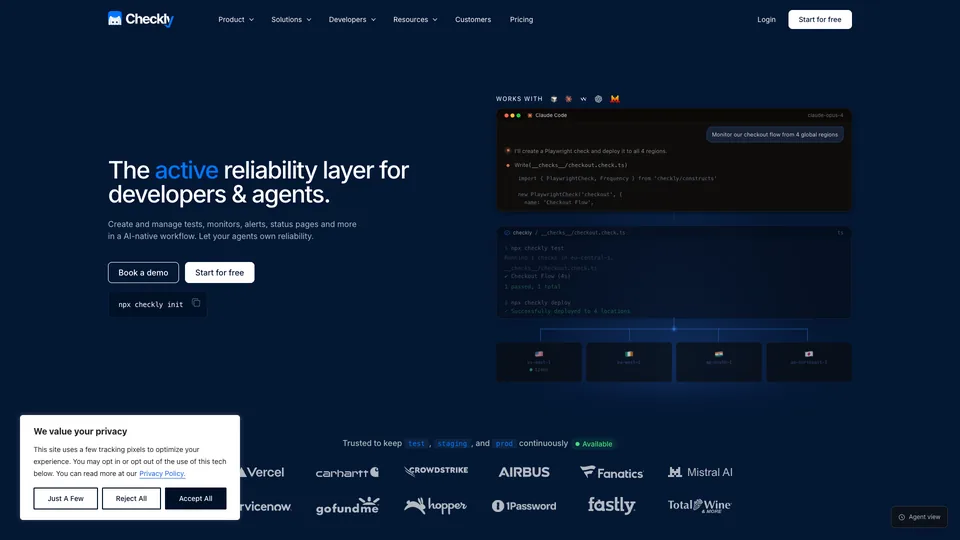
All of this can be set up in the web interface, but the company pushes a different approach, which it calls “monitoring as code.” You describe your checks in TypeScript files, try them locally with npx checkly test, then publish them with npx checkly deploy, from your machine or from your continuous integration pipeline. Terraform and Pulumi providers exist for teams that already manage their infrastructure as code, and an MCP server now lets agents such as Claude Code or Cursor create and read checks. Checks run from 22 public regions, or from private locations installed inside your own network. When a check fails, Checkly retries it before alerting, following a retry strategy you set per check (number of attempts, delay, same region or a different one), then notifies you by email, Slack, SMS, phone call, PagerDuty or Opsgenie. On top of that come public status pages, OpenTelemetry traces and an analysis assistant, Rocky AI, which suggests a likely cause for each new failure.
The project started in 2018, when developer Tim Nolet released a first beta on his own. The company took shape in 2020 with Hannes Lenke, who became CEO, and Timo Euteneuer, and raised $2.25 million from Accel the same year. In July 2024, a $20 million Series B led by Balderton Capital brought total funding to $32.25 million. Checkly claimed more than 1,000 customers at the time and now lists references such as Vercel, Airbus, CrowdStrike and 1Password; the company has offices in Berlin and New York.
Checkly at a glance
- Type
- Online synthetic monitoring (SaaS)
- Launched
- 2018 (beta), company in 2020
- Founders
- Tim Nolet, Hannes Lenke, Timo Euteneuer
- Origin
- Germany (Berlin)
- Offices
- Berlin and New York
- Funding raised
- $32.25M (Series B in 2024)
- Technology
- Playwright, TypeScript, OpenTelemetry
- Free plan
- Yes, 10 monitors and 1,000 browser checks a month
- Starting price
- $29/month ($24 billed yearly)
What is Checkly used for?
-
Make sure your site is up
uptime monitors on a URL, a port, a DNS record or an SSL certificate, as often as every 30 seconds depending on the plan.
-
Monitor your APIs
HTTP requests replayed around the clock, with assertions on the status code, the response body and the response time.
-
Replay your visitors’ journeys
login, cart or form flows run in a real browser with Playwright, with a video and a trace when something fails.
-
Manage monitoring in your code
checks written in TypeScript, versioned in the repository and deployed through the CLI, Terraform, Pulumi or GitHub Actions.
-
Get alerts without false alarms
a retry from another region before any alert, which is then sent by email, Slack, SMS, phone call, PagerDuty or Opsgenie.
-
Track Web Vitals
speed and stability metrics for the pages your tests visit, recorded on every run.
-
Keep customers informed during an incident
status pages fed by check results, with incident management on the higher plans.
-
Understand an outage faster
Rocky AI analyzes a failure and suggests a likely cause, drawing on OpenTelemetry traces when they are connected.


Checkly review
Good tool
For a team that already writes its end-to-end tests with Playwright, Checkly is almost a no-brainer. The script that checks the checkout flow before every release becomes, without a rewrite, a probe that runs every ten minutes from Frankfurt, Virginia and Singapore. Checks live in the repository and go through code review like everything else, and when one of them fails, you get the video, screenshots and Playwright trace to understand what happened. That debugging comfort, more than the monitoring itself, is what sets it apart from a simple ping service.
One thing to sort out before putting a journey into production: every run is a real visit that fills a cart, triggers transactional emails and shows up in your analytics. You need a test account, a dummy payment method and a filter for these visits in your analytics tool, or your traffic and conversion figures will be skewed.
The downside is obvious: Checkly is designed for developers. You can create an uptime monitor or an API check in the interface without writing code, but the real value of the tool lies in Playwright scripts and the command line. For the owner of a brochure site who just wants to know whether the homepage is up, it is far too much tooling for a need that simpler services cover very well. Keep its scope in mind too: Checkly watches the application from the outside, like a visitor, but it replaces neither a server-side performance monitoring tool, nor log collection, nor infrastructure monitoring.
On the budget side, the free plan is generous to get started and is enough on its own for a small project. Beyond that, the bill is calculated in test runs, and that is where you need to pay attention: a browser journey launched every minute from three regions burns through its quota quickly, and overages are billed automatically on paid plans. Well tuned, Checkly stays far easier to read than the synthetic modules of the big observability platforms; poorly calibrated, it can spring a surprise at the end of the month.
Strengths
- Playwright tests reused as is as production probes.
- A genuine “monitoring as code” approach, with a CLI, Terraform, Pulumi and continuous integration.
- Failures that are easy to analyze thanks to videos, screenshots and traces.
- A retry from another region that cuts down on false alarms.
- A lasting free plan, no credit card required.
- Public, detailed pricing, overage rates included.
Weaknesses
- A tool that assumes you can write TypeScript to get the most out of it.
- Monitoring from the outside only: no APM, no logs, no infrastructure.
- A bill that climbs quickly with the frequency and number of regions of browser checks.
- Status pages and the AI assistant billed on top of the main plan.
- Only six regions on the smaller plans, and no private location before Team.
Is Checkly worth it?
Yes, if you build a web application or an API where the slightest outage costs sales or customers, and your team already works with Playwright and a continuous integration pipeline. You will monitor in production exactly what you test before shipping, in the same place as the code. The free plan is enough to give it a serious try on a real project, and Team becomes the logical choice as soon as you need several regions, private locations or ten users.
Not necessarily, if you only want to be told when your site goes down: UptimeRobot or Better Stack do that more simply, without a single line of code. If your company already uses Datadog, New Relic or Grafana Cloud for observability, their synthetic modules have the advantage of keeping everything in one tool, at the cost of less flexibility with Playwright. And to track the loading speed of a handful of pages, PageSpeed Insights remains free.
How much does Checkly cost?
Checkly publishes its prices in dollars only, billed monthly or yearly with a discount of up to 20%. The price below covers the core product, monitoring (Detect); each plan includes a number of monitors and a monthly volume of test runs, while status pages and the AI assistant are paid separately.
| Plan | Per month | Per month, billed yearly | Included | Who it's for |
|---|---|---|---|---|
| Hobby | $0 | — | 10 monitors, 10,000 API checks and 1,000 browser checks a month, 1 user | Personal project, getting to know the tool |
| Starter | $29 | $24 | 50 monitors, 25,000 API checks and 3,000 browser checks a month, 3 users | Startup or small product team |
| Team | $80 | $64 | 75 monitors, 100,000 API checks and 12,000 browser checks a month, 10 users, 22 regions and private locations | Engineering teams monitoring critical services |
| Enterprise | Custom pricing | Custom volumes, checks as often as every second, SSO, 99.9% SLA | Large organizations | |
Source: official Checkly pricing page, checked on October 31, 2026.
- The Hobby plan is free with no credit card, but capped at its quota: checks stop once the limit is reached.
- On Starter and Team, checks keep running beyond the quota and overages are billed: $6.50 (Starter) or $6.25 (Team) per 1,000 browser checks, $2.60 or $2.50 per 10,000 API checks. Volumes can also be bought in advance, for less.
- Status pages (Communicate): $12 a month on Starter and $34 on Team ($9 and $30 billed yearly). Rocky AI assistant (Resolve): $19 and $49 a month ($12 and $39 billed yearly).
- 30% off for startups less than two years old and 50% off for nonprofits, on request.
- A free trial is offered on Starter and Team, with no stated length.
FAQ
Answers to questions about Checkly
Is Checkly free?
Yes, with the Hobby plan, no credit card required: 10 uptime monitors, 10,000 API checks and 1,000 browser checks a month, for a single user. Checks stop once the quota is reached. Paid plans start at $29 a month, or $24 a month billed yearly.
Do you need to know how to code to use Checkly?
Not to create an uptime monitor or a simple API check, which you can set up in the interface. Browser journeys, however, rely on Playwright scripts in JavaScript or TypeScript, and most of the tool’s value comes from this code-based approach.
What is the difference between Checkly and Playwright?
Playwright is an open-source Microsoft library for automating a browser and writing tests. Checkly runs those scripts at regular intervals from several regions around the world, stores the results and sends alerts when something fails.
How is Checkly’s pricing calculated?
Each plan includes a number of monitors and a monthly volume of runs. A check launched from two regions counts twice, and a Playwright suite uses one run per 30-second block. Beyond the quota, paid plans bill the overage.
Information checked on October 31, 2026