
- Web technical
- Deliverability and diagnostics
- DNS and domains
MxToolbox: check an IP, a domain or a blacklist in seconds
Reference
MxToolbox is the site where you type in a domain name or an IP address first when an email bounces, a customer stops receiving anything or a new domain needs to be set up. It queries DNS and servers directly to display MX, SPF, DKIM and DMARC records, test how an SMTP server responds, break down a message’s headers and check whether an IP appears on more than a hundred blacklists. Free and requiring no sign-up, these tests have made it one of the most widely used toolkits among system administrators and email teams, with monitoring and DMARC subscriptions for those who want to go further.
What is MxToolbox?
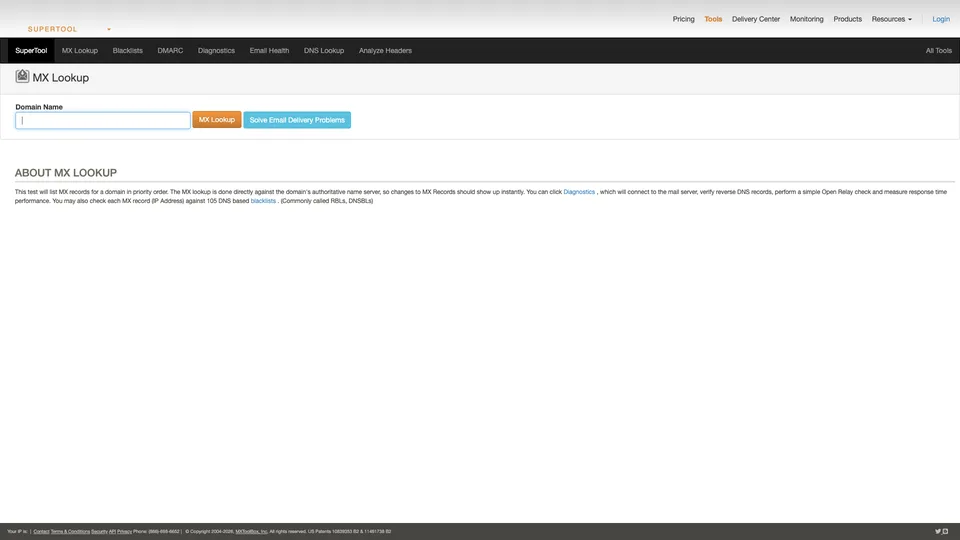
MxToolbox is a set of small online tools grouped under a single search bar, the “SuperTool.” You enter a domain or an IP address, pick the test, and the answer shows up within seconds as a table, with a status for each item checked. The list is long: all kinds of DNS records (MX, A, TXT, PTR, CNAME, SOA), authentication rules (SPF, DKIM, DMARC, BIMI, MTA-STS), SMTP connection test on port 25, ping, traceroute, WHOIS or ASN lookup. The blacklist check runs an IP or a domain against more than a hundred public DNS-based lists, the ones spam filters consult. Finally, a header analyzer reconstructs the path of a received email and the delays between each server.
The difference with Mail-tester comes down to method. Mail-tester judges a real message that you send it: it sees the email as it leaves your tool, content included, and sums it up in a score. MxToolbox doesn’t wait for anything to be sent: it queries a domain’s public records and a server’s status, which lets you pinpoint the faulty record, check the setup of a domain that isn’t yours or test a receiving server. Beyond one-off tests, the company sells subscriptions under the Delivery Center name: continuous blacklist monitoring, DMARC report analysis, inbox placement tests with the major providers, and tracking of complaints and message delivery times.
Behind the site is MxToolbox, Inc., a company based in Austin, Texas. The domain was registered in 2004 by a company then called eTools Group, which took the name of its flagship product in 2006. In late 2015, the business was acquired by j2 Global, a US online services group renamed Ziff Davis in 2021. The company claims more than twenty years in business, users in more than 120 countries and two US patents related to DMARC.
MxToolbox at a glance
- Type
- Online diagnostic tools and monitoring subscriptions
- Founded
- 2004
- Company
- MxToolbox, Inc. (formerly eTools Group)
- Origin
- United States
- Headquarters
- Austin, Texas
- Acquisition
- By j2 Global, late 2015
- Blacklists checked
- More than 100
- Free plan
- Tests with no account, 1 domain monitored weekly
- Starting price
- $129/month (Delivery Center)
What is MxToolbox used for?
-
Find out if your IP is blacklisted
an address or a domain is checked against more than a hundred public lists, with the name of each list that flags you.
-
Read a domain’s DNS records
MX, A, TXT, PTR or CNAME, queried directly from the authoritative server so you can see a change without waiting.
-
Check SPF, DKIM and DMARC
each record is read, broken down and explained, with syntax errors and exceeded limits.
-
Test a mail server
SMTP connection, response time, reverse DNS and open relay, for a server you are responsible for.
-
Trace an email’s journey
the header analyzer reconstructs the servers the message went through, the delays between them and the authentication results.
-
Get alerted when you’re blacklisted
free weekly monitoring for one domain, hourly or real-time with a subscription.
-
Make use of your DMARC reports
reports sent by mailbox providers are grouped by sender so you can gradually move to a reject policy.
-
Measure inbox placement
with Delivery Center, monthly tests show whether a campaign lands in the main inbox or in spam, notably at Google and Outlook.com.


MxToolbox review
Reference
When it comes to free tests, MxToolbox has no equally complete equivalent. When a message bounces or a customer complains about receiving nothing, you can check within a minute that the MX records point to the right place, that SPF stays under its limit of ten DNS lookups (quickly reached when you combine email hosting, an email marketing tool and a CRM), that the DKIM key is published and that the server’s IP hasn’t landed on a blacklist. All without an account, with results that are readable even for a non-specialist. It is the tool people who run email systems keep close at hand.
You still need to know what it doesn’t do. A green light means the record exists and is well formed, not that your emails will reach Gmail or Outlook, and the DKIM test requires knowing the selector in use, otherwise the key looks missing. Some results can also be misleading because of DNS caching right after a change. As for blacklists, MxToolbox checks them but doesn’t remove anyone: delisting requests go to each list operator. Not all lists carry the same weight, either. A listing on Spamhaus or Spamcop hurts deliverability, while other lists, which flag entire address ranges or charge for removal, have almost no effect. And the reputation Gmail or Outlook assigns to your domain doesn’t appear on any DNS list: you’ll find it in Google Postmaster Tools or Microsoft’s SNDS.
Compared with Mail-tester, the division of labor is fairly clear. Mail-tester gives an overall verdict on an email that was actually sent, content included; MxToolbox then lets you find the record or IP causing the problem, and monitor the situation over time. The two complement each other more than they replace each other.
The paid side calls for more caution. Delivery Center, starting at $129 a month, is aimed at companies that send a lot and want to track DMARC, their blacklists and their inbox placement in one place; for a small business, it is expensive. Subscriptions also have a reputation for being hard to cancel, so note the renewal date as soon as you sign up. One last detail: results pages are dotted with banners pushing the paid plans, which takes nothing away from the tests but makes them heavier to read.
Strengths
- Dozens of free DNS, SMTP and blacklist tests, with no sign-up.
- Direct reading of records, useful for pinpointing a configuration error.
- More than a hundred blacklists checked in a single lookup.
- A handy header analyzer for understanding where a message was delayed or rejected.
- Free monitoring for one domain, which works as an early warning.
Weaknesses
- A green light doesn’t guarantee inbox delivery.
- Possible false negatives, especially on DKIM without the right selector or right after a DNS change.
- Results pages cluttered with promotional banners.
- Expensive subscriptions for a small business, with no annual price listed.
- Paid plans known for being hard to cancel.
Is MxToolbox worth it?
Yes, if you manage a domain, a mail server or email for a few clients: its free tests are worth bookmarking, and the weekly monitoring that comes with a free account is often enough to get warned of a blacklisting. It makes the most sense after a first pass through Mail-tester, to dig into whatever lowered the score.
Not necessarily, if you only want to know whether a newsletter is set up correctly: Mail-tester answers faster with a single send. For the paid side, compare before you sign up. DMARC specialists such as dmarcian or EasyDMARC handle reports, GlockApps measures inbox placement, and Google Postmaster Tools, which is free, shows your domain’s reputation with Gmail.
How much does MxToolbox cost?
The site’s one-off tests are free and require no account. A free account adds monitoring for one domain, and two Delivery Center subscriptions, billed in dollars, bring together monitoring, DMARC and placement tests. Only monthly prices are listed.
| Plan | Per month | Included | Who it's for |
|---|---|---|---|
| Free | $0 | 1 domain, weekly monitoring of the top 30 blacklists | A small business that wants to be alerted |
| Delivery Center | $129 | 5 domains, 500,000 messages a month, 30 placement tests, DMARC, hourly monitoring | Companies sending in volume |
| Delivery Center Plus | $399 | 5 domains, 5 million messages a month, 100 placement tests, real-time monitoring, SPF Flattening | High-volume senders, complex environments |
Source: official MxToolbox pricing page, checked on October 31, 2026.
- Annual billing is offered at sign-up, but its price isn’t published.
- The company advertises a 30-day satisfaction guarantee on Delivery Center, without detailing its terms.
- Paid plans add API access, bulk lookups and support; a managed services offering, where the MxToolbox team takes charge of deliverability, is sold on a quote basis.
FAQ
Answers to questions about MxToolbox
Is MxToolbox free?
Yes for one-off tests (DNS, SPF, DKIM, DMARC, SMTP, blacklists, headers), with no account. A free account adds weekly monitoring for one domain. Delivery Center subscriptions start at $129 a month.
How do I check if my IP is blacklisted with MxToolbox?
Enter the sending server’s IP address, or the domain, in the Blacklist Check tool. It checks it against more than a hundred public lists and shows which ones flag it. Removal is then requested from each list involved, not from MxToolbox.
Do I have to choose between MxToolbox and Mail-tester?
No, they complement each other. Mail-tester scores an email that was actually sent, content included. MxToolbox queries DNS and servers directly, which helps you find the record or IP address at fault and then monitor it.
Why can’t MxToolbox find my DKIM key?
The DKIM test needs the selector chosen by your sending tool, a short label visible in message headers. Without it, the key looks missing. After a change, DNS caching can also delay the new value from showing up.
Information checked on October 31, 2026