
- Deliverability and diagnostics
Mail-tester: the go-to check for an email account’s setup
Reference
Mail-tester is the quick test almost everyone runs when setting up a new email account or configuring a new domain. You send a message to the address the site gives you and, within seconds, you get a score out of 10 along with a detailed report: domain authentication (SPF, DKIM, DMARC), sending server settings, blacklist status and content quality. Free for three tests a day with no sign-up, it is one of the reference tools for checking that an email isn’t at risk of ending up in spam.
What is Mail-tester?
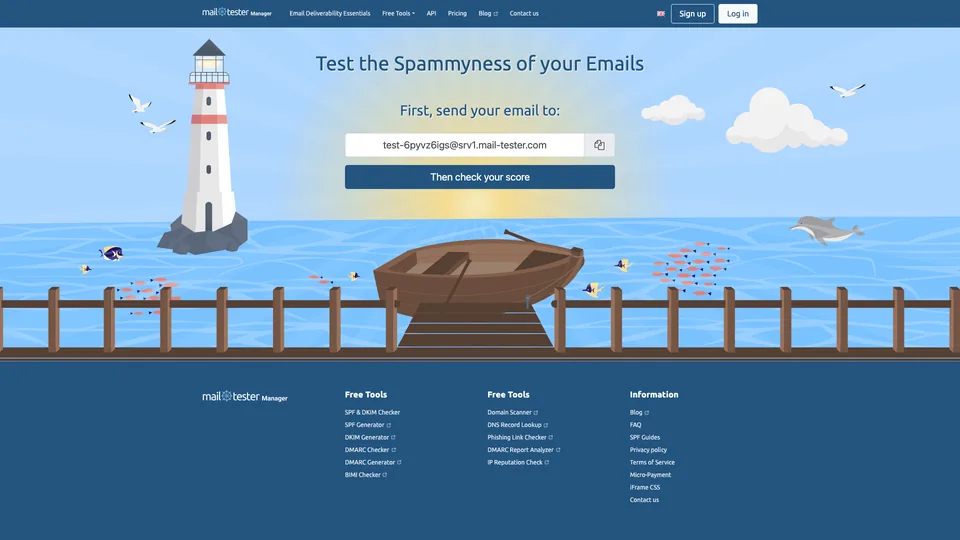
No account to create, nothing to install: Mail-tester runs entirely in the browser. On every visit, the homepage shows a unique email address, something like test-xxxxx@srv1.mail-tester.com. You send your message to it from the tool you normally use, whether a newsletter platform, outreach software or a plain email client, then click the button to check your score. A few seconds later, the report appears: a score out of 10, followed by a breakdown of what pulled it down.
At the heart of the analysis is SpamAssassin, a widely used open-source spam filter, installed without any special tuning, whose score is simply inverted so that 10 is the best result. On top of that come the checks that mailbox providers run when a message arrives: the SPF, DKIM and DMARC records of the sending domain, the server’s reverse DNS, whether its IP address appears on public blacklists, plus checks on the HTML code, the text-to-image ratio and broken links.
The tool was born in 2012 within the team behind MailPoet, the WordPress newsletter plugin founded in France in 2011 and acquired by Automattic, the parent company of WordPress.com, in December 2020. Its creators first wanted a simple, inexpensive way to test their own emails; the site then took on a life of its own and became second nature for developers and mail server administrators. According to its terms of service, it is now operated by Mail Tester LLC, a company registered in Delaware, in the United States.
Mail-tester at a glance
- Type
- Online tool, nothing to install
- Founded
- 2012
- Created by
- The MailPoet team (WordPress newsletters)
- Origin
- France
- Current operator
- Mail Tester LLC, Dover (Delaware, United States)
- Analysis engine
- SpamAssassin, open-source filter
- Free plan
- Yes, 3 tests every 24 hours
- Starting price
- $10/month, plus tax (50 tests)
What is Mail-tester used for?
-
Measure your spam score
a score out of 10 calculated by SpamAssassin, with the list of rules triggered and pointers for fixing each one.
-
Check SPF, DKIM and DMARC
the three DNS records that prove to mailbox providers that the sender is authorized: SPF lists the servers allowed to send for your domain, DKIM signs each message, and DMARC says what to do when either one fails.
-
Check your sending server
reverse DNS, IP address and configuration of the server that actually sends the message.
-
Spot a blacklisting
whether your server appears on the main public blacklists, the ones spam filters look up.
-
Analyze the message content
HTML code, discouraged tags, image alt attributes and the text-to-image ratio.
-
Detect broken links
every link in the message is followed, and the ones that don’t respond are flagged.
-
Build the test into your tools
with a paid account, a JSON API and an embeddable frame (iframe) to display the results in your own software.


Mail-tester review
Reference
As a first check, Mail-tester does the job perfectly. In a minute, with no account, it tells you whether SPF, DKIM and DMARC are in place, whether the server is properly set up and whether it has landed on a blacklist, each time with a pointer for fixing it. Before you email your customers from a new address, it’s hard to find anything simpler.
You just need to know how to read the score. A 10/10 shows that the technical setup is sound, not that your emails are guaranteed to reach the inbox: Gmail, Outlook and Yahoo apply their own filters, which take into account the sender’s reputation and how recipients react. The tool also says nothing about the quality of your contact list or your domain’s history. For an important send, a campaign or a sales follow-up, it’s best to add an inbox placement test on real mailboxes.
A tip to avoid needless alarm: send a real campaign to the test address, not the “test email” offered by your newsletter tool. Those test sends often go through a different route, without an unsubscribe link or a List-Unsubscribe header, and a message that just says “test” loses points on content. The report then reflects flaws your subscribers will never see.
So it is a simple, effective tool whose free version is enough for the vast majority of users: three tests a day is plenty to validate a setup or a newsletter. The paid plans are aimed mainly at agencies and software companies that want to build the test into their own tools.
Two precautions, though. Reports can be viewed by anyone who knows the test address, so don’t send confidential data to it. And purchases are never refunded.
Strengths
- Free and instant: no account, no installation, a report in seconds.
- A complete technical diagnosis: SPF, DKIM, DMARC, reverse DNS, blacklists and content in a single report.
- An explanation for every point lost, useful even if you’re not a specialist.
- Works with any sending tool, since all you do is send an email.
- An API and an embeddable frame for agencies and software companies.
Weaknesses
- A score built on SpamAssassin and a few technical checks: it reflects neither the filters of Gmail, Outlook or Yahoo nor the sender’s reputation.
- No real inbox placement test and no tracking over time.
- Results that sometimes vary from one test to the next for the same message.
- Reports visible to anyone who knows the test address, kept for only 7 days without an account.
- A service that has had outages, and purchases that can’t be refunded.
Is Mail-tester worth it?
Yes, if you have just created an email account, switched hosting providers or connected a newsletter tool to your domain: it’s the fastest way to check that everything is in order, and it’s free. Same reflex when your messages start landing in spam for no obvious reason.
Not necessarily, if you want to know where your campaigns actually land at Gmail, Outlook or Yahoo. You then need a placement test on real mailboxes, such as GlockApps or Mailreach, and an eye on your domain’s reputation with Google Postmaster Tools, which is free. A Mail-tester subscription only makes sense for testing at volume or building the service into a tool.
How much does Mail-tester cost?
Mail-tester stays free for occasional use: three tests every 24 hours, with no account. Beyond that, the service runs on a monthly subscription, billed in US dollars before tax, with a set number of tests included each month. Pay-per-test packs, left over from the old model, are still on sale but are being phased out.
| Plan | Per month | Tests included | Who it's for |
|---|---|---|---|
| Free | $0 | 3 every 24 hours | Checking your setup now and then |
| 50 tests | $10 | 50 a month | A single website, regular tests |
| 500 tests | $25 | 500 a month | Small agency, several domains |
| 2,000 tests | $80 | 2,000 a month | Agencies, API integration |
| 7,500 tests | $250 | 7,500 a month | Software companies, white label |
Source: official Mail-tester pricing page, checked on October 31, 2026.
- Pay-per-test packs range from $5 for 10 tests to $700 for 15,000 tests.
- Tests not used during the month are lost, and no purchase is refunded.
- An account, even a paid one, also lets you keep your results for 30 days instead of 7, remove ads from reports and access the API.
FAQ
Answers to questions about Mail-tester
Is Mail-tester free?
Yes, for three tests every 24 hours, with no account required. Beyond that, you need a monthly subscription starting at $10, plus tax, for 50 tests.
Does a 10/10 score guarantee my emails will reach the inbox?
No. The score comes from SpamAssassin, an open-source filter, while Gmail, Outlook and Yahoo use their own, which take into account the sender’s reputation and how recipients react. A good score shows that the technical setup is sound, nothing more.
Who is behind Mail-tester?
The tool was created in 2012 by the team behind MailPoet, the WordPress newsletter plugin. It is now operated by Mail Tester LLC, a company registered in Delaware, in the United States.
Do my test emails stay private?
Not really: the report can be viewed by anyone who knows the test address, for 7 days without an account and 30 days with one. It’s best to send only messages with no confidential information.
How do I improve my Mail-tester score?
Follow the order of the points lost in the report: publish or fix the domain’s SPF, DKIM and DMARC records, check the sending server’s reverse DNS, get your IP address removed from any blacklists flagged, then lighten the message (fewer images relative to text, working links, clean HTML).
Information checked on October 31, 2026