
- Deliverability and diagnostics
GlockApps: find out where your emails really land
Good tool
A perfectly configured message can still end up in Gmail’s Promotions tab or in Outlook’s junk folder. GlockApps lets you check before you hit send: you add a list of seed mailboxes, set up at Gmail, Outlook, Yahoo and about twenty other providers, to your campaign, and the report tells you, for each one, whether the message reached the inbox, a tab, spam or nowhere at all. Its name comes up again and again whenever inbox placement testing is discussed, among newsletter senders and outbound sales teams alike.
What is GlockApps?
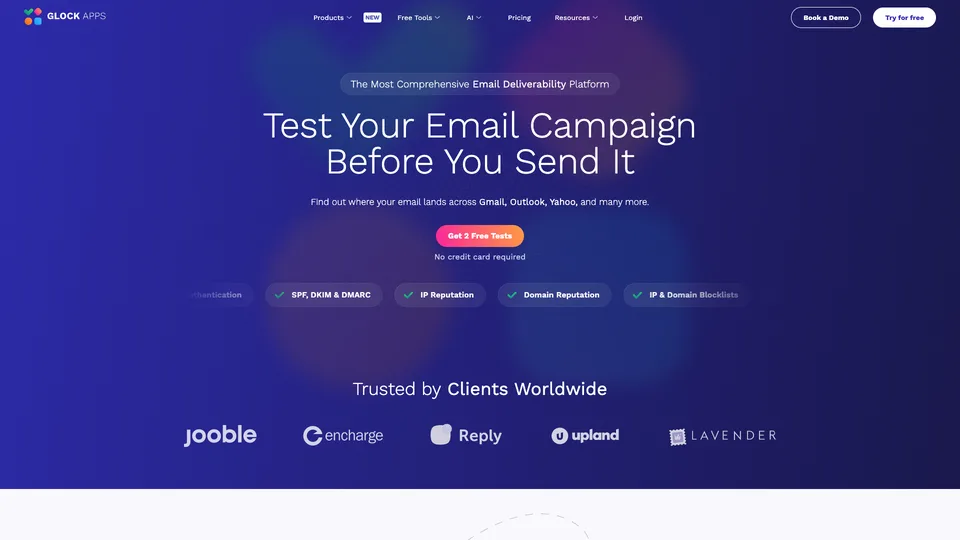
To run a test from the web app, GlockApps gives you its list of test mailboxes (the seed list), which you add to your campaign’s recipients in your usual sending tool, or a single address that forwards the message to all of those mailboxes. The software then logs into each of them and records where the message was filed: inbox, tab, spam folder or missing. The report also runs the message through five spam filters used by businesses, including SpamAssassin, Barracuda, Proofpoint and Microsoft 365’s protection, checks the domain’s authentication (SPF, DKIM, DMARC), the server’s reverse DNS and whether the IP address and domain appear on more than fifty blocklists, then analyzes the HTML code, links and images.
The seed mailboxes are deliberately “cold”: they never open or click anything, and they keep each provider’s default settings. Around this test, called Inbox Insight, GlockApps has added DMARC report analysis, IP reputation monitoring, access to Google Postmaster Tools data, an API and, more recently, an MCP server that lets you run a test from Claude or ChatGPT.
The service comes from G-Lock Software, the developer of EasyMail7, an email marketing program for Windows, which says it has more than fifteen years of experience building email tools. According to its LinkedIn page, the company was founded in 2009 and lists its headquarters in Pinedale, Wyoming, with offices in Amsterdam and Tbilisi. The site is now operated by Deluxe Custom Apps LLC, the US licensee of the GlockApps software.
GlockApps at a glance
- Type
- Online software (SaaS)
- Original developer
- G-Lock Software (EasyMail7)
- Developer founded
- 2009
- Headquarters
- Pinedale, Wyoming, United States
- Operator
- Deluxe Custom Apps LLC
- Mailbox providers tested
- Gmail, Outlook, Yahoo and about twenty others
- Free plan
- 2 placement tests, DMARC reports
- Starting price
- $85/month before tax, $59 billed yearly
What is GlockApps used for?
-
See where your campaign lands
inbox, tab, spam or lost message, provider by provider, based on real seed mailboxes.
-
Get past business spam filters
the verdict from SpamAssassin, Barracuda, Proofpoint and Microsoft’s and Google’s filters, with an analysis of your message content.
-
Check SPF, DKIM and DMARC
your domain’s signature and alignment, verified on the message you actually sent.
-
Watch your blocklist status
your IP address and domain checked against more than fifty lists, then monitored continuously by the reputation monitor.
-
Read your DMARC reports
the reports sent by mailbox providers, formatted so you can spot who sends on behalf of your domain and what fails.
-
Schedule automatic tests
a test run at regular intervals, with an alert as soon as your inbox placement slips.
-
Connect your own tools
an API to automate tests, and an MCP server to run and read them from an AI assistant.


GlockApps review
Good tool
GlockApps shows you the result rather than a prediction, and that is what makes it valuable. Seeing at a glance that your campaign gets through at Gmail but goes to spam at Outlook, or that a filter like Barracuda blocks it, changes how you look for the problem. If you email businesses, this view of corporate filters is especially useful, because that is where outreach messages most often disappear without a trace. The report adds authentication, blocklists and content: everything you need to go from spotting the issue to fixing it.
That result should be read with some perspective. Seed mailboxes never react to messages, whereas Gmail and Outlook also sort mail based on what real recipients do: a loyal subscriber may get in the inbox what the seed mailbox files as spam, and vice versa. Results also shift from one test to the next, and sending the same message again a few minutes later is enough to drag them down. This score points to a direction to watch from test to test; it doesn’t tell you exactly what happens in each of your customers’ inboxes.
Price does the rest of the sorting. At $85 a month for 30 tests, or $59 when you pay yearly, GlockApps is aimed mainly at agencies, sending platforms and teams that send a lot and need to monitor several domains. A small business that sends one newsletter a month will be better off with a pack of one-off tests when a problem shows up. One last thing to watch: the subscription renews automatically, and unused credits expire at the end of each month.
Strengths
- A real placement test, on real mailboxes, with details by provider and by tab.
- Business spam filters tested separately, which is valuable for B2B outreach.
- A complete report: authentication, blocklists, content and filters on a single page.
- Scheduled tests with alerts, to catch a drop before it costs you a campaign.
- DMARC reports and reputation monitoring included in the same plans.
Weaknesses
- Seed mailboxes with no history or engagement, which don’t reflect how your real subscribers behave.
- Results that vary from test to test, and get worse if you resend the same message too quickly.
- A high cost for occasional senders, and only two placement tests in the free version.
- Credits lost at the end of the month and a subscription that renews automatically.
- An offering split into several building blocks (tests, DMARC, monitoring), which makes the pricing page crowded.
Is GlockApps worth it?
Yes, if you regularly send campaigns or outreach sequences and your setup is already sound: once SPF, DKIM and DMARC have passed a free test such as Mail-tester, GlockApps takes over to show where your messages actually land, provider by provider. It is also the right tool for understanding a sudden drop in open rates, or for an agency that needs to monitor several clients’ domains.
Not necessarily, if you send little, or only want to know whether your domain is set up correctly: a free spam test is enough for that, and you can track your domain’s reputation at Gmail for free in Google Postmaster Tools, just as you can track your IP addresses at Outlook in SNDS, Microsoft’s free service. For a one-off check, a pack of a few tests costs less than a subscription.
As for alternatives, Mailreach also offers placement tests on seed mailboxes, on top of its main feature, warming up outreach mailboxes; Litmus and Email on Acid add a preview of how the email renders in each provider; Validity Everest remains the reference for large senders, at a much higher price. Mail-tester, for its part, is still the first free check of your setup.
How much does GlockApps cost?
GlockApps publishes its prices in dollars, before tax, with three paid plans that bundle placement tests, DMARC reports and reputation monitoring. Paying yearly cuts the bill by about 30%, and the free account lets you run two tests to get a feel for it.
| Plan | Per month | Per month, billed yearly | Placement tests | Who it's for |
|---|---|---|---|---|
| Free | $0 | — | 2 tests to try it out | Discovering the report, tracking your DMARC reports |
| Essential | $85 | $59 | 30 a month | A regular sender, single user |
| Growth | $142 | $99 | 90 a month | Small businesses and outbound teams, up to 5 users |
| Enterprise | $185 | $129 | 150 a month | Agencies and high volumes, up to 10 users |
| Custom | Custom pricing | To be defined | Very large senders, specific needs | |
Source: official GlockApps pricing page, checked on October 31, 2026.
- On yearly billing, plans are paid upfront: $708, $1,188 and $1,548, with the monthly credits multiplied by twelve.
- Without a subscription, test packs are sold separately: $16.99 for 3 tests (valid for one month), $47.99 for 10 and $75.99 for 20.
- Each test uses one credit, including automatic tests. Unused credits don’t roll over and are lost when you cancel.
- The free account also includes 10,000 DMARC messages analyzed per month and a 14-day trial of reputation monitoring.
- Until November 3, 2026, a Halloween offer included 100 tests a year for $149 and 250 tests for $299.
FAQ
Answers to questions about GlockApps
Is GlockApps free?
Partly. The free account gives you two placement tests to try it out, plus analysis of 10,000 DMARC messages a month. To test more, you need a subscription, starting at $85 a month before tax, or a test pack starting at $16.99.
What is the difference between GlockApps and Mail-tester?
Mail-tester checks a message’s technical setup and gives it a score, without telling you where it lands. GlockApps sends the message to real mailboxes at Gmail, Outlook, Yahoo and other providers, and tells you whether it lands in the inbox, a tab or spam. The two complement each other.
Are GlockApps results reliable?
They are real, but they only apply to the seed mailboxes. Those mailboxes never interact with messages, whereas mailbox providers take your real recipients’ behavior into account. It is better to follow the trend over several tests, spaced at least fifteen minutes apart, than to rely on a single result.
Can you buy tests without a subscription?
Yes. GlockApps sells packs of 3, 10 or 20 tests, valid for one to three months, priced from $16.99 to $75.99.
Information checked on October 31, 2026