
- Web technical
- DNS and domains
IntoDNS: a free health check for a domain’s DNS servers
Good tool
A domain that stops responding after a hosting move, name servers incorrectly registered with the registry, an SOA record dragging along values from another era: IntoDNS lets you spot all of this at a glance. You type in a domain name, and in a fraction of a second the site returns a report of more than forty tests, from delegation at the registry to the mail servers, each with a status indicator and an explanation that points to the RFCs. Completely free and with no signup, it remains in the toolkit of many system administrators and hosting providers, alongside MxToolbox and DNSChecker.
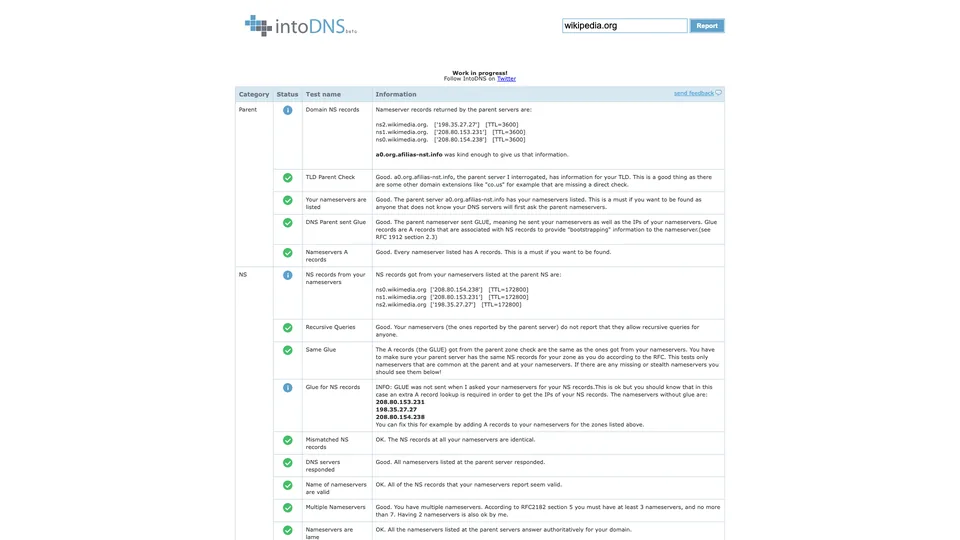
What is IntoDNS?
One box, one “Report” button, and you’re done: IntoDNS queries the parent domain’s servers (for example, those for .com), then the domain’s own name servers, and compares their answers. The report is organized into five categories. “Parent” checks that the name servers are properly registered with the registry, along with their addresses (the glue). “NS” checks consistency between those servers: identical answers, servers that don’t respond or aren’t authoritative, open recursion, TCP connections, and distribution across separate networks to avoid a single point of failure. “SOA” reviews the serial number and the refresh, retry and expire times, compared with RFC recommendations. Next come the MX records, their validity and their reverse DNS, then the address of the www subdomain. Each report has its own URL, such as intodns.com/yourdomain.com, which is easy to share.
That is where the scope ends. Despite the “mail servers report” label, IntoDNS does not read SPF, DKIM or DMARC records, does not check DNSSEC, does not query any blocklist and does not connect to the SMTP server: on the email side, it is limited to MX records and how they resolve. The site still displays a “Work in progress” notice and the word “beta” in its logo.
The tool went live in 2007, built by Elvsoft, a company based in Cluj-Napoca, Romania, which first developed it for its own needs as a hosting provider before making it public to show customers their configuration errors. Elvsoft has been called Hosterion since November 2016 and sells web hosting and virtual private servers, under its own brand and under IntoVPS. IntoDNS, for its part, has stayed free: the publisher describes it as a passion project and says it checks more than 1.2 million domains every month.
IntoDNS at a glance
- Type
- Online DNS report, no account
- Launched
- 2007
- Publisher
- Hosterion SRL (Elvsoft until 2016)
- Origin
- Romania
- Headquarters
- Cluj-Napoca
- Domains checked
- More than 1.2 million a month, according to the publisher
- Email checks
- MX and reverse DNS, no SPF, DKIM or DMARC
- Free plan
- Yes, the whole tool
- Starting price
- Free
What is IntoDNS used for?
-
Check your domain’s delegation
the name servers registered with the registry, their addresses and whether they match the ones your zone publishes.
-
Spot a faulty name server
a server that doesn’t respond, isn’t authoritative, accepts recursive queries from anyone or refuses TCP gets flagged.
-
Check the SOA record
the same serial number on every server, with refresh and expire times compared against RFC recommendations.
-
Review your MX records
valid names, public addresses, no CNAMEs, duplicates and reverse DNS for your mail servers.
-
Confirm a hosting move
after a migration or a change of DNS servers, one report is enough to see whether everything points to the right place.
-
Share a diagnosis
each report has its own URL, handy for showing an error to a client or a support team.


IntoDNS review
Good tool
Within the scope it covers, IntoDNS gets the job done without fuss. When a domain behaves strangely after a migration, it tells you in a second whether the name servers are properly registered with the registry, whether they all give the same answer and whether the SOA got lost along the way. Delegation errors, the kind that make a site unreachable for only some visitors, show up more clearly than in many newer tools. Free, no account, no ads for a paid plan: nothing gets in the way of reading the results.
The report is written by technicians for technicians. The explanations cite RFCs and talk about glue, lame servers and stealth NS: a beginner webmaster will understand that something is wrong, but not always how to fix it. Some warnings are also stricter than they need to be: the expected values for the SOA and the number of name servers come from a 1996 RFC, and the major DNS providers, from Cloudflare to OVHcloud, deliberately depart from them with settings their customers can’t change anyway. An orange warning on those lines can safely be ignored.
Above all, the tool has not kept up with how DNS has evolved. SPF, DKIM and DMARC, now essential for an email to be accepted by Gmail or Outlook, appear nowhere, and neither does DNSSEC. In our tests, a “null” MX, the standard way of stating that a domain does not receive mail, was even flagged as an error. An all-green report therefore tells you that the zone is served correctly, not that the domain’s email is properly configured.
A first-rate first diagnosis for name servers and delegation, worth bookmarking, and to be supplemented as soon as email is involved.
Strengths
- Free, no account, and a complete report in under a second.
- A very detailed check of delegation and consistency between name servers.
- A status and an explanation for each test, with a reference to the relevant RFC.
- A clean report, with no ads and no paid plan to dodge.
- A direct URL for each domain, easy to share.
Weaknesses
- No checks for SPF, DKIM, DMARC or DNSSEC.
- On the email side, no SMTP test and no blocklist check.
- Technical explanations that are hard going for non-specialists.
- A few warnings that are too strict or outdated, such as treating a null MX as an error.
- No history, no monitoring, no alerts: each report is a one-off.
Is IntoDNS worth it?
Yes, if you are changing registrars, hosting providers or DNS providers, or a domain has become unreachable for no obvious reason: it is one of the fastest ways to check delegation and name servers. Hosting providers and administrators who manage their clients’ zones will also find it a report that is easy to pass along.
Not necessarily, if your problem is with email: MxToolbox reads SPF, DKIM and DMARC and checks blocklists, and Mail-tester assesses a message that has actually been sent. To follow how a change propagates around the world, DNSChecker is a better fit, and to visualize the DNSSEC chain, the free DNSViz is the reference. Finally, Zonemaster, the open-source tool from the French and Swedish registries, offers a more up-to-date zone audit in a similar spirit.
How much does IntoDNS cost?
IntoDNS is free, with no account, no stated limit and no paid plan. The publisher funds it through its hosting business and offers no add-ons to buy.
| Plan | Per month | Access | Who it's for |
|---|---|---|---|
| Free | $0 | Full report, no account | Webmasters, administrators, hosting providers |
Source: official IntoDNS pricing information, checked on October 31, 2026.
- IntoDNS has no pricing page: its publisher, Hosterion, states that it is free on the IntoVPS about page.
- No public API or monitoring plan is offered.
FAQ
Answers to questions about IntoDNS
Is IntoDNS free?
Yes, completely. There is no account to create and no paid plan: you enter a domain and the report appears.
Does IntoDNS check SPF, DKIM and DMARC?
No. On the email side, it only checks MX records, their addresses and their reverse DNS. For SPF, DKIM and DMARC, you need a tool such as MxToolbox or Mail-tester.
What does “Your nameservers are listed” mean in the report?
It means your domain’s name servers are properly registered with the registry for its extension (.com, .org and so on). If this test fails, visitors can’t find the domain, whatever your zone contains. The fix is then made in your registrar’s dashboard, where name servers are declared, not in the DNS zone itself: this is the classic mistake after a migration, when the zone has been recreated at the new host but the domain still points to the old servers.
Who is behind IntoDNS?
Hosterion, a hosting provider based in Cluj-Napoca, Romania, which was called Elvsoft until 2016. The tool went live in 2007, initially for the company’s own needs.
What is the difference between IntoDNS and IntoDNS.ai?
They are two unrelated tools. IntoDNS.ai is a separate, more recent service that also checks email authentication and DNSSEC. The report described here is the one on intodns.com.
Information checked on October 31, 2026