
- Web technical
- DNS and domains
DNSChecker: confirm a DNS change has propagated around the world
Reference
After switching hosts, pointing a domain somewhere new or editing an MX record, the site often shows up for only some of your visitors. DNSChecker shows how far propagation has gone by querying more than a hundred public DNS servers around the world at the same time, then displaying on a map and in a list what each one returns. Free and with no sign-up, it is one of the sites webmasters, hosting providers and network administrators reach for first during a migration, alongside a set of DNS lookup and network tools.
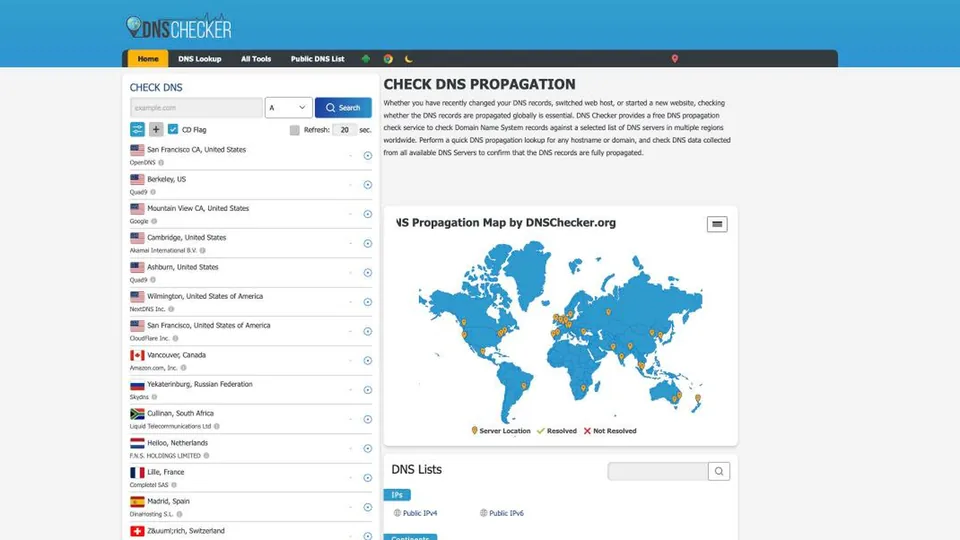
What is DNSChecker?
Everything starts with a search box. You type a domain name, pick the record type to check (A, AAAA, CNAME, MX, NS, TXT…) and DNSChecker sends the same query to more than a hundred public resolvers. Each row in the list shows a city, a country and the server’s operator, from OpenDNS to Quad9, Google, Cloudflare or Akamai, with the answer it gave and a green check or a red cross. The same results appear on a world map, so you can see at a glance which regions already see the new value. The page can refresh itself at regular intervals, which is handy for following a migration live, and an option asks the servers to skip DNSSEC validation (CD flag).
It’s worth being clear about what the tool measures. A public DNS server caches the answers it has already given for as long as the record’s TTL says; until that time runs out, it keeps serving the old value. DNSChecker therefore shows what people using those resolvers actually see, not what the domain’s authoritative server publishes. That is exactly what sets it apart from MxToolbox, which queries the authoritative server directly to confirm that a change has been recorded.
Around the propagation check, the site offers a standard DNS lookup, a list of public DNS servers by country, a display of the visitor’s IP address and a menu of other network tools, plus a Chrome extension and an Android app. The service is entirely free and funded by advertising, as its privacy policy states. It is operated by Softrix Technologies, according to the site’s content policy, which on the other hand publishes no company history or headquarters address.
DNSChecker at a glance
- Type
- Online DNS propagation checker and network tools
- Operator
- Softrix Technologies
- Servers queried
- More than 100 public resolvers
- Sign-up
- None
- Apps
- Chrome extension, Android app
- Business model
- Advertising
- Free plan
- The whole site
- Starting price
- Free
What is DNSChecker used for?
-
See whether a DNS change is visible everywhere
more than a hundred public resolvers answer at once, city by city, with the value they return.
-
Spot the regions lagging behind
the world map places each server and shows at a glance which ones still return the old answer, or none at all.
-
Check a specific record type
A, AAAA, CNAME, MX, NS or TXT, to confirm a new server address, a mail setup or a verification record.
-
Follow a migration live
the page refreshes automatically at the interval you choose, with no need to run the search again.
-
Find a public DNS server
the list of public resolvers, sorted by country, helps you choose a DNS or test from another region.
-
Find your public IP address
the home page shows it as soon as you arrive, useful before setting up a firewall or contacting support.


DNSChecker review
Reference
During a migration, DNSChecker is the tab you keep open. It answers quickly, with no account and no settings, the only question that matters at that point: is the new server already visible somewhere other than on my machine? The list of resolvers and the map make the answer easy to read even for someone who doesn’t work with DNS every day, which makes it a good link to send a client worried that their site isn’t showing up. For a free service, it’s hard to get simpler.
You still need to know how to read the result. A red cross or an old value doesn’t necessarily mean something is wrong: most of the time, the resolver in question is holding the answer in cache until the TTL expires, and there’s nothing to do but wait. Conversely, an all-green map only says that these public servers see the new value, not that every visitor’s internet provider has picked it up yet. Differences from one resolver to another are normal, and showing them is precisely what the tool is for.
Next to MxToolbox, the two play complementary roles. MxToolbox queries the authoritative server and confirms that a change has been recorded, with a full set of email diagnostics on top; DNSChecker takes over to tell you when that change is actually seen by users, region by region. The two sites often sit side by side in administrators’ bookmarks.
The price of free is advertising, very present around the results, and a site that says little about who runs it. Nothing that gets in the way of a one-off check, but it’s a far cry from a professional tool with alerts and history: each test is a snapshot in time that you have to run again.
Strengths
- More than a hundred public resolvers queried in a single search.
- A clear map and list, even if you don’t know DNS.
- Free, no sign-up, with automatic refresh.
- The main record types covered, from A to TXT.
- A Chrome extension and an Android app to run checks outside the site.
Weaknesses
- Results skewed by resolver caching, which you need to know how to interpret.
- No direct reading of the domain’s authoritative server.
- Pages heavily loaded with ads.
- A one-off check, with no history of results.
- Little published information about who runs the site.
Is DNSChecker worth it?
Yes, if you are changing hosts, mail servers or DNS providers, or launching a new domain: it’s the fastest way to see how far propagation has gone and to reassure a client who can’t see the new site yet. Free and with no account, there’s no reason to go without it.
Not necessarily, if you want to confirm that your DNS provider is actually publishing a record, or to troubleshoot email: MxToolbox reads the authoritative server and adds SPF, DKIM, DMARC and blacklist checks. For continuous monitoring with alerts, you need a dedicated monitoring service.
Alternatives: whatsmydns.net offers a very similar propagation check, the Google Admin Toolbox (Dig tool) queries servers from Google, and the dig and nslookup commands remain the standard for anyone working from the command line. To check the delegation and the name servers themselves, before you even start tracking propagation, IntoDNS rounds out the diagnosis.
How much does DNSChecker cost?
DNSChecker doesn’t sell any plan: all of its tools are available without an account, and the site pays for itself with the ads shown on its pages.
| Plan | Per month | Included | Who it's for |
|---|---|---|---|
| Free | $0 | Propagation check, DNS lookup, public DNS list and other network tools, no sign-up | Webmasters, hosting providers, network administrators |
Source: official DNSChecker privacy policy, which describes the service as free, checked on October 31, 2026.
- The site publishes no pricing page and offers no paid plan in its navigation.
- The ads shown may be targeted, according to the privacy policy.
FAQ
Answers to questions about DNSChecker
Is DNSChecker free?
Yes, completely, and with no sign-up. The site is funded by advertising and doesn’t offer a subscription.
Why do some servers still show the old value?
Each resolver keeps the answer in memory for as long as the record’s TTL. Until that time has passed, it serves the old value. Usually all you need to do is wait, then run the test again.
What’s the difference between DNSChecker and MxToolbox?
DNSChecker shows what more than a hundred public resolvers around the world return, in other words what users see. MxToolbox queries the domain’s authoritative server directly and adds many email tests. The first tracks propagation, the second checks the configuration.
Does an all-green map mean everyone sees the change?
Not quite. It means the public resolvers tested return the new value. The DNS servers of internet providers, not all of which are on the list, may keep serving the old one for a while.
Information checked on October 31, 2026