
- Website creation
- WordPress page builders
Divi: the all-in-one visual builder for WordPress sites
Good tool
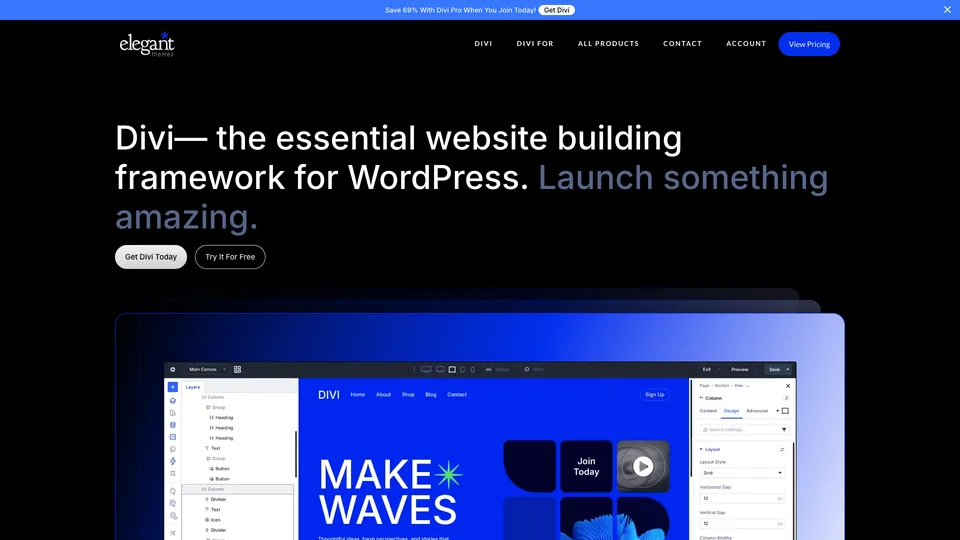
Divi turns WordPress into a design studio: you build your pages right on screen by dragging in blocks of text, images, forms or products, and adjust how they look on desktop, tablet and mobile from a settings panel. It ships with more than 2,000 ready-made layouts, according to its publisher, and works just as well for a business website as for a WooCommerce store. It is one of the best-known page builders in the WordPress world, widely used by freelancers and agencies.
What is Divi?
Divi is both a WordPress theme and a visual page builder. Once installed, it replaces the usual editor with an interface where you see the page exactly as it will appear: you stack sections, rows and modules, more than 200 of them according to the publisher, from a simple button to a product carousel, then adjust colors, spacing, fonts and animations in a side panel. The Theme Builder extends that work to the template of the whole site: header, footer, and templates for posts, categories or WooCommerce product pages.
Around the builder, Elegant Themes sells optional services. Divi AI writes copy and generates images, code or layouts, and its agent builds a site from a description. Divi Cloud stores your elements so you can reuse them from one site to the next, Divi Teams gives access to collaborators and Divi VIP guarantees priority support. Divi Dash, free for customers, lets you manage several sites from a single dashboard.
The company dates back to 2008, when Nick Roach, then a student, started selling WordPress themes. Elegant Themes now works fully remote, with a team spread across more than twenty countries. Divi arrived in 2013 and gradually took over its whole catalog. In February 2026, Divi 5 rebuilt the tool on a new technical foundation: content is no longer saved as shortcodes, the Divi-specific tags that made leaving it so painful, but in a lighter format inspired by WordPress blocks, which is still specific to Divi.
Divi at a glance
- Type
- WordPress theme and page builder
- Publisher
- Elegant Themes
- Founded
- 2008 for the publisher, 2013 for Divi
- Founder
- Nick Roach
- Company
- Remote team across 20+ countries
- Customers
- Nearly one million, according to the publisher
- Current version
- Divi 5, since February 2026
- Free plan
- No, 30-day money-back guarantee
- Starting price
- $89 a year, or $249 for life
What is Divi used for?
-
Build your pages on screen
A visual editor where you drag in sections and modules and see the result live, without code.
-
Start from a ready-made layout
More than 2,000 layouts supplied by the publisher, to adapt to your copy, photos and colors.
-
Design your site templates
The Theme Builder creates the templates shared across the whole site: header, footer, posts and categories.
-
Fine-tune the mobile view
Every setting can be adjusted by screen size, so the page stays readable on tablets and phones.
-
Design your online store
Dedicated WooCommerce modules for product pages, the cart and category pages.
-
Write and build with Divi AI
Copy, images, code and layouts generated on demand, as a paid add-on.
-
Keep track of all your client sites
Divi Dash brings your sites together in one dashboard, and Divi Cloud shares your elements between them.


Divi review
Good tool
For a long time, Divi was the bargain of the WordPress world: a lifetime license, unlimited sites and a builder complete enough to deliver a professional website without a developer. For a freelancer or an agency turning out client sites one after another, the math is still hard to beat, and the support team, available around the clock, has a good reputation.
Its flaws, on the other hand, are nothing new. Up to Divi 4, pages were saved in a Divi-specific format: deactivating the theme left pages full of unreadable tags, and switching tools meant rebuilding the site. Pages built with Divi are also heavier than those of a lean site, which costs you loading speed, and the feature-packed interface takes real time to learn. Divi 5 fixes some of these flaws, but upgrading from Divi 4 isn’t always painless, and some plugins have been slow to catch up.
There is also a deeper risk, one that weighs on every page builder. Their whole reason for being is to let someone who doesn’t code design a WordPress site. AI is shifting that need: you can now ask ChatGPT or Claude for the code of a page, or generate an entire site with Lovable, at the cost of leaving WordPress, its admin and its plugins behind, while the WordPress block editor improves with every release. WordPress itself is losing ground year after year, as measured by W3Techs, which shrinks the market for every page builder. Elegant Themes is now betting on Divi AI, but nothing guarantees that a paid builder will still be needed a few years from now, and a lifetime license is only worth something as long as the publisher keeps the tool alive.
Divi remains a good tool for anyone who builds WordPress sites in volume and knows its limits. For a single site, though, it is no longer the must-have it once was.
Strengths
- A lifetime license and unlimited sites, a rare value for agencies.
- A complete visual editor, with Theme Builder and WooCommerce modules.
- More than 2,000 ready-made layouts to get started fast.
- Support available around the clock, known for being responsive.
- Divi 5 drops shortcodes and modernizes the technical foundation.
Weaknesses
- No free version: you pay before you try, with 30 days to get a refund.
- Pages heavier than a lean site, at the expense of speed.
- A feature-packed interface that takes time to learn.
- Leaving Divi is still costly for sites built with Divi 4.
- A business model exposed to AI site building and the decline of WordPress.
- Prices listed in dollars only, with no detail on taxes.
Is Divi worth it?
Yes, if you are a freelancer or an agency delivering WordPress sites to clients: the lifetime license, unlimited sites, Divi Dash to keep track of them and the layout library save a lot of time. It is also a sensible choice if you want to design a WordPress site yourself without touching code, and you are ready to learn the tool.
Not necessarily, if you only have one site to build: the free WordPress block editor is often enough for a simple site, and an all-in-one website builder like Wix or Squarespace spares you the maintenance. If loading speed is a priority, a lightweight theme will do better. And if you are starting from scratch, look at AI website builders too, which produce a site without going through a page builder.
Elementor is the direct alternative: a free version to try it out and a much larger ecosystem, but an annual subscription priced by number of sites, with no lifetime license.
How much does Divi cost?
There is no free version of Divi: you use it with a license, annual or lifetime, valid for an unlimited number of sites. Elegant Themes publishes its prices in dollars only, without saying whether taxes are included. The lifetime license is a one-time payment; the Pro services (Divi AI, Cloud, VIP and Teams) remain subscriptions, bundled in Divi Pro or sold separately.
| Plan | Per month | Per month, billed yearly | Included | Who it's for |
|---|---|---|---|---|
| Divi | — | $7.42 | Divi, Divi Dash, updates and support, unlimited sites: $89 a year | Freelancers and small businesses on WordPress |
| Divi Pro | — | $23.08 | Divi, Divi AI, Divi Cloud, Divi VIP and Divi Teams (4 members): $277 a year | Agencies and teams |
| Divi Lifetime | — | — | Divi and Divi Dash for life: $249 one time | Freelancers and agencies who prefer a one-time purchase |
| Divi Lifetime + Pro | — | $17.67 | Lifetime license and Pro services: $297 the first year ($24.75 a month), then $212 a year ($17.67 a month) | Agencies that want the lifetime license and AI |
| Divi AI add-on | $21.36 | $16.08 | AI-generated copy, images, code and layouts | Anyone who wants AI without Divi Pro |
| Divi Cloud add-on | $8 | $6 | Store your elements and reuse them from one site to the next | Agencies |
| Divi VIP add-on | $8 | $6 | Priority support, response in under 30 minutes | Business-critical sites |
| Divi Teams add-on | $2 | $1.50 | Access for one collaborator, priced per member | Teams |
Source: official Divi pricing page, checked on November 1, 2026.
- Every plan comes with a 30-day refund, no questions asked.
- According to the publisher, Divi Pro also includes $60 a year in AI agent credit and a $50 credit on the Divi Marketplace.
- The pricing page regularly shows discounts, so the price you pay may vary depending on when you buy.
FAQ
Answers to questions about Divi
Is Divi free?
No. Divi is sold with an annual license ($89 a year) or a lifetime license ($249 one time), valid for an unlimited number of sites and refundable within 30 days. There is no free version.
Is Divi a theme or a plugin?
Both. Divi is sold as a WordPress theme with a built-in visual builder; the same builder also comes as a plugin, the Divi Builder, which works with another theme.
Is it easy to leave Divi?
Not always. Pages built with Divi 4 are saved in a Divi-specific format: if you switch tools, you have to rebuild them. Divi 5 saves content in a format inspired by WordPress blocks, cleaner and faster, but still specific to Divi: without the builder, the WordPress editor can’t display it. You are still tied to the tool, it is just less visible.
Divi or Elementor?
Elementor is better for a first try, thanks to its free version, and is far ahead in number of sites. Divi becomes the better deal for an agency juggling many projects, thanks to its lifetime license valid for an unlimited number of sites.
Should you upgrade to Divi 5?
Not in a rush. Divi 5 modernizes the technical foundation and drops shortcodes, but migrating from Divi 4 isn’t always painless: test it on a copy of your site and check that your third-party plugins are compatible before switching.
Does Divi have a future in the age of AI?
Like every page builder, it could lose some of its appeal if AI makes it possible to lay out a site without one. Elegant Themes is responding with Divi AI, an assistant and an agent that build pages from a description, sold as an add-on.
Information checked on November 1, 2026