
- Website creation
- No-code website builders
Canva Websites: a polished website in a few hours, without leaving Canva
Worth a look
In Canva, you put a website together the way you build a presentation: start from a template, drop in your text, photos and videos, then publish it to a web address in one click, with no hosting to manage. Canva Websites is mostly used for portfolios, event pages, online résumés and small brochure sites of one or a few pages. Included in every Canva plan, the free one too, it has earned a place among consumer website builders thanks to the huge user base of its parent app.
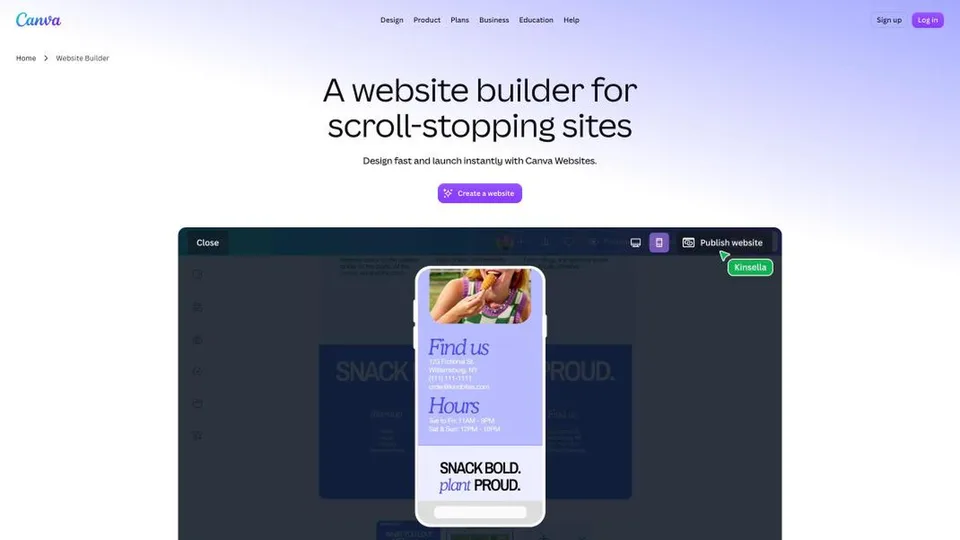
What is Canva Websites?
Canva Websites isn’t separate software. It is one design type among many in the Canva editor, just like a poster or a presentation. You pick a one-page or multi-page template, customize it with your mouse using the photos, illustrations, fonts and colors from the library, then publish. The site adapts to phone screens on its own. Canva’s AI tools generate images and copy, including the descriptions meant for search engines, and you can add forms, links to your social accounts or embedded content. Once live, the site is served over HTTPS, can be password-protected and comes with traffic stats, which are more detailed on a paid plan.
When it comes to the web address, there are three options. For free, the site is published on a subdomain such as name.my.canva.site, with up to five live sites. With Canva Pro or a higher plan, you can connect a domain you already own, or buy one directly in Canva, which resells domains from the registrar Tucows.
The website builder was unveiled in September 2022 at the first Canva Create conference in Sydney, as part of a suite of work tools that also included docs and whiteboards. At the time, it only produced one-page sites, generated from a design or a presentation; multi-page sites came later. Behind it is Canva, an Australian company founded in Perth in 2013 by Melanie Perkins, Cliff Obrecht and Cameron Adams, now based in Sydney and still privately held. At the end of 2025, it reported more than 265 million monthly active users, including more than 31 million paying subscribers, and $4 billion in annualized recurring revenue.
Canva Websites at a glance
- Type
- Website builder built into Canva, online
- Launched
- September 2022
- Publisher
- Canva, a privately held company
- Canva founders
- Melanie Perkins, Cliff Obrecht, Cameron Adams
- Origin
- Australia
- Headquarters
- Sydney
- Free plan
- Yes, 5 sites on a my.canva.site subdomain
- Custom domain
- From Canva Pro
- Starting price
- $18/month (Canva Pro)
What is Canva Websites used for?
-
Build your site with drag and drop
from a one-page or multi-page template, with Canva’s entire library of photos, videos and fonts.
-
Publish without a web host
for free on a my.canva.site subdomain, or on your own domain with a paid plan.
-
Generate copy and visuals with AI
images, text and page descriptions for search engines, within the credits of your plan.
-
Collect leads
with forms you insert into a page, for a sign-up, a quote request or feedback.
-
Track your traffic
how many views your site gets, then unique visitors and clicks on a paid plan.
-
Work as a team
in real time on the same site, with comments and, on team plans, shared brand kits.


Canva Websites review
Worth a look
Canva Websites shines where Canva already shines: visuals. For a landing page, a photographer’s portfolio or a wedding website, you get something attractive in a few hours, consistent with the rest of your materials, without ever wondering what a web host is. If your colors, logos and graphics already live in Canva, that is a strong argument.
Still, it is a layout tool that can publish, more than a full website builder. Navigation across several pages remains basic, there is no blog and no store, and the SEO settings are limited to the essentials. A site you want to grow on Google, update every month or use to sell will hit those limits quickly. The tool is improving, but it still trails specialists like Wix or Squarespace.
On price, everything depends on the address. The free version is fine for a page whose URL doesn’t matter much; as soon as you need your own domain, you have to pay for the full Pro subscription. That makes sense if you already use Canva for everything else, much less if you are only there for the website. One sore point remains, and it applies to Canva as a whole: support is hard to reach beyond the chatbot and canned replies, and billing disputes come up after a cancellation or a trial, so keep an eye on the end date of the free trial.
Strengths
- Instantly familiar to anyone who has already made a poster or a presentation in Canva.
- Polished templates and Canva’s whole library of visuals at your fingertips.
- Free publishing, with no web host to choose and HTTPS included.
- A site consistent with the brand’s other materials, thanks to shared brand kits.
- A custom domain included with Canva Pro, with no separate website subscription.
Weaknesses
- Navigation between pages is still basic, designed first and foremost for one-page sites.
- No built-in blog or online store.
- SEO settings limited to the essentials.
- A custom domain reserved for paid plans.
- Support that is hard to reach and billing disputes that affect Canva as a whole.
Is Canva Websites worth it?
Yes, if you need an attractive page online fast, whether a portfolio, a résumé, an announcement, a product launch or an event site, and you already work in Canva. Free on a my.canva.site address, nothing else takes you from a design to a published site in a few minutes; and if you already pay for Canva Pro, a custom domain costs you nothing beyond its registration.
Not necessarily, if your site needs to attract visitors from Google, publish articles or sell. Wix and Squarespace offer a real blog, a store and fuller SEO settings; for a cheap single page, Carrd does just as well for a few dollars a year; and for a site that will grow, WordPress remains the most flexible option. Paying for Canva Pro just to connect a domain gets expensive if you don’t use the rest of the suite.
How much does Canva Websites cost?
Canva has no “websites” plan: the website builder comes with each of the suite’s four plans, the free one included, and what changes from one plan to the next is mostly the site’s address and the extras around it. Published prices run from $18 a month for Pro, or $144 a year, to $25 per person per month for Pro+, or $250 per person per year. Enterprise is priced on request.
| Plan | Per month | Per month, billed yearly | For websites | Who it's for |
|---|---|---|---|---|
| Free | $0 | — | Up to 5 live sites on a my.canva.site subdomain, view stats, HTTPS | A page whose address doesn’t matter much |
| Pro | $18 | $12 | Connect an existing domain or buy one in Canva, detailed stats, premium templates and visuals | Freelancers and creators who want their own address |
| Pro+ | $25 | $20.83 | Everything in Pro, plus team tools, approvals and 100 brand kits, per person | Marketing teams and small businesses |
| Enterprise | Custom pricing | Internal sites behind single sign-on (SSO), security controls, access-controlled integrations | Large organizations, intranets | |
Source: official Canva pricing page, checked on October 31, 2026.
- Pro+ is billed per person: a team of three comes to $75 a month, or $750 a year.
- A free trial is available for Pro and Pro+, but not for Enterprise.
- A domain bought through Canva is billed on top of the subscription; its price depends on the extension you choose. It comes with domain locking and privacy protection for the owner’s contact details.
- Schools and recognized nonprofits can get most premium features for free.
FAQ
Answers to questions about Canva Websites
Is Canva Websites free?
Yes, for creating and publishing up to five sites on a subdomain such as name.my.canva.site. To use your own domain, you need at least Canva Pro, at $18 a month or $144 a year.
Can I connect my own domain to a Canva website?
Yes, with Canva Pro or a higher plan: you can connect a domain already registered elsewhere, or buy one directly in Canva, billed separately.
Can a Canva website rank well on Google?
It can be found, but it isn’t built for SEO. You can set the title and description of each page and the alt text of images, but text isn’t marked up as hierarchical headings (H1, H2) that Google can read, there are no redirects, no structured data and no blog for publishing regularly, and a one-page site packs all its topics into a single URL. For a site that needs to attract visitors from search engines, a builder like Wix or Squarespace, or WordPress, is a better fit.
Can I sell online with Canva Websites?
Not directly: Canva doesn’t offer a built-in store for its websites. At most, you can send visitors to a store hosted elsewhere, through a link or a button.
Information checked on October 31, 2026