
- Web technical
- Web performance
WebPageTest: the specialists’ tool for dissecting how a web page loads
Reference
Pick a city, a browser and a connection type, then watch a page load request by request: that is what WebPageTest offers. Each test produces a detailed waterfall of everything the browser downloads, a frame-by-frame filmstrip of the rendering, Core Web Vitals and a Lighthouse report, with suggestions for improvement. Web performance specialists have long relied on it to understand why a page is slow, where other tools stop at a score out of 100.
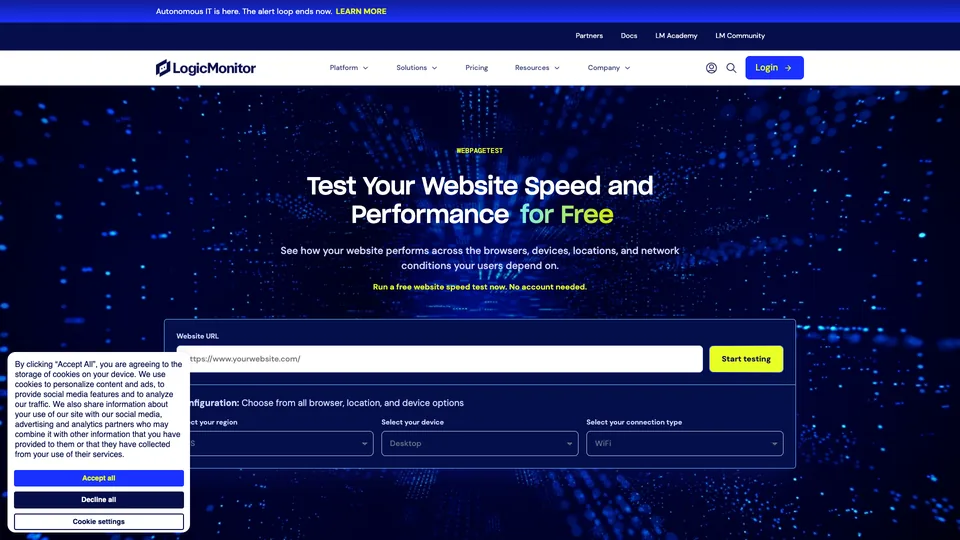
What is WebPageTest?
The page isn’t simulated: it is actually loaded by a browser installed on a test machine somewhere in the world. You choose the location (Paris, Frankfurt, London, Dulles, Tokyo, São Paulo…), the browser (Chrome, Firefox, Edge or Brave), the device type and the connection speed, from Wi-Fi to 3G. The test can be repeated several times, with a first view and then a repeat view with a primed cache, to measure what a returning visitor gains.
Results are read across several views. The waterfall lines up every file on a timeline, with DNS lookup, connection, server wait and download: it’s what shows that a third-party script is blocking rendering or that a font arrives too late. The filmstrip and the video show what the visitor actually sees, second by second, and let you compare two pages side by side. On top of that come the standard metrics (server response time, Speed Index, Core Web Vitals), a Lighthouse report, an estimate of the page’s carbon footprint and an “Opportunities” report that ranks possible improvements. Scripts let you test a multi-step journey, for example a page behind a login. The paid plan adds scheduled tests, alerts, the API and “Experiments”, which apply an optimization on the fly to measure its effect without touching the site.
WebPageTest was born at AOL, where Patrick Meenan built it for internal use before releasing it as open source in 2008. For years, the public service ran on machines hosted by its creator. In September 2020, Catchpoint, a New York–based monitoring company, bought the tool and its website, promising to keep a free service; the code, still publicly available, has since moved to a more restrictive license, Polyform Shield. Another change came in December 2025: Catchpoint was acquired by LogicMonitor, a California-based IT monitoring company, which now presents WebPageTest and its pricing on its own website.
WebPageTest at a glance
- Type
- Online tool and API
- Launched
- 2008, originally open source
- Creator
- Patrick Meenan, then at AOL
- Publisher
- Catchpoint (New York), since 2020
- Owner
- LogicMonitor, since December 2025
- Browsers
- Chrome, Firefox, Edge, Brave
- Test locations
- 30 on the free plan, more on Pro
- Free plan
- Yes, 150 page loads a month
- Starting price
- $15/month billed annually ($180/year)
What is WebPageTest used for?
-
Read the loading waterfall
every file on the page on a timeline, to spot the slow request, the blocking script or the unnecessary resource.
-
Watch the page render frame by frame
a filmstrip and a video of the load, and a side-by-side comparison of two pages or two versions.
-
Test under your visitors’ conditions
the location, browser, device and connection speed chosen to match your audience.
-
Measure your Core Web Vitals
LCP, CLS and server response time recorded on every test, in the lab: INP, which depends on real visitors’ interactions, isn’t included. A Lighthouse report comes on top.
-
Know what to fix first
the Opportunities report ranks possible improvements, and Experiments on the Pro plan measure their effect before you touch the site.
-
Monitor your pages over time
with a subscription, scheduled tests, alerts and dashboards to track how speed changes.
-
Automate your tests
an API, reserved for paid accounts, to run tests in bulk or from a deployment pipeline.


WebPageTest review
Reference
WebPageTest doesn’t settle for a score. When PageSpeed Insights says a page is slow, it’s the tool you open to understand why: the waterfall shows exactly which file is making the browser wait, the filmstrip what the visitor sees in the meantime. And because the test runs in a real browser, from the city and over the connection you choose, the measurements stay close to what a real user experiences. It’s a reliable tool that has been the authority among specialists for more than fifteen years.
That precision comes at a price: reading it. Speed Index, time to first byte, first and repeat views, dozens of rows in the waterfall… Without some technical background, you quickly get lost in the numbers, and the tool doesn’t always say clearly what to do. The Opportunities report helps, but WebPageTest remains first and foremost a tool for developers and performance engineers, not for the site owner who wants to know in two minutes whether everything is fine.
The free version is more than enough for a one-off diagnosis: 150 page loads a month, thirty test locations, the waterfall, the filmstrip and Lighthouse, without paying a cent. A subscription makes sense when you need to monitor pages over time, automate tests or work as a team. Watch the count, though: a test repeated three times with first and repeat views already uses six page loads.
A team that wants to automate without a subscription can also run its own instance: the code, still published, runs on your own server, with its API and no quota, at the cost of a machine to maintain.
One concern remains, and it has less to do with the technology than with where the tool is heading. Acquired twice in five years, WebPageTest has gradually been absorbed into monitoring platforms designed for large enterprises. Its new interface is less clear, some options are harder to find, and the open-source code has all but stopped evolving. The measurements themselves remain solid; it’s the “developer tool” spirit that has faded a little.
Strengths
- A loading waterfall and filmstrip of rare precision, even on the free plan.
- A choice of location, browser, device and connection speed.
- Measurements taken in a real browser, not just a simulation.
- A generous free plan for occasional use.
- Scripts to test a user journey or a page behind a login.
- A Pro plan that is affordable for small teams compared with monitoring services.
Weaknesses
- Results that can be baffling without a technical background.
- A redesigned, less clear interface where some options have become hard to find.
- An API reserved for subscribers, while PageSpeed Insights’ API is free.
- A page-load quota that runs out faster than you’d think.
- An uncertain future, after two acquisitions and open-source code that has almost stalled.
Is WebPageTest worth it?
Yes, if you are a developer, front-end engineer or technical SEO and need to understand what is slowing a page down, not just confirm that it’s slow. The free version is enough for most diagnoses; a subscription becomes worthwhile if you track the speed of several sites over time or want to build tests into your deployment pipeline.
Not necessarily, if you just want to know whether your site is fast enough. PageSpeed Insights, which is free, gives you the score and the Core Web Vitals Google measures from your real visitors, and the Google Search Console report tracks them across the whole site. GTmetrix also offers a waterfall and a choice of location, in a more approachable presentation. For continuous monitoring with history, services such as DebugBear or SpeedCurve are built for exactly that, and Lighthouse, built into Chrome, lets you test locally.
How much does WebPageTest cost?
One-off tests remain free, and the Starter plan, with nothing more than an account, gives you 150 page loads a month. Beyond that, the Pro subscription comes in four tiers by volume, payable monthly or yearly with a 20% discount. Prices are published in US dollars only.
| Plan | Per month | Per month, billed yearly | Page loads per month | Who it's for |
|---|---|---|---|---|
| Starter | $0 | — | 150, 3 per test, 30 locations | One-off diagnosis of a page |
| Pro 1,000 | $18.75 | $15 | 1,000 | Freelancer, a few sites tracked |
| Pro 5,000 | $87.50 | $70 | 5,000 | Small team, scheduled tests |
| Pro 10,000 | $168.75 | $135 | 10,000 | Agency, many sites |
| Pro 20,000 | $312.50 | $250 | 20,000 | Automated testing at scale |
Source: official WebPageTest pricing, checked on October 31, 2026.
- A page load is one view in a test: three runs with first and repeat views use six, and a Lighthouse report counts as one more.
- All Pro plans include scheduled tests, alerts, the API, private and bulk tests, Experiments, 13 months of history (60 days on the free plan) and up to five team members.
- There’s no free trial of Pro; payment by credit card only, cancel anytime, with access until the end of the paid period.
- Billing is in US dollars: banks outside the United States may charge currency conversion fees.
FAQ
Answers to questions about WebPageTest
Is WebPageTest free?
Yes, for occasional use. A quick test runs without an account, and the free Starter plan gives you 150 page loads a month, from 30 locations, with the waterfall, the filmstrip and Lighthouse. The Pro subscription starts at $15 a month billed annually.
What’s the difference between WebPageTest and PageSpeed Insights?
PageSpeed Insights sums up the page in a score and shows the Core Web Vitals Google collects from real users. WebPageTest loads the page in a real browser, from the location and over the connection you choose, and breaks down every request: it’s for understanding why a page is slow rather than grading it.
What is a “test run” on WebPageTest?
It’s a page load. A test repeated three times with first view only counts as three loads; with the repeat view, cache primed, it counts as six.
Who is behind WebPageTest?
The tool was created by Patrick Meenan at AOL and released as open source in 2008. Catchpoint bought it in 2020, and Catchpoint was itself acquired by LogicMonitor in December 2025.
Can I test a page that requires a login?
Yes, with scripts, which chain several steps before the measurement, such as filling in a login form. The free plan limits these scripts to three steps. It’s best to use a test account with no sensitive data.
Information checked on October 31, 2026