
- Website creation
- No-code website builders
Jimdo: the simple website builder for freelancers and small businesses
Worth a look
Putting a business website together in one evening, without touching a line of code: that is Jimdo’s home turf. You answer a few questions about your business, the AI assistant suggests a first version of the site, then you adjust text, photos and colors in an editor that is deliberately kept simple. Appointment booking, payment links, forms and legal texts round out the package, with hosting in Europe. Less famous than Wix or Squarespace, Jimdo is nonetheless one of the long-standing website builders on the market, firmly established in Germany and designed first and foremost for freelancers and very small businesses.
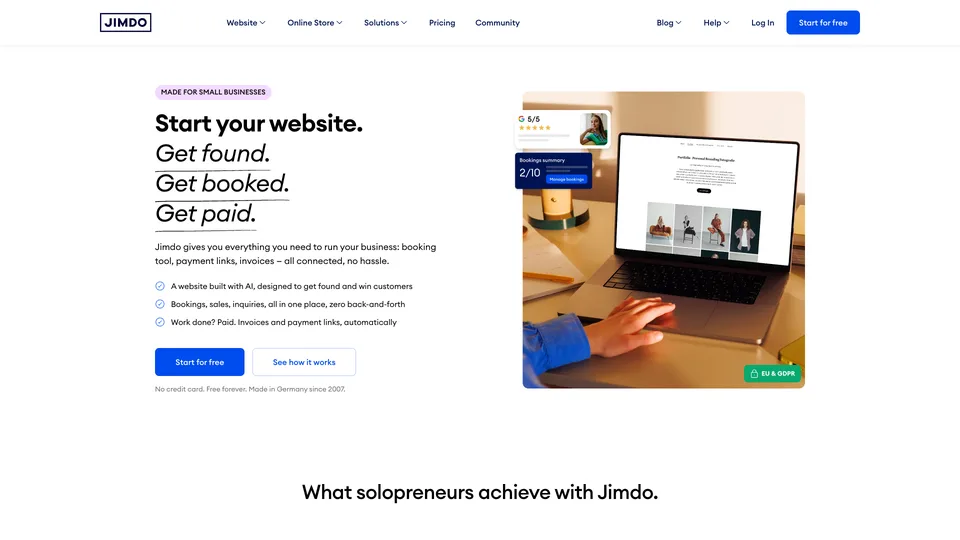
What is Jimdo?
Jimdo is an online website builder: everything happens in the browser, and hosting, the security certificate and the domain name are included in the subscription. Its main editor, the AI Builder (long called Dolphin), starts from a short questionnaire to generate the site structure, the first pages and a suggested layout. You then edit each section with the mouse, choosing from predefined blocks rather than placing elements freely down to the pixel: the result is clean and mobile-friendly, but room for customization stays within set limits. For those who want more freedom, Jimdo maintains a second, older editor, Creator, which accepts custom code.
Around the website, Jimdo has gradually added what it takes to run a small business: an appointment booking module, shareable payment links, smart forms, a presence on Google and social media with Jimdo Local and, in the “Legal” plans, legal texts that are generated and kept up to date. An online store is offered separately, with its own plans. Since November 2025, an assistant called Companion has also been suggesting priority actions to win customers, first in German-speaking countries, the United Kingdom, Ireland and the United States.
The company was born in Hamburg in February 2007, founded by Matthias Henze, Christian Springub and Fridtjof Detzner. It launched its online store in 2010, then Dolphin, its AI-assisted editor, in 2017. Still independent, it brought in the American fund Spectrum Equity in 2015, which invested €25 million for a minority stake. Jimdo now claims more than 32 million websites built with its tools.
Jimdo at a glance
- Type
- Online website builder (SaaS)
- Founded
- 2007
- Founders
- Matthias Henze, Christian Springub, Fridtjof Detzner
- Origin
- Germany
- Headquarters
- Hamburg
- Ownership
- Independent, bought back its investors’ stakes in 2024
- Websites created
- More than 32 million (according to Jimdo)
- Free plan
- Yes: 5 pages, .jimdosite.com address, ads
- Starting price
- Start plan, on a 12-month term
What is Jimdo used for?
-
Build your site with AI
a few questions about your business are enough to get a first version of the site, which you then refine block by block.
-
Take appointments
your customers book a time slot directly from the site, with optional online payment and no Jimdo commission on the booking.
-
Get paid
payment links to send by message or place on the site, included even in the free plan.
-
Sell online
a small store with a catalog, product variants and social selling, in dedicated plans.
-
Host your site and your domain
hosting in Europe, an HTTPS certificate and a domain name included in paid plans, with the option to connect your email address.
-
Publish your required legal pages
privacy policy, legal notice and cookie banner, with customized texts kept up to date in the Legal plans.
-
Get found near you
titles, descriptions and a sitemap submitted to Google in paid plans, plus Google or Facebook listings managed from Jimdo with the Jimdo Local service.


Jimdo review
Worth a look
Jimdo delivers on the essentials: a freelancer with no technical skills at all can publish a decent website in an hour or two and keep it up to date without help. The AI assistant saves time on the structure and the first drafts of copy, the editor leaves little room for mistakes, and you never have to worry about hosting or updates. For a coach, a tradesperson, a therapist or a photographer who mainly wants to be visible and take appointments, it is a tool that gets straight to the point.
That simplicity comes at a price. Layouts rely on fixed blocks, the templates can look a little tame next to Squarespace’s, and you quickly hit the limits as soon as you want a truly custom page, a substantial blog or advanced SEO: Jimdo covers the basics, nothing more. The store follows the same logic, fine for a few dozen products, not for a real online business.
Its German roots, on the other hand, count in its favor with small European businesses: hosting in the European Union, tools designed for the GDPR and generated legal texts, a selling point that few American competitors put forward as strongly.
The subscription itself calls for vigilance. The advertised prices assume a one-year or even a two-year commitment, monthly billing costs noticeably more, and the contract renews automatically. It is wise to note the renewal date and to settle what happens to the domain name and email addresses before leaving, two points that hold surprises for anyone who cancels in a hurry. Support, finally, is handled in writing, with response times that depend on the plan: don’t count on an immediate answer with the smaller plans.
Strengths
- One of the easiest builders on the market to pick up, with a first version of the site generated by AI.
- Bookings and payment links included, even in the free plan.
- Hosting in Europe and tools designed for the GDPR, with legal texts included in the Legal plans.
- Hosting, HTTPS and domain included: no technical maintenance to plan for.
- A free version with no time limit, to try things out or run a simple page.
Weaknesses
- A block-based layout that quickly becomes limiting for a custom site.
- SEO, blogging and store features that remain basic.
- A no-commitment monthly rate much higher than the advertised 12-month price.
- Automatic renewals and a cancellation process that call for vigilance.
- Written-only support, with response times that vary by plan.
- Domain and DNS management that is less flexible than at a regular registrar.
Is Jimdo worth it?
Yes, if you are a freelancer or run a very small business and want a clean introduction website, with appointment booking and payments, without spending too much time on it. The Start plan is enough for a personal site, Grow for a business that needs more pages and faster support. European hosting and the legal texts are a real plus if compliance worries you.
Not necessarily, if you want complete layout freedom or a site that is meant to grow: Wix and Squarespace offer more design latitude for a similar budget, and WordPress remains the most open choice for a blog or a content-rich site. For a store where selling is the core of the business, Shopify is better equipped. Finally, if your budget is tight, Hostinger’s website builder is worth comparing.
How much does Jimdo cost?
Jimdo displays its prices including tax, and the price highlighted on the official page assumes a 12-month commitment. Without commitment, on a monthly basis, the bill goes up by roughly half. The plans below cover the website; the online store has its own pricing.
| Plan | Per month | Per month, billed yearly | Included | Who it's for |
|---|---|---|---|---|
| Free | €0 | — | 5 pages, 5 GB, .jimdosite.com address, ads, bookings and payment links | Trying the tool or running a very simple page |
| Start | €18.15 | €12.10 | 10 pages, 30 GB, domain included, no ads, SEO settings and statistics, support within 1 to 2 business days | A personal site or a small business showcase |
| Grow | €29.24 | €20.17 | 50 pages, 50 GB, file uploads in forms, 5 email forwards, support within 24 hours | Freelancers and small businesses |
| Grow Legal | €41.34 | €29.25 | Grow, plus customized legal texts and alerts when the law changes | Those who want compliant legal pages without a lawyer |
| Unlimited | €74.63 | €50.42 | Unlimited pages, 500 GB, Bookings Essentials, support within 12 hours | Larger businesses, richer websites |
Source: official Jimdo pricing page, checked on October 31, 2026.
- A 24-month commitment lowers the monthly bill further, on every plan.
- The domain name is free for the first term of the contract, then renews with the subscription.
- The online store is paid separately, with three plans of its own (Basic, Business and VIP).
- There is no free trial of the paid plans, but there is a free plan with no time limit; consumers have a 14-day right of withdrawal where the law provides for it, businesses do not.
FAQ
Answers to questions about Jimdo
Is Jimdo free?
Yes, with the Free plan, with no time limit: 5 pages, a .jimdosite.com address and ads. For a domain in your own name and an ad-free site, you need to move up to Start, the first paid plan.
Can you pay for Jimdo monthly?
Yes, but it costs noticeably more: on Grow, the no-commitment monthly rate is about 45% higher than the monthly price on a 12-month term, and a 24-month term is cheaper still.
Is Jimdo good for SEO?
For the basics, yes: titles, descriptions and indexing can be set from the Start plan. It does not replace a more open tool such as WordPress for an ambitious content strategy.
Can you use a domain name you already own?
Yes, with a paid plan: you can either transfer the domain to Jimdo or leave it with your current registrar and simply connect it to the site. If you leave, it is best to settle what happens to the domain before the contract ends.
Information checked on October 31, 2026