
- Website creation
- No-code website builders
Google Sites: build a simple website or a team intranet for free
Good tool
A page for your nonprofit, an event website, a department intranet or a project portal: Google Sites lets you put that kind of site together in a few hours, without coding or paying for hosting. You build pages by drag and drop, drop in Google Drive files, a calendar or a YouTube video, then publish, for everyone or for just a few people. Included with every Google account and with Google Workspace, it is a very common choice for internal sites at teams, schools and small organizations, far more than for business websites.
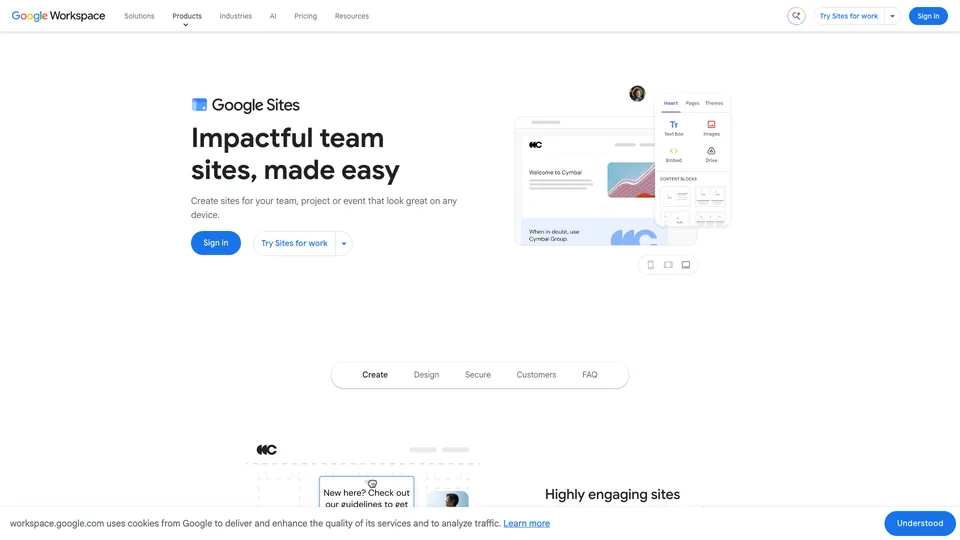
What is Google Sites?
Anyone who has used Google Docs will find their way around Google Sites right away. The editor opens in the browser, with three tabs on the right: Insert, Pages and Themes. You pick a template or a blank page, add text boxes, images and buttons, then content from Drive, Docs, Sheets, Slides, Forms, Calendar, Maps or YouTube, which updates on its own. A grid lines up elements automatically and adapts the page to mobile: it’s simple, but it’s also what limits your layout freedom. An “Embed” block accepts a URL or a snippet of code to display an outside service, but inside an isolated frame: no Tag Manager, ad pixel or cookie banner acting on the whole page, with Google Analytics as the only built-in measurement.
The site is shared like a Google doc: several people can edit it at the same time, and the published version can be public or limited to selected people, or, with a work account, to members of the organization. Google hosts it for free at a sites.google.com address, and it can be connected to a custom domain bought elsewhere, up to five per site, after verification in Search Console. Google Analytics is hooked up by pasting the property ID into the settings.
Google Sites grew out of the acquisition of JotSpot, a maker of business wikis founded by Joe Kraus and Graham Spencer, two of the founders of Excite, which Google bought in October 2006. The service opened on February 28, 2008. A completely rewritten version arrived in 2016, and the old one, known as “classic Sites”, was shut down in 2021, with mandatory migration. Google also publishes Blogger, its free blogging platform, which meets a different need: publishing articles, whereas Sites is for organizing pages.
Google Sites at a glance
- Type
- Online no-code website builder
- Launched
- February 28, 2008
- Origin
- JotSpot, acquired by Google in 2006
- Publisher
- Google (Alphabet)
- Headquarters
- Mountain View, California (United States)
- Current version
- Since 2016, classic Sites shut down in 2021
- Custom domain
- Yes, up to 5 per site
- Free plan
- Yes, with a Google account
- Starting price
- Free (Workspace billed per user per month)
What is Google Sites used for?
-
Build a site without code
pages assembled by drag and drop from templates, with a layout that adapts to mobile on its own.
-
Display your Google files
Docs, Sheets, Slides, Forms, Calendar or Maps drop in with one click and stay up to date on the site.
-
Work as a team
your colleagues edit the site at the same time as you, with the same sharing permissions as in Google Docs.
-
Publish without a web host
Google hosts the site for free, and it can be connected to your own domain name.
-
Measure your audience
by connecting the site to Google Analytics, simply with your property ID.


Google Sites review
Good tool
To judge Google Sites fairly, look at what it was designed for: the site of a team, a class or a nonprofit that you want online fast, with no budget and no one to look after hosting. In that role, it’s hard to beat. You get going in a few minutes, files already stored in Drive show up without any fiddling, and permissions work exactly as they do in Docs. For an intranet or a project portal limited to a handful of people, it’s one of the most practical options around.
As soon as the site needs to sell or be found, the limits show. The automatic grid guarantees clean pages, but they all look alike, and you quickly run into what it won’t let you do. SEO settings boil down to very little: the page title doubles as the title tag, there is no per-page meta description, no 301 redirect and no access to the code’s head section, and the URL structure is imposed (the sitemap, for its part, is generated automatically). There’s no real blog and no store either, and downloadable files, such as a PDF, have to go through Drive. You get a clean, maintenance-free site, but it will stay modest.
Price, on the other hand, is a non-issue: everything is free, custom domain included, as long as you buy that domain from a registrar. A Google Workspace subscription only makes sense if you want it for email and the office suite; it then adds company-wide site administration. One last thing to know: a sites.google.com address instinctively inspires trust, which scammers exploit to host fake login pages. For a public business website, a domain in your own name is the better choice.
Strengths
- Completely free, hosting included, with no charge to connect a custom domain (the domain itself is bought from a registrar).
- Instantly familiar for anyone who already uses Google Docs.
- Content from Drive, Docs, Sheets, Calendar or YouTube embeds in one click and stays up to date.
- Co-editing and fine-grained sharing permissions, down to a site limited to a few people.
- Pages that adapt to mobile on their own, with no setup.
Weaknesses
- A layout constrained by the grid, with little room for customization.
- Very few SEO settings.
- No online store and no real built-in blog.
- Downloadable files have to go through Google Drive.
- Limited integrations with services outside Google.
Is Google Sites worth it?
Yes, if you need an intranet, a team wiki, or a site for a class, an event or a small nonprofit, especially if your organization already works in Google Drive. Free and maintenance-free, it does the job without anyone having to become a webmaster.
Not necessarily, if your site needs to bring in customers from Google, publish articles regularly or sell online. Wix or Squarespace give you far more layout freedom for a business website, WordPress remains the most complete route for a site that needs to grow and work on its SEO, and Shopify is the obvious pick for a store. For a free blog, Blogger, Google’s other service, is a better fit than Sites.
How much does Google Sites cost?
For the vast majority of uses, Google Sites costs nothing: a Google account is enough to create, publish and connect a custom domain. Google doesn’t sell a subscription specific to Sites, but includes it in every Google Workspace plan, its business suite billed per user, along with email on your own domain and centralized administration.
| Plan | Per month | Per month, billed yearly | Included | Who it's for |
|---|---|---|---|---|
| Free Google account | €0 | — | Site creation and hosting, custom domain bought elsewhere | Nonprofits, teachers, individuals, small teams |
| Workspace Business Starter | — | €6.80 | Sites, Gmail on your domain, 30 GB per user | Small businesses that want professional email |
| Workspace Business Standard | — | €13.60 | Sites and the Workspace suite, with more storage and tools | Small and midsize businesses that collaborate on Google |
| Workspace Business Plus | — | €21.10 | Sites and the Workspace suite, with stronger security and archiving | Companies with more advanced control needs |
| Workspace Enterprise | Custom pricing | Sites and the Workspace suite, with no user limit | Large organizations | |
Source: official Google Workspace pricing page, checked on October 31, 2026.
- Workspace prices exclude tax and are per user per month, with a one-year commitment; the page shows no price without a commitment.
- A 14-day free trial is offered, and a 50% discount on the first three months is advertised from November 14, 2026 to February 14, 2027.
- Business plans are capped at 300 users; beyond that, Enterprise is quote-based.
- The domain name is paid for separately at a registrar; buying it directly through Google requires a Workspace subscription.
FAQ
Answers to questions about Google Sites
Is Google Sites really free?
Yes. With a regular Google account, you can create and publish sites and have Google host them. Only a custom domain name, if you want one, has to be bought from a registrar.
Can I use my own domain name with Google Sites?
Yes, up to five domains per site. You need to own the site, verify ownership of the domain in Google Search Console and add the requested DNS records; the site must be public.
Is Google Sites good for SEO?
It works for being found on your own name, but not for serious SEO work: the settings are very limited and there is no real blog. For a site that needs to draw traffic from Google, WordPress or a more complete website builder is a better choice.
What’s the difference between Google Sites and Blogger?
Both are free and made by Google. Blogger is for publishing dated posts, like a blog; Google Sites is for organizing static pages, such as an intranet, a project portal or a nonprofit’s page.
Can I limit a Google Sites site to a few people?
Yes. When you share it, the published version can be restricted to selected people or, with a work account, to members of your organization.
Information checked on October 31, 2026