
- Newsletters and campaigns
Brevo: send your newsletter with an affordable tool made in France
Good tool
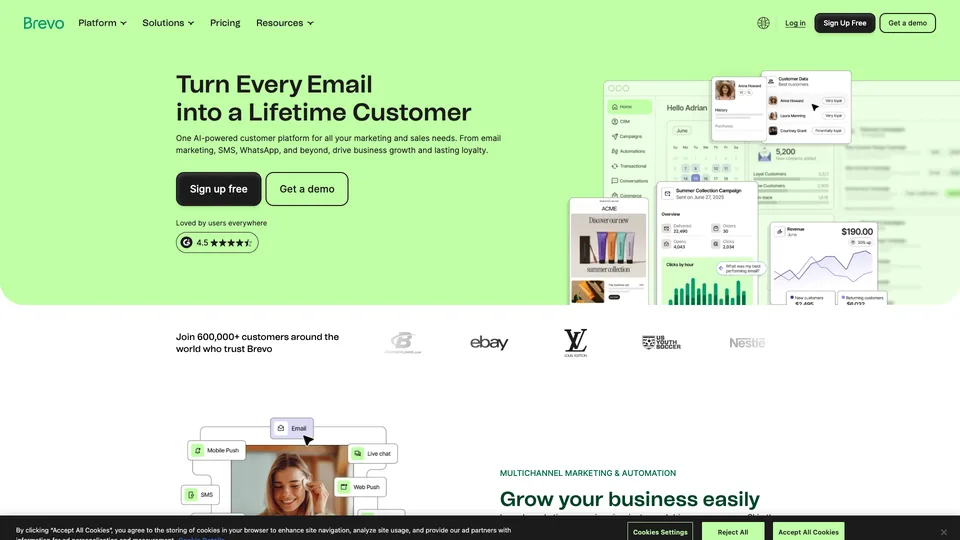
Brevo lets you build a subscriber list, design a newsletter without coding and send it, then see who opened it and who clicked. Around that core, the platform has added SMS, WhatsApp, automation, transactional email and a CRM. With a free plan that doesn’t expire and pricing based on the number of emails you send, it has become a common choice for small businesses and nonprofits, in France and across Europe.
What is Brevo?
Brevo is web-based software: everything happens in the browser, after a sign-up that doesn’t ask for a credit card. You import your contacts or collect them with a sign-up form, build your message in a drag-and-drop editor from templates, then send it right away or schedule it. The stats come in straight after: opens, clicks, unsubscribes. Higher plans add automated workflows (welcome message, abandoned cart reminder), A/B testing and more detailed reports. The same accounts also handle transactional email, the messages a website sends for every order or forgotten password, via API or SMTP relay.
The company was founded in 2012 by Armand Thiberge under the name Sendinblue, with teams in France and India. Long known as a budget newsletter tool, it took the name Brevo in May 2023 to mark its shift toward a broader customer relationship suite, built partly through acquisitions, including the German company Newsletter2Go in 2019. Still based in Paris, it claims more than 600,000 customers and became a unicorn in December 2025, after a €500 million funding round led by General Atlantic and Oakley Capital.
Brevo at a glance
- Type
- Email and online marketing platform
- Founded
- 2012, as Sendinblue
- Founder
- Armand Thiberge
- Origin
- France
- Headquarters
- Paris
- Customers (company figure)
- More than 600,000
- Free plan
- Yes, 300 emails a day
- Starting price
- $9/month (5,000 emails)
What is Brevo used for?
-
Send a newsletter
a drag-and-drop editor, mobile-friendly templates and a writing assistant for the subject line and copy.
-
Manage your subscribers
file imports, sign-up forms to embed on your site and segments based on how your contacts behave.
-
Automate your follow-ups
from the Standard plan up, workflows triggered by a sign-up, a visit or a purchase.
-
Measure your campaigns
opens (to be read with caution since Apple Mail inflates them), clicks and unsubscribes for every send, with click maps and A/B tests on higher plans.
-
Send your transactional emails
order confirmations or password resets, via API or SMTP relay, on every plan.
-
Connect it to your website
connectors for WordPress, Shopify, Stripe or Zapier, among more than 150 advertised integrations.


Brevo review
Good tool
For a nonprofit, a shop owner or a small business that wants to write to its customers regularly, Brevo covers the essentials at a low price. The editor takes a few hours to learn, the templates are clean, and the free plan lets you send a real newsletter to a few hundred subscribers. A company based in Paris is also reassuring for anyone who wants to keep their data in Europe.
Against Mailchimp, its main argument is how the bill is calculated. Mailchimp charges mainly by the size of your contact list; Brevo, by the number of emails you send each month. When you have a lot of subscribers but rarely write to them, the gap quickly tips in Brevo’s favor. Be careful, though: under the current pricing, the small paid plans also cap the number of contacts (500 for 5,000 emails a month), and you need to go up to 20,000 emails a month to get real breathing room.
The downside is well known, and it concerns the company more than the software. Brevo sends most campaigns from IP addresses shared between customers; to protect their reputation, it can suspend an account overnight if bounces or complaints climb, even in the middle of a campaign. Support, often automated at first, then takes a while to respond, and phone support is reserved for the Pro plan. Finally, the editor can be slow on heavy messages.
As long as you send to contacts who have genuinely opted in, from a clean list, these problems remain rare. It is a very good choice for getting started and growing, provided you look after your list.
One last prerequisite, too often overlooked: authenticate your own domain before your first send. Brevo walks you through adding the DKIM and DMARC records to your DNS zone, and it is not a formality: Gmail and Yahoo have required this authentication from bulk senders since 2024, and it is this, far more than the plan you choose, that decides whether emails sent from shared IPs reach the inbox.
Strengths
- A free plan that doesn’t expire, with 300 emails a day and up to 100,000 stored contacts.
- Pricing based on sending volume, a good deal when you rarely write to a large list.
- An easy drag-and-drop editor, with templates and sign-up forms.
- Newsletters and transactional email on the same account, even on the free plan.
- A European company, with its headquarters in Paris.
Weaknesses
- Account suspensions that can be abrupt when bounces or complaints rise.
- Slow, heavily automated support; phone support only comes with the Pro plan.
- Small plans that now also cap the number of contacts.
- The Brevo logo in your emails on the free plan, and a paid add-on to remove it on Starter.
- Automation reserved for the Standard plan and above.
- An editor that can lag on long or image-heavy messages.
Is Brevo worth it?
Yes, if you are launching or running the newsletter of a small organization and want a tool that is free as long as you stay under 300 emails a day, then inexpensive after that. It is also a very good fit for websites that need both newsletters and transactional email, and for senders whose list is long but whose campaigns are spaced out.
Not necessarily, if email is at the heart of your revenue and a suspension, even for a few days, would cost you dearly: responsive support and a dedicated IP then become deciding factors. The same caution applies if you write very often to a small list, where per-contact pricing from Mailchimp or MailerLite can work out cheaper.
As for alternatives, Mailchimp remains the best-known option, with a very rich integration ecosystem, but a price that climbs with the size of your list. MailerLite wins people over with the simplicity of its editor, and Mailjet, another tool born in France, takes a similar approach, combining newsletters and transactional email.
How much does Brevo cost?
Brevo offers a free plan with no time limit and four paid plans, billed monthly or yearly with a 10% discount. The listed price matches an entry volume: 5,000 emails a month on Starter and Standard, 150,000 on Pro. Beyond that, you pick a higher sending tier and the bill goes up accordingly: according to the official pricing, 10,000 emails a month cost $17 on Starter and $35 on Standard. The number of contacts doesn’t affect the price, but it is capped depending on the tier you choose.
| Plan | Per month | Per month, billed yearly | Emails included per month | Who it's for |
|---|---|---|---|---|
| Free | $0 | — | 300 a day, about 9,000 a month | Small list, occasional newsletter |
| Starter | $9 | $8.08 | 5,000, up to 100,000 as an option | Regular newsletter, single user |
| Standard | $18 | $16.17 | 5,000, up to 500,000 as an option | Small businesses that want to automate follow-ups |
| Pro | $499 | $449.08 | 150,000, up to 10 million as an option | Multichannel marketing teams |
| Enterprise | Custom pricing | Custom | Large accounts, more than one million contacts | |
Source: official Brevo pricing page, checked on October 31, 2026.
- Free plan: 300 emails a day, a single user, the Brevo logo in the email footer, no credit card required.
- Contact cap on Starter and Standard: 500 with 5,000 emails a month, 1,500 with 10,000, 2,500 with 15,000, then 500,000 from 20,000 emails up.
- Removing the Brevo logo: included from Standard up, $12 a month on Starter.
- Users: one on Starter, up to three on Standard ($12 a month per additional user), ten included on Pro.
- SMS are paid separately, as credits. Prepaid email credits that never expire can replace the subscription for occasional sends.
- The sales management module (CRM) is an add-on, billed per user.
FAQ
Answers to questions about Brevo
Is Brevo free?
Yes, with no time limit, for 300 emails a day and a single user, with the Brevo logo at the bottom of your messages. Paid plans start at $9 a month for 5,000 emails.
Are Brevo and Sendinblue the same thing?
Yes. Sendinblue was renamed Brevo in May 2023, when the company broadened its offering toward customer relationship management. The newsletter tool is still at the heart of the platform.
Is Brevo cheaper than Mailchimp?
Often, when the list is large and sends are infrequent, because Brevo charges by the number of emails sent and Mailchimp mainly by the number of contacts. For a small list you email very often, the gap narrows, or even reverses.
Why can Brevo suspend an account?
When a send triggers a lot of bounces or spam complaints, Brevo blocks the account while it checks, to protect its shared sending servers. A list of up-to-date subscribers who have opted in greatly reduces that risk.
Information checked on October 31, 2026