
- Email APIs
Resend: the API for sending your app’s emails
Good tool
Sign-up confirmations, password reset links, order receipts: Resend handles sending the emails an app or a website triggers. The developer calls its API, or its SMTP server, from their code; Resend takes care of delivery, domain authentication and tracking each message, whether delivered, opened or bounced. Built to compete with SendGrid, Postmark and Mailgun, it quickly carved out a place among developers, especially in the JavaScript world, where its libraries and React Email have made it a familiar name.
What is Resend?
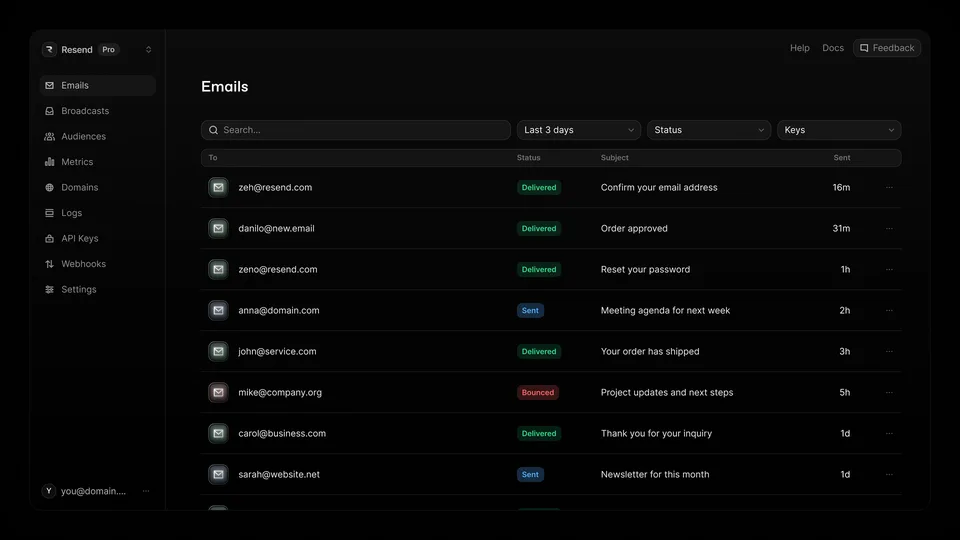
Resend is an online service you can only really use with a bit of code. After adding your domain and the DNS records it asks for, you create an API key and send your messages with a single request, using the official libraries for Node.js, Python, PHP, Ruby, Go, Java, .NET or Rust, or through a plain SMTP relay for tools that support nothing else. The dashboard then shows the log of every email, bounces, complaints and statistics, while webhooks notify the app in real time. The company also champions React Email, its open-source library for coding email templates as React components, converted into HTML that email clients can render, and it has expanded into sending newsletters to a contact list (Broadcasts), receiving email and automations. Sending can originate from the United States, Ireland, Brazil or Japan, but account data stays hosted in the United States.
The project started in the summer of 2022, launched by Zeno Rocha and Bu Kinoshita, who were joined by Jonni Lundy in early 2023. The team first released React Email, then joined the Y Combinator accelerator (Winter 2023 batch) before opening the service to the public in June 2023. A $3 million seed round followed, then an $18 million Series A led by Andreessen Horowitz in December 2024. The company, registered in San Francisco with a fully remote team, claims 3 million users as of June 2026.
Resend at a glance
- Type
- Email sending API (SaaS)
- Public launch
- 2023
- Founders
- Zeno Rocha, Bu Kinoshita, Jonni Lundy
- Headquarters
- San Francisco (remote team)
- Investors
- Y Combinator, Andreessen Horowitz
- Users
- 3 million claimed (June 2026)
- Free plan
- Yes, 3,000 emails a month
- Starting price
- $20/month (50,000 emails)
What is Resend used for?
-
Send your emails through the API
a single request from your code, with official libraries for the main languages or through an SMTP relay.
-
Authenticate your domain
guided SPF and DKIM setup when you add the domain, then DMARC and BIMI to strengthen mailbox providers’ trust.
-
Protect your deliverability
an automatic suppression list for failing addresses, detailed bounces and, as an option, a dedicated IP address warmed up by Resend.
-
Track every message
a send log, delivered, opened, clicked or bounced statuses, and webhooks to notify your app in real time.
-
Send a newsletter
Broadcasts send a message to your contacts from a visual editor or through the API, with the unsubscribe link handled for you.
-
Manage your contacts
list imports and per-contact attributes, for marketing sends.
-
Automate sequences
email sequences triggered by an event, with 10,000 runs included every month.
-
Receive email
inbound email on your domain forwards incoming messages to your app, with three mailboxes included.


Resend review
Good tool
Resend’s success comes first from how pleasant it is to integrate. Where legacy services have piled up years of menus and options, this one gets straight to the point: clear documentation, copy-paste examples, a test mode that simulates bounces and an interface that shows right away what happened to every message. For a developer who has to wire up an app’s emails at the end of the day, it is often an hour’s work, which is why it turns up in so many Next.js projects and apps generated by AI tools.
Simplicity doesn’t spare you the technical part. The step that trips people up most is the domain’s DNS setup: without correct SPF and DKIM records, messages end up in spam, just as they would with any competitor. On deliverability, Resend does the job well for clean transactional sends, but it can’t work miracles with a poorly maintained list, and a dedicated IP is offered only as an option on the Scale plan.
What calls for the most attention is the relationship with the company. To protect its shared IP addresses, Resend may suspend an account it considers risky, sometimes without a detailed explanation, and when a live product’s login or order emails go through it, an outage is costly. On the entry-level plans, support works by ticket and doesn’t always respond quickly. So it pays to keep your sending clean from the start and to plan a fallback if your emails are critical.
On price, the free plan is more than enough to get a project off the ground, and the Pro plan stays affordable for most apps. Everything is billed monthly only, though, and account data is stored in the United States: a detail that matters to some European companies.
Strengths
- One of the easiest APIs and sets of documentation to get started with.
- A permanent free plan of 3,000 emails a month.
- A clear log of every send, webhooks and a test mode.
- React Email for coding reusable email templates.
- Transactional email, newsletters and inbound email in a single service.
Weaknesses
- Account suspensions that can be abrupt and poorly explained.
- Fairly slow ticket-based support on the entry-level plans.
- A dedicated IP reserved for the Scale plan, as a paid option.
- Account data hosted in the United States, and monthly billing only.
- Of little use without a developer: everything goes through code or SMTP.
Is Resend worth it?
Yes, if you are building an app or a website and want a reliable way to send its transactional emails without spending a week on it. For a new project, the free plan comfortably covers the first few months, and you move up to Pro when volume grows. It’s also a good choice if your team works in JavaScript or React, where the integration feels most natural.
Not necessarily, if your emails are so critical that an account suspension would be a disaster, or if you already send large volumes. Postmark has built a solid reputation on transactional email alone, with separate streams for marketing messages; SendGrid, one of the industry’s veterans, handles very large volumes and marketing, at the cost of a heavier interface; Mailgun also targets developers and lets you host your data in Europe. And if what you mainly need is to send a newsletter without coding, a tool like Brevo will be a much better fit.
How much does Resend cost?
Resend publishes its prices in US dollars, monthly only, with no annual discount and no trial period, but with a permanent free plan. Transactional emails are priced by monthly volume, newsletters by number of contacts; the two price lists are separate. The prices below are the entry point for each plan.
| Plan | Per month | Volume included | Who it's for |
|---|---|---|---|
| Free | $0 | 3,000 emails a month (100 a day), 1,000 marketing contacts, 3 domains | Personal project, app just getting started |
| Pro | $20 | 50,000 emails a month, 10 domains ($35 for 100,000 emails) | App in production, startup |
| Scale | $90 | 100,000 emails a month, 1,000 domains (up to 2.5 million emails for $1,150) | High volumes, multi-tenant platforms |
| Pro marketing | $40 | 5,000 contacts, unlimited sends (up to 150,000 contacts for $650) | Newsletters and campaigns |
| Enterprise | Custom pricing | Custom volume | Large accounts needing contractual guarantees |
Source: official Resend pricing page, checked on October 31, 2026.
- Beyond your quota, overage is turned on in the settings and billed per 1,000 emails, at $0.90 on Pro, then from $0.80 to $0.46 depending on the Scale tier.
- Add-ons: 100 extra domains for $20 a month (Pro and Scale), a dedicated IP for $30 a month (Scale, above 3,000 emails a day), single sign-on (SSO) for $150 a month (Scale).
- Registered nonprofits can ask for 50% off the paid plans.
- The requests-per-second limit is the same on every plan: upgrading doesn’t raise it, but support can increase it on request, and batch sending lets you send several messages in one request.
FAQ
Answers to questions about Resend
Is Resend free?
Yes, up to 3,000 emails a month and 100 a day, with 3 domains and up to 1,000 contacts for newsletters. Beyond that, the Pro plan starts at $20 a month for 50,000 emails.
Do I need to know how to code to use Resend?
For transactional email, yes: sending goes through the API or through an SMTP server you configure in your app. Only newsletters can be written and sent from the dashboard editor.
Does Resend work without React?
Yes. React Email is just one option for coding your templates: Resend accepts HTML or plain text and offers official libraries for Python, PHP, Ruby, Go, Java, .NET, Rust or Node.js, as well as an SMTP relay.
Where is data stored with Resend?
Emails can be sent from the United States, Ireland, Brazil or Japan, but account data is stored in the United States, whichever region you choose.
Does Resend offer an annual subscription?
No. Every plan is paid monthly, with no annual discount; for custom terms, you need to go through the Enterprise offer, on a quote.
Information checked on October 31, 2026