
- Web technical
- Web technology lookup
BuiltWith: find out what a website is built with, and who uses a technology
Good tool
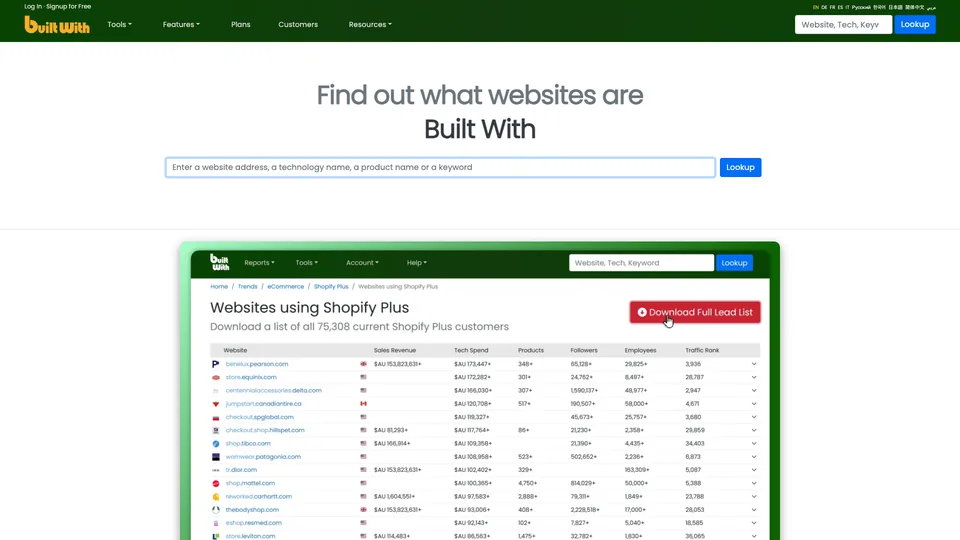
Type a website’s address into BuiltWith and you see what powers it: CMS, e-commerce platform, hosting provider, analytics tools, ad scripts, payment methods, along with the date each one appeared or disappeared. The tool can also work the other way around, and that is how it makes its money: it builds a list of every website using a given technology, enriched with company data, for prospecting or sizing up a market. Around since the early days of web technology detection, it is used mostly by the sales teams of software companies and agencies.
What is BuiltWith?
BuiltWith crawls the web the way a search engine does, with its own bots, and spots in the code of each page the traces every technology leaves behind: a script, a tag, a server header, a file name. The company says it buys nothing from third parties and tracks more than 128,000 technologies across nearly 492 million domains (figures shown in October 2026). The results can be viewed in two ways. On the website side, a profile lists the technologies detected, their history and, in the detailed version, an estimate of technology spend and the company’s public contacts. On the technology side, a report lists the websites that use it, which you can filter by country, industry, traffic, estimated revenue or spend, then export to CSV or Excel.
On top of that come market share trends, alerts when websites adopt or drop a technology, lists by keyword or by product sold, connectors for Salesforce, HubSpot, Dynamics 365 or Zoho, a wide range of APIs and full datasets for data warehouses. A browser extension shows the technologies of the site you are visiting.
The tool was born in 2007 in Sydney, where Gary Brewer, a developer, wanted to automate what he had been doing by hand by reading websites’ source code. Andrew Rogers joined him as co-founder. The company, BuiltWith Pty Ltd, has stayed independent and Australian, with a very small technical team.
BuiltWith at a glance
- Type
- Online service, API and extension
- Founded
- 2007
- Founders
- Gary Brewer and Andrew Rogers
- Origin
- Australia
- Headquarters
- Sydney
- Company
- BuiltWith Pty Ltd, independent
- Technologies tracked
- More than 128,000 (October 2026)
- Free plan
- Yes, one site at a time
- Starting price
- $295/month (Basic)
What is BuiltWith used for?
-
Identify a website’s technologies
CMS, store, hosting, analytics, advertising or payments, with the date each was first and last detected.
-
List the websites that use a technology
every site running Shopify, Magento or a competitor of your software, filtered by country, industry or size, to build a prospect list.
-
Measure market share
how a technology evolves over time and which websites switch from one competitor to another.
-
Get alerted to changes
a notification when websites on your list adopt or drop a technology, often the sign of a project underway.
-
Enrich your CRM
technology data sent to Salesforce, HubSpot, Dynamics 365, Zoho or Pardot.
-
Connect your tools to the API
APIs by domain, by list or by change, and full datasets for a data warehouse or an AI agent.


BuiltWith review
Good tool
BuiltWith’s free lookup comes in handy when you want to know quickly what a website is made of, but that’s not why people pay for it. Its real value is the list: every website in a country running a given platform, with its history, its estimated size and contacts. For a software company looking for buyers, an agency specializing in one CMS or an analyst following a market, few tools go as far back in time or as deep in volume.
That data has its limits. BuiltWith only sees what a website reveals in its code: a technology installed on the server side, or loaded only after a visitor takes an action, can slip past it, and a tag left behind after a migration can make it look as if a tool is still in use. Lists therefore go stale, more or less quickly depending on how often the bots come back, and spend or revenue estimates remain ballpark figures. An exported file always needs cleaning up before you launch a campaign.
Then there’s the price, which limits the tool to companies that turn it into real sales revenue: the first plan costs nearly $300 a month for just two technologies, and the one-month minimum commitment makes a one-off report a significant expense. For a freelancer or a small agency that simply wants to know a competitor’s CMS, a free extension is more than enough.
Dealing with the company calls for a little caution. Accounts are vetted at sign-up, which can delay access, and canceling is entirely up to the customer. It’s best to cancel from the interface, keep a record and check your statements the following month.
Strengths
- Lists of websites by technology, the use where the tool is still the most complete.
- A long detection history, useful for spotting websites that change platforms.
- Unlimited CSV and Excel exports, with no data locked inside the tool.
- CRM connectors and many APIs to automate prospecting.
- A free lookup, with no time limit, to check one website at a time.
Weaknesses
- A high entry price, with only two technologies in the first plan.
- Data that goes stale: abandoned technologies still listed, company filters sometimes wrong.
- No visibility into anything that leaves no trace in the public code.
- No free trial of the paid features, and a one-month minimum commitment.
- Sign-up and cancellation can be a hassle, and support is slow to respond.
Is BuiltWith worth it?
Yes, if you sell a product or service tied to a specific technology, such as a Shopify app, a migration offer away from Magento or a payment solution, and a qualified list of target websites brings in more than it costs. The same logic applies to an analyst tracking an industry’s market share over several years.
Not necessarily, if you only want to know which CMS or analytics tool a website uses: BuiltWith’s free lookup or an extension like Wappalyzer will tell you in one click. Wappalyzer also offers lists of websites by technology, with a simpler interface, and specialized services like Store Leads target online stores. For market share or an adoption curve, BuiltWith’s Trends pages publish a technology’s aggregate figures for free, by country and over time; only the list of named websites is paid.
How much does BuiltWith cost?
Looking up one website at a time stays free, with no time limit. Lists, alerts and exports require a subscription billed in US dollars, starting at $295 a month; paying yearly works out to about two months free.
| Plan | Per month | Per month, billed yearly | Included | Who it's for |
|---|---|---|---|---|
| Free | $0 | — | Technology profile of one website at a time | Checking a website’s technology now and then |
| Basic | $295 | $245.83 | 2 technology reports, 2 keyword reports, 2 e-commerce reports, 1 login, CRM | A targeted need on one or two technologies |
| Pro | $495 | $412.50 | Unlimited reports, 1 login, CRM | A sales team or agency prospecting every day |
| Team | $995 | $829.17 | Unlimited reports, unlimited logins for the company, CRM | Several salespeople on the same account |
| Team Ultra | Custom pricing | Team, plus unlimited API on a dedicated login and full datasets | Large accounts and large-scale integration | |
Source: official BuiltWith pricing page, checked on October 31, 2026.
- Invoices are issued in US dollars.
- One-month minimum commitment on monthly plans, one year on annual plans. You cancel from the interface, and access stays open until the end of the paid period.
- There is no free trial of the paid plans. For a one-off report, the company suggests taking the Basic plan for a month, then canceling.
- An Advanced plan, billed yearly, gives unlimited detailed profiles one website at a time (history, estimated spend, contacts), with no lists, API or CRM.
- Payment by card, PayPal or Bitcoin; bank transfer available for annual contracts.
FAQ
Answers to questions about BuiltWith
Is BuiltWith free?
Yes, for looking up the technologies of one website at a time, with no time limit. Lists of websites by technology, exports, alerts and CRM connectors require a subscription, starting at $295 a month.
Does BuiltWith detect every technology on a website?
No. It only sees what leaves a trace in the public code of the pages: scripts, tags, headers. Tools installed only on the server side often slip past it, and a technology that has been dropped can stay listed for a while.
Can I buy a single report on BuiltWith?
Not individually. The company recommends subscribing to the Basic plan, downloading the report you need and then canceling, keeping in mind that the minimum commitment is one month.
What is the difference between BuiltWith and Wappalyzer?
Both detect a website’s technologies and sell lists of websites by technology. BuiltWith relies on the depth of its history and on its company data for prospecting, Wappalyzer on the simplicity of its extension and interface.
Who is behind BuiltWith?
BuiltWith Pty Ltd, an independent Australian company based in Sydney, founded in 2007 by Gary Brewer, later joined by Andrew Rogers as co-founder.
Information checked on October 31, 2026