
- Web technical
- SSL and HTTPS
SSL Checker (SSL Shopper): a quick check of an installed SSL certificate
Good tool
Right after you install a certificate, SSL Shopper’s SSL Checker tells you in a few seconds whether the server sends the full chain, whether the domain name is covered and when you will need to renew, from nothing more than the site’s hostname, with no account or installation. Among the many tools that share the same name, it is one of the oldest and one of the most cited by system administrators and hosting providers for spotting an incomplete certificate chain.
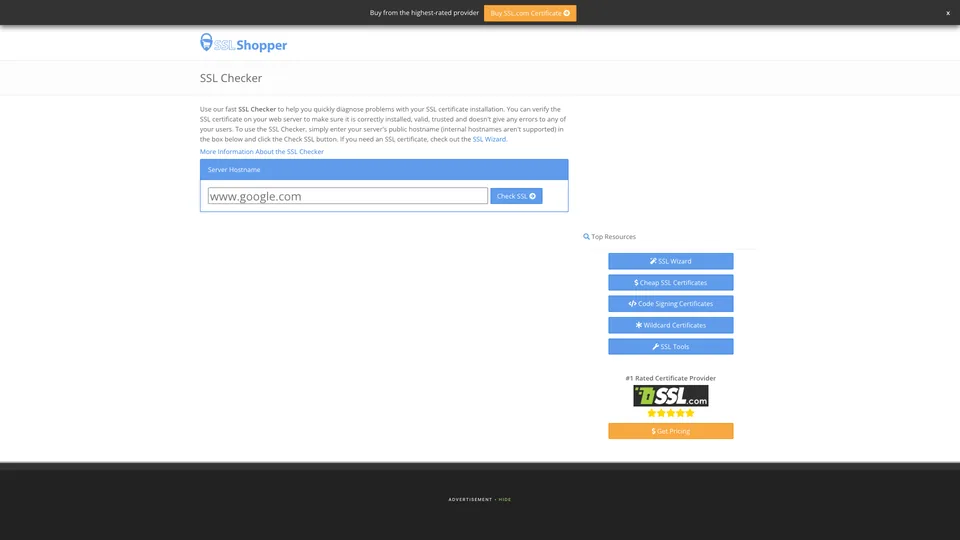
What is SSL Checker (SSL Shopper)?
There are dozens of “SSL Checkers,” offered by hosting providers and certificate sellers. This review covers the one from SSL Shopper, at sslshopper.com/ssl-checker.html. The principle fits in one line: you type the server’s public hostname, for example www.example.com, then click “Check SSL.” The tool connects to the site the way a browser would and shows what it receives: whether there is a certificate, its expiration date and the number of days left, whether the certificate matches the hostname, whether the intermediate certificates linking it to a trusted authority are present, and a few known issues such as an outdated hash function. You can copy the link to the results page to share the diagnosis.
A few limitations are stated on the page itself. Internal names (a server on a corporate network, for example) aren’t supported: SSL Shopper then points you to the openssl s_client command. Results may be cached for up to a day when you run the same test often, and a captcha is sometimes required. For revocation, cipher suites and protocols, the site itself recommends Qualys SSL Labs’ SSL Server Test.
SSL Shopper is first and foremost a comparison and review site for SSL certificates, whose domain was registered in February 2007. Its About page, written in the first person by a web developer who doesn’t give his name, describes it as independent of certificate sellers. It makes money from advertising and affiliate commissions on certificates bought through its links, which explains the SSL.com ads around the tool. The site also offers a CSR decoder, a certificate decoder, a certificate key matcher and a format converter.
SSL Checker (SSL Shopper) at a glance
- Type
- Online tool, no installation
- Publisher
- SSL Shopper, a certificate comparison site
- Domain active since
- February 2007
- Owner
- Not disclosed
- Funding
- Advertising and affiliate commissions
- Account
- None
- Free plan
- Yes, the tool is completely free
- Starting price
- Free
What is SSL Checker (SSL Shopper) used for?
-
Check a certificate installation
in one click, you know whether the server presents a valid, trusted certificate for the hostname you entered.
-
Spot an incomplete chain
the tool flags missing intermediate certificates, a classic cause of warnings that only some visitors see.
-
Check which names are covered
it verifies that the hostname is included in the certificate, useful after adding a subdomain or a wildcard certificate.
-
Plan ahead for expiration
the end date and the number of days left are shown, with an email reminder you can schedule before the deadline.
-
Share a diagnosis
the results page address includes the hostname, so you just send it to your hosting provider or developer.
-
Decode and convert your certificates
the site’s companion tools read a CSR or a certificate, check that a key matches and convert between PEM, DER, PFX and PKCS#7.


SSL Checker (SSL Shopper) review
Good tool
For what it promises, SSL Shopper’s SSL Checker is genuinely useful. Right after installing or renewing a certificate, it is the check you run for peace of mind: the result comes back fast, is readable without being a specialist, and it pinpoints the most common mistake, a forgotten intermediate chain. That flaw goes unnoticed in your own browser: Chrome, Safari and Windows keep intermediates in memory or fetch them on their own, whereas Firefox, Android, command-line clients and many bots don’t, and refuse the connection.
Don’t ask it for more. The tool doesn’t grade the configuration, and tests neither TLS versions, nor cipher suites, nor known vulnerabilities, nor certificate revocation. An all-green result means the certificate is in place, not that the server is properly secured. Two details can also be misleading: the cache, which can show a state a few hours old right after a fix, and the trust verdict, which depends on the root certificates the tool knows and can differ from one checker to another.
Then there is the setting. The page is first of all a storefront for a certificate seller, with banners, ad slots and advertising, and the publisher doesn’t say who he is. The expiration reminder asks for an email address and offers a deals newsletter along the way. Nothing deal-breaking for a one-off test, but to monitor certificates over time, you are better off with a monitoring tool or your hosting provider’s automatic renewal.
Strengths
- Free, with no account: the site’s hostname is all you need.
- A result in a few seconds, readable by a non-specialist.
- Very effective at detecting an incomplete intermediate chain.
- Expiration date and days left shown right away.
- A results link that is easy to send to a hosting provider or developer.
Weaknesses
- No checks on protocols, ciphers, vulnerabilities or revocation.
- Results cached for up to a day, and sometimes a captcha.
- Unusable for an internal server that can’t be reached from the internet.
- A page loaded with ads and affiliate links, from an anonymous publisher.
- An expiration reminder sent by email, with no real monitoring.
Is SSL Checker (SSL Shopper) worth it?
Yes, if you have just installed, renewed or moved a certificate and want quick confirmation: full chain, right domain name, right end date. The same goes when a customer reports a security warning you can’t see on your own machine: an incomplete chain is the first lead, and the tool confirms it in an instant.
Not necessarily, if you want to assess a server’s HTTPS security as a whole. Qualys SSL Labs’ SSL Server Test, also free, takes longer but reviews protocols, ciphers and vulnerabilities, and gives an overall grade: it is the audit tool, whereas SSL Shopper is the quick-glance tool. For an internal server, the openssl s_client command runs the same check locally. And to never let a certificate expire again, automatic renewal via the ACME protocol (Let’s Encrypt, or your hosting provider’s equivalent option) is a far better bet than an email reminder: certificate lifetimes, capped at 200 days since March 2026, are set to drop to 47 days in 2029, which makes manual renewal unsustainable.
How much does SSL Checker (SSL Shopper) cost?
SSL Checker is completely free, with no sign-up and no stated limit, apart from the cache and an occasional captcha. The site makes money from advertising and from commissions on certificates bought through its links: the tool itself has no paid version.
| Plan | Per month | Access | Who it's for |
|---|---|---|---|
| Online tool | $0 | No account, one hostname per test | Checking a certificate after installation or renewal |
Source: official SSL Shopper tool page (no paid plan), checked on October 31, 2026.
- The expiration reminder is free too, but it asks for a name and an email address to confirm; signing up for the deals newsletter is a separate, optional box.
- The certificates promoted on the page are sold by third-party authorities: the tool works with any certificate, free or paid.
FAQ
Answers to questions about SSL Checker (SSL Shopper)
Is SSL Shopper’s SSL Checker free?
Yes, completely, with no account. The site is funded by advertising and by commissions on certificates sold through its links.
How is it different from SSL Labs?
SSL Shopper checks the certificate installation: chain, hostname, expiration. Qualys SSL Labs’ SSL Server Test audits the server’s entire HTTPS configuration (protocols, ciphers, vulnerabilities) and gives it a grade. The first is for a quick check, the second for an audit.
Why doesn’t the result change after my fix?
SSL Shopper may keep a result cached for up to a day when the same hostname is tested several times. To confirm a fix right away, a second tool such as SSL Labs or the openssl s_client command will do the job.
Can you test an internal server?
No, only public hostnames reachable from the internet are accepted. For an internal server, use the openssl s_client command from the network in question.
Information checked on October 31, 2026